
PowerShell 7 added a ternary operator, condition ? valueIfTrue : valueIfFalse, that returns one of two values in a single expression. It’s the short form of if/else, and here it picks a status and a singular or plural word:
$diskFreeGB = 12

$status = $diskFreeGB -lt 20 ? 'Low disk space' : 'OK'
"Status: $status"

$servers = 'web01', 'web02', 'sql01'
"Found $($servers.Count) $($servers.Count -eq 1 ? 'server' : 'servers')"
Output:
Status: Low disk space
Found 3 servers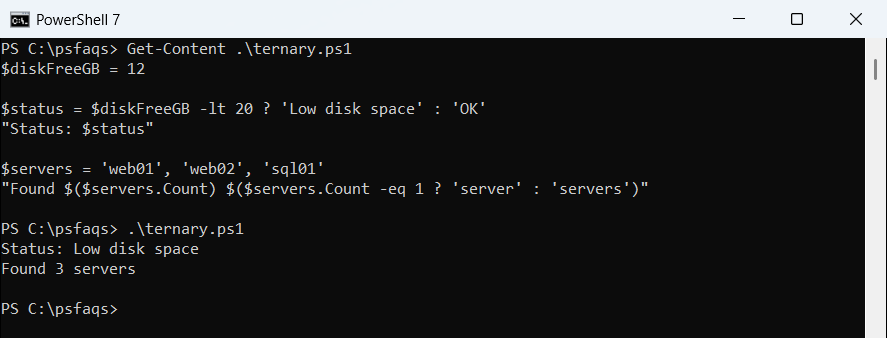
It doesn’t exist in Windows PowerShell 5.1, so I’ll show the 5.1 equivalents too. The question mark also shows up in ??, ?., the ? alias and $?, which are covered after the ternary sections.
PowerShell ternary operator syntax
The condition comes first, then a question mark, the value for true, a colon and the value for false. Any expression that returns something works as the condition, usually one of the PowerShell comparison operators like -lt or -eq.
These two statements do exactly the same thing:
$diskFreeGB = 35

$status = if ($diskFreeGB -lt 20) { 'Low disk space' } else { 'OK' }
"if/else:  $status"

$status = $diskFreeGB -lt 20 ? 'Low disk space' : 'OK'
"Ternary:  $status"
Output:
if/else:  OK
Ternary:  OK
Only the branch that matches runs. The other one is never evaluated, just like an if/else statement in PowerShell.
How does the ternary operator decide what’s true?
PowerShell converts the condition to a Boolean first. That conversion has a few surprises, because strings and arrays count as true or false by their content:
"0       -> $(0 ? 'true' : 'false')"
"'0'     -> $('0' ? 'true' : 'false')"
"''      -> $('' ? 'true' : 'false')"
"'False' -> $('False' ? 'true' : 'false')"
"@()     -> $(@() ? 'true' : 'false')"
"`$null   -> $($null ? 'true' : 'false')"
Output:
0       -> false
'0'     -> true
''      -> false
'False' -> true
@()     -> false
$null   -> false
The string ‘False’ is true because it isn’t empty. If your condition comes from a CSV file or user input, convert the string to a Boolean before you test it.
Wrap commands in parentheses
When the condition or a branch calls a cmdlet, put it in parentheses. Without them, PowerShell hands the ? and everything after it to the cmdlet as arguments:
$reports = (Test-Path -Path .\Reports) ? 'Reports folder found' : 'Reports folder missing'
$backups = (Test-Path -Path .\Backups-Q4) ? 'Backups found' : 'Backups missing'
"$reports | $backups"

try { Test-Path -Path .\Reports ? 'found' : 'missing' }
catch { "Failed. $($_.Exception.Message)" }
Output:
Reports folder found | Backups missing
Failed. A positional parameter cannot be found that accepts argument '?'.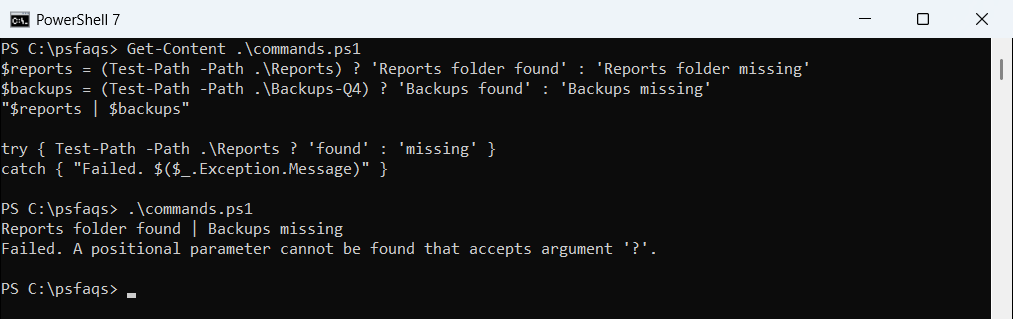
The same rule applies to the branches. A bare command after the ? is a parse error (“You must provide a value expression following the ‘?’ operator.”), so the whole script won’t run. Write ? (Write-Output 'found') : (Write-Output 'missing') instead.
Here Test-Path checks the folder and returns True or False, which is exactly what the ternary needs.
Can you nest ternary operators?
Yes. Each extra ? : goes in the false branch, and PowerShell reads them from left to right like an elseif chain:
foreach ($score in 95, 84, 71, 52) {
    $grade = $score -ge 90 ? 'A' : $score -ge 80 ? 'B' : $score -ge 70 ? 'C' : 'F'
    "Score $score -> grade $grade"
}
Output:
Score 95 -> grade A
Score 84 -> grade B
Score 71 -> grade C
Score 52 -> grade F
Two levels read fine. Past that, a PowerShell switch statement is easier to scan and easier to change later.
Use the ternary operator in a pipeline
Because it’s an expression, the ternary fits inside script blocks. That makes it handy in calculated properties and in ForEach-Object:
$disks = @(
    [pscustomobject]@{ Server = 'web01'; FreeGB = 12 }
    [pscustomobject]@{ Server = 'web02'; FreeGB = 48 }
    [pscustomobject]@{ Server = 'sql01'; FreeGB = 19 }
)
$disks | Select-Object Server, FreeGB,
    @{ Name = 'Status'; Expression = { $_.FreeGB -lt 20 ? 'Low' : 'OK' } } |
    Format-Table -AutoSize

1..4 | ForEach-Object { "$_ is $($_ % 2 ? 'odd' : 'even')" }
Output:
Server FreeGB Status
------ ------ ------
web01      12 Low
web02      48 OK
sql01      19 Low

1 is odd
2 is even
3 is odd
4 is even
The Status column comes from a calculated property in Select-Object. The odd/even lines use $_ inside ForEach-Object.
Spaces and line breaks around ? and :
PowerShell allows ? inside variable names, so $ok? is read as a variable called ok?. Put a space before the ?, or wrap the name in braces:
$errors = $null
$code = '$ok?"yes":"no"'
$null = [System.Management.Automation.Language.Parser]::ParseInput($code, [ref]$null, [ref]$errors)
"No spaces:   $($errors.Count) parse errors"

$ok = $true
"With spaces: $($ok ? 'yes' : 'no')"
"With braces: $(${ok}?'yes':'no')"

$message = $ok ?
    'Backup finished' :
    'Backup failed'
"Multi-line:  $message"