
PowerShell arithmetic operators are + for addition, – for subtraction, * for multiplication, / for division and % for the remainder (modulus). They work on numbers the way you’d expect:
$price = 19.99
$quantity = 3

"Add:      {0}" -f (10 + 4)
"Subtract: {0}" -f (10 - 4)
"Multiply: {0}" -f ($price * $quantity)
"Divide:   {0}" -f (10 / 4)
"Modulus:  {0}" -f (10 % 4)
Output:
Add:      14
Subtract: 6
Multiply: 59.97
Divide:   2.5
Modulus:  2
They also have a few PowerShell-specific habits, like division that returns decimals and + that joins strings. I ran every example in PowerShell 7.6 and Windows PowerShell 5.1, with the same results.
Division returns a decimal when needed
Dividing two integers gives an integer only when there’s no remainder. Otherwise, PowerShell returns a Double instead of cutting off the decimals:
"10 / 5  = {0} ({1})" -f (10 / 5), (10 / 5).GetType().Name
"10 / 4  = {0} ({1})" -f (10 / 4), (10 / 4).GetType().Name
"[int](7 / 2)            = {0}" -f [int](7 / 2)
"[int](5 / 2)            = {0}" -f [int](5 / 2)
"[Math]::Floor(7 / 2)    = {0}" -f [Math]::Floor(7 / 2)
"[Math]::Truncate(-7 / 2) = {0}" -f [Math]::Truncate(-7 / 2)
Output:
10 / 5  = 2 (Int32)
10 / 4  = 2.5 (Double)
[int](7 / 2)            = 4
[int](5 / 2)            = 2
[Math]::Floor(7 / 2)    = 3
[Math]::Truncate(-7 / 2) = -3![PowerShell division returns a double and [int] rounds](https://powershellfaqs.com/wp-content/uploads/2026/09/powershell-division-returns-double-rounding.png)
For whole-number division, don’t cast with [int], because it rounds halves to the nearest even number. Use [Math]::Floor to round down, or [Math]::Truncate to drop the decimals, which also works for negatives.
To trim those decimals for display, see rounding to 2 decimal places.
Modulus: the remainder
% returns what’s left after dividing. The most common use is checking whether a number is even or odd:
foreach ($n in 1..6) {
    if ($n % 2 -eq 0) { "$n is even" } else { "$n is odd" }
}
"-7 % 3 = $(-7 % 3)"
Output:
1 is odd
2 is even
3 is odd
4 is even
5 is odd
6 is even
-7 % 3 = -1
With a negative number on the left, the result is negative too. Wrap it in [Math]::Abs if you need a positive remainder.
Operator precedence
* / and % run before + and -, and operators of the same level run left to right. Use parentheses to change the order:
"2 + 3 * 4   = $(2 + 3 * 4)"
"(2 + 3) * 4 = $((2 + 3) * 4)"
"10 - 4 - 3  = $(10 - 4 - 3)"
"-2 * -3     = $(-2 * -3)"
Output:
2 + 3 * 4   = 14
(2 + 3) * 4 = 20
10 - 4 - 3  = 3
-2 * -3     = 6
A minus sign in front of a number is a unary operator, which runs before everything else. That’s why -2 * -3 is 6.
Arithmetic with strings and arrays
The value on the left decides what the operator does. A string on the left makes + join text and * repeat it. An array on the left makes + add an item:
"'5' + 3 = $('5' + 3)"
"3 + '5' = $(3 + '5')"
"'ab' * 3 = $('ab' * 3)"
"@(1, 2) + 3 = $((@(1, 2) + 3) -join ', ')"
"@(1, 2) * 2 = $((@(1, 2) * 2) -join ', ')"
"5MB / 1KB = $(5MB / 1KB)"
Output:
'5' + 3 = 53
3 + '5' = 8
'ab' * 3 = ababab
@(1, 2) + 3 = 1, 2, 3
@(1, 2) * 2 = 1, 2, 1, 2
5MB / 1KB = 5120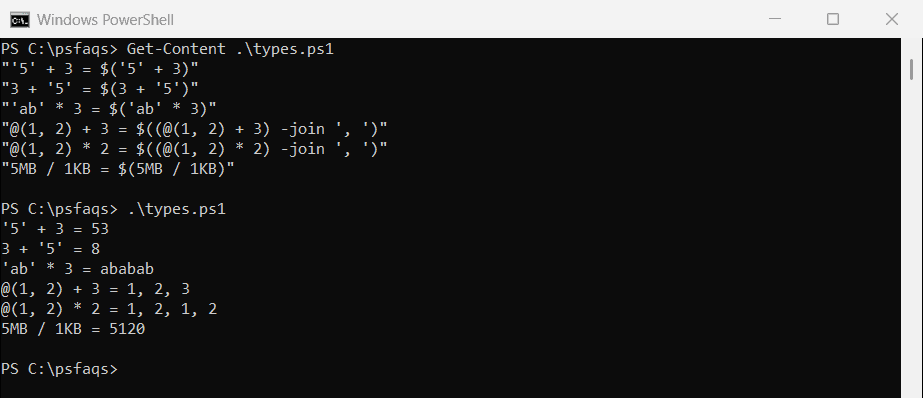
Convert text to a number first when you read values from files or input. Converting strings to numbers covers that. PowerShell’s KB, MB, GB and TB suffixes are handy for file sizes.
Overflow and division by zero
PowerShell doesn’t wrap around when a result is too big for its type. It switches to a larger type instead, so [int] math can return a Double and [byte] math returns an Int32:
$big = [int]::MaxValue + 1
"[int]::MaxValue + 1 = $big ($($big.GetType().Name))"

$bytes = [byte]200 + [byte]100
"[byte]200 + [byte]100 = $bytes ($($bytes.GetType().Name))"

$zero = 0
try { 10 / $zero } catch { "Failed. Dividing an integer by zero isn't allowed" }
"10.0 / 0.0 as a double = $([double]10 / [double]0)"
Output:
[int]::MaxValue + 1 = 2147483648 (Double)
[byte]200 + [byte]100 = 300 (Int32)
Failed. Dividing an integer by zero isn't allowed
10.0 / 0.0 as a double = Infinity
Integer division by zero throws an error, so check the divisor first when it comes from data. Double division by zero returns Infinity instead of an error.
Assignment operators
Each arithmetic operator has a matching assignment operator that updates the variable in place. $total += 25 is short for $total = $total + 25:
$total = 100
$total += 25;  "After += 25: $total"
$total -= 10;  "After -= 10: $total"
$total *= 2;   "After *= 2:  $total"
$total /= 4;   "After /= 4:  $total"
$total %= 50;  "After %= 50: $total"
Output:
After += 25: 125
After -= 10: 115
After *= 2:  230
After /= 4:  57.5
After %= 50: 7.5
On arrays, += copies the array each time, which arrays vs lists explains.
Unary operators: ++, –, – and -not
Unary operators work on one value. ++ and — add or subtract 1. Placed after the variable, the old value is used first. Placed before, the variable changes first:
$i = 5
$a = $i++
"Postfix: `$a = $a, `$i = $i"

$i = 5
$b = ++$i
"Prefix:  `$b = $b, `$i = $i"

$temp = 12
"Negated: $(-$temp)"
"From text: $(-'42')"
"-not `$true: $(-not $true), !`$false: $(!$false)"
Output:
Postfix: $a = 5, $i = 6
Prefix:  $b = 6, $i = 6
Negated: -12
From text: -42
-not $true: False, !$false: True
A leading minus negates a number, and even converts numeric text. -not and ! both reverse a Boolean. Incrementing a variable has more ++ examples.
Convert a negative number to positive
[Math]::Abs returns a number’s absolute value, which turns negatives into positives and leaves positives alone. It works on integers and decimals:
$changes = 42.5, -17, 0, -3.25, 8

foreach ($n in $changes) { '{0,6} -> {1}' -f $n, [Math]::Abs($n) }

$total = ($changes | ForEach-Object { [Math]::Abs($_) } | Measure-Object -Sum).Sum
"Total size of all changes: $total"
Output:
  42.5 -> 42.5
   -17 -> 17
     0 -> 0
 -3.25 -> 3.25
     8 -> 8
Total size of all changes: 70.75