
PowerShell’s logical operators are -and, -or, -xor, -not and !. They combine or flip True/False conditions, mostly inside if statements and Where-Object filters:
$age   = 25
$state = 'TX'

if ($age -ge 21 -and $state -eq 'TX') { 'Both conditions are true' }
if ($state -eq 'CA' -or $state -eq 'TX') { 'At least one condition is true' }
if (-not ($state -eq 'NY')) { 'The condition is false, so -not makes it true' }
Output:
Both conditions are true
At least one condition is true
The condition is false, so -not makes it true
! is just a shorter spelling of -not. I ran every example in PowerShell 7.6 and Windows PowerShell 5.1, with the same results except the last section.
What each logical operator returns
This table runs every combination of two values through -and, -or and -xor:
'{0,-7} {1,-7} {2,-7} {3,-7} {4}' -f 'A', 'B', '-and', '-or', '-xor'
foreach ($a in $true, $false) {
    foreach ($b in $true, $false) {
        '{0,-7} {1,-7} {2,-7} {3,-7} {4}' -f $a, $b, ($a -and $b), ($a -or $b), ($a -xor $b)
    }
}
Output:
A       B       -and    -or     -xor
True    True    True    True    False
True    False   False   True    True
False   True    False   True    True
False   False   False   False   False
-and needs both sides true, -or needs at least one, and -xor needs exactly one.
Logical operators usually combine comparisons, which are covered in PowerShell comparison operators.
-and and -or stop early (short-circuit)
PowerShell skips the right side when the left side already decides the answer. Only the third call runs here:
$script:checked = @()
function Test-Server {
    param([string]$Name)
    $script:checked += $Name
    $true
}

$null = $false -and (Test-Server -Name WEB01)
$null = $true  -or  (Test-Server -Name WEB02)
$null = $true  -and (Test-Server -Name WEB03)

"Test-Server ran for: $($script:checked -join ', ')"
Output:
Test-Server ran for: WEB03That lets you guard a slow or risky check, like $server -and (Test-Connection $server -Quiet), so it only runs when the first part is true.
Operator precedence: -and doesn’t win over -or
In C# and JavaScript, && binds tighter than ||. In PowerShell, -and and -or have the same precedence and run left to right, which trips up a lot of people:
$isAdmin   = $true
$isManager = $true
$isLocked  = $true

"Without parentheses: $($isAdmin -or $isManager -and -not $isLocked)"
"With parentheses:    $($isAdmin -or ($isManager -and -not $isLocked))"
Output:
Without parentheses: False
With parentheses:    True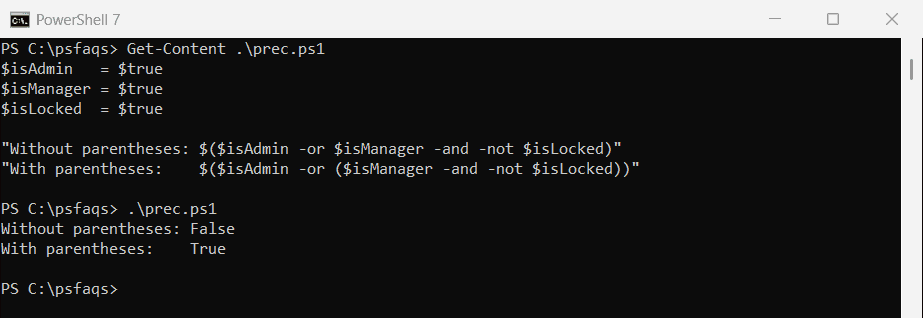
PowerShell read the first line as (admin or manager) and not locked. Whenever you mix -and and -or, add parentheses. The operator precedence table shows -and, -or and -xor on the same row.
The -not and ! operators
-not binds tighter than -eq
-not applies to the value right next to it, not to the whole comparison:
"-not 5 -eq 3   = $(-not 5 -eq 3)"
"-not (5 -eq 3) = $(-not (5 -eq 3))"
"!`$false        = $(!$false)"
Output:
-not 5 -eq 3   = False
-not (5 -eq 3) = True
!$false        = True
In the first line, PowerShell computed -not 5, which is False, and then compared False with 3. Wrap the comparison in parentheses.
Negate a command like Test-Path
Commands need their own parentheses. Without them, !Test-Path is read as a command named “!Test-Path”, and -not Test-Path is a syntax error:
$path = 'C:\psfaqs\Archive2026'

if (!(Test-Path -Path $path)) { "Missing: $path" }
if (-not (Test-Path -Path $path)) { 'Same check with -not' }
Output (the folder doesn’t exist):
Missing: C:\psfaqs\Archive2026
Same check with -not
Test-Path in PowerShell has more Test-Path examples.
What counts as true and false
Logical operators turn any value into True or False first. Some results surprise people, especially text:
$values = [ordered]@{
    "'False' (text)" = 'False'
    "'0' (text)"     = '0'
    "' ' (a space)"  = ' '
    '0'              = 0
    "'' (empty)"     = ''
    '$null'          = $null
    '@()'            = @()
    '@(0)'           = @(0)
    '@(0, 0)'        = @(0, 0)
}

foreach ($name in $values.Keys) {
    '{0,-16} counts as {1}' -f $name, [bool]$values[$name]
}
Output:
'False' (text)   counts as True
'0' (text)       counts as True
' ' (a space)    counts as True
0                counts as False
'' (empty)       counts as False
$null            counts as False
@()              counts as False
@(0)             counts as False
@(0, 0)          counts as True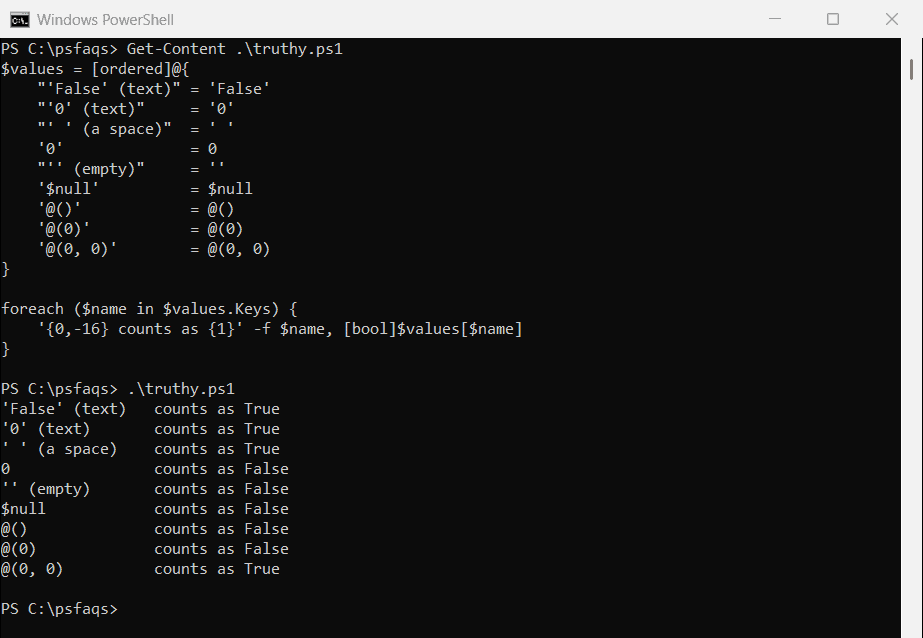
So if ('False') runs, and a CSV value of “0” counts as true. Convert first with [int] or [bool]::Parse().
Combine conditions in Where-Object
Inside a Where-Object script block, -and and -not work on each object’s properties:
$orders = @(
    [pscustomobject]@{ Id = 1001; State = 'TX'; Total = 250.00; Paid = $true }
    [pscustomobject]@{ Id = 1002; State = 'CA'; Total = 980.50; Paid = $false }
    [pscustomobject]@{ Id = 1003; State = 'TX'; Total = 1200.00; Paid = $false }
    [pscustomobject]@{ Id = 1004; State = 'FL'; Total = 75.25; Paid = $true }
)

$orders | Where-Object { $_.State -eq 'TX' -and -not $_.Paid } |
    ForEach-Object { 'Unpaid Texas order {0}: {1:C}' -f $_.Id, $_.Total }
Output:
Unpaid Texas order 1003: $1,200.00Where-Object covers the short syntax, which can’t combine conditions, and the script block form used here.
&& and || in PowerShell 7
PowerShell 7 added && and ||, but they’re pipeline chain operators, not logical ones. They check whether the previous command succeeded, not whether it returned True:
Test-Path -Path C:\psfaqs\NoSuchFolder && 'This still runs'
Get-Item -Path C:\psfaqs\NoSuchFolder -ErrorAction SilentlyContinue || 'Get-Item failed, so || ran this'
Output in PowerShell 7:
False
This still runs
Get-Item failed, so || ran this</