
To convert HTML to plain text in PowerShell, strip the tags with -replace and then decode entities like & with WebUtility.HtmlDecode. For a short snippet, this one line does both:
[System.Net.WebUtility]::HtmlDecode(($html -replace '<[^>]+>', ''))Full pages and email bodies need a bit more care, though. Scripts, styles and line breaks get in the way, and Windows PowerShell 5.1 and PowerShell 7 don’t agree on a few of the tools. I ran everything below in both.
Strip HTML tags with -replace
The pattern <[^>]+> matches a less-than sign, everything that isn’t a greater-than sign, and the closing bracket. In other words, one tag. Replace each match with nothing:
$html = '<p>The <b>Q4 budget</b> review is on Oct 14 & starts at 9:00 AM ET.</p>'
$html -replace '<[^>]+>', ''
$cells = '<td>Austin</td><td>Denver</td>'
$cells -replace '<[^>]+>', ''
($cells -replace '<[^>]+>', ' ' -replace '\s+', ' ').Trim()Output:
The Q4 budget review is on Oct 14 & starts at 9:00 AM ET.
AustinDenver
Austin Denver
The tags are gone, but and & are still there. And the table cells ran together as AustinDenver, so replace tags with a space when they separate words, then collapse the spaces.
-replace swaps every match, not just the first. The pattern syntax is covered in my PowerShell regex guide.
Decode HTML entities like & and
WebUtility.HtmlDecode turns entities back into characters. It’s part of System.Net, so it works in PowerShell 7 and 5.1 with no setup:
$text  = 'Oct 14 & 15, 2026 <draft> "Denver" $1,250'
$plain = [System.Net.WebUtility]::HtmlDecode($text)
$plain
'No-break spaces: {0}' -f [regex]::Matches($plain, '\u00A0').Count

$plain = $plain -replace '\u00A0', ' '
'After the fix:   {0}' -f [regex]::Matches($plain, '\u00A0').Count
Output:
Oct 14 & 15, 2026 <draft> "Denver" $1,250
No-break spaces: 1
After the fix:   0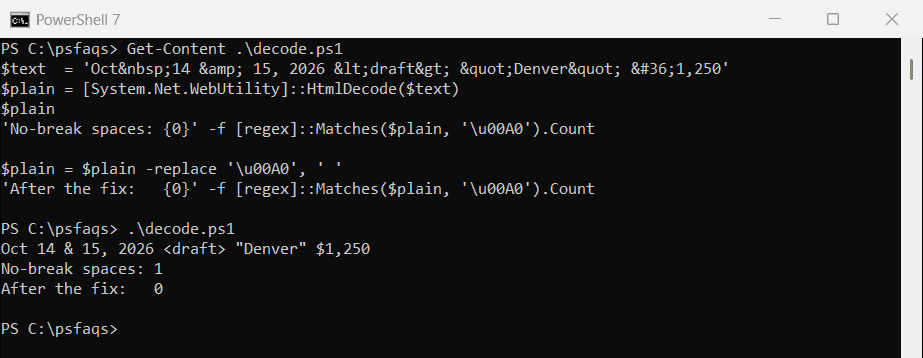
Watch the . It becomes U+00A0, a no-break space that looks like a space but fails a match on ‘ ‘. Swap it for a regular space, the same way you’d replace any text in a string.
Many scripts use System.Web.HttpUtility instead. That type isn’t loaded in Windows PowerShell 5.1:
try {
    [System.Web.HttpUtility]::HtmlDecode('Tom & Maria')
} catch {
    "Failed. $($_.Exception.Message)"
}
Output:
Tom & MariaThat’s PowerShell 7. Windows PowerShell 5.1 prints Failed. Unable to find type [System.Web.HttpUtility].
In 5.1, run Add-Type -AssemblyName System.Web first, or just use WebUtility. The try and catch blocks keep the error readable.
Remove script and style blocks first
My sample file, update.html, is a small office notice with a style block in the head and a script at the bottom. A plain tag strip keeps the code inside them:
$html  = Get-Content -Path 'C:\psfaqs\htmltext\update.html' -Raw
$naive = $html -replace '<[^>]+>', ''
$clean = $html -replace '(?is)<(script|style)\b[^>]*>.*?</\1>', '' -replace '<[^>]+>', ''

'Naive text has CSS:        {0}' -f ($naive -match 'color:')
'Naive text has JavaScript: {0}' -f ($naive -match 'console\.log')
'Clean text has either:     {0}' -f ($clean -match 'color:|console\.log')
Output:
Naive text has CSS:        True
Naive text has JavaScript: True
Clean text has either:     False
The (?is) prefix makes the match case-insensitive and lets the dot cross line breaks, so .*? spans the whole block. The \1 makes the closing tag match the opening one, much like extracting text between delimiters.
Keep line breaks from paragraphs and lists
Stripping every tag also throws away the structure. Turn <br> and closing block tags into newlines first, and list items into dashes:
$html = &#