
Test-NetConnection checks whether your computer can reach another host, and whether a specific TCP port on it is open. Give it a computer name and a port:
Test-NetConnection -ComputerName learn.microsoft.com -Port 443 |
    Select-Object -Property ComputerName, RemotePort, TcpTestSucceeded
Output:
ComputerName        RemotePort TcpTestSucceeded
------------        ---------- ----------------
learn.microsoft.com        443             True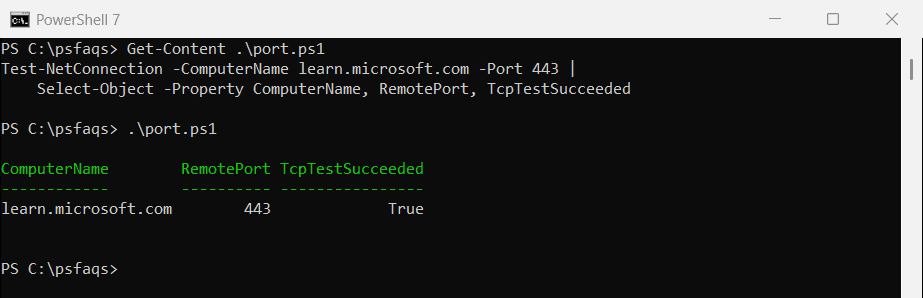
TcpTestSucceeded True means the port accepted a connection. I selected three properties because the full output also lists your own IP address and network adapter. Every example ran in PowerShell 7.6 and Windows PowerShell 5.1 on Windows 11.
Get a simple True or False
In scripts, add -InformationLevel Quiet. Test-NetConnection then returns just True or False, which drops straight into an if statement:
$open = Test-NetConnection -ComputerName learn.microsoft.com -Port 443 -InformationLevel Quiet
"Port 443 reachable: $open"
Output:
Port 443 reachable: TrueTest several ports
Loop through the ports you care about. -WarningAction SilentlyContinue hides the yellow warning Test-NetConnection prints for every closed port:
foreach ($port in 80, 443, 3389) {
    $ok = Test-NetConnection -ComputerName www.microsoft.com -Port $port -InformationLevel Quiet -WarningAction SilentlyContinue
    '{0,-5} {1}' -f $port, $(if ($ok) { 'open' } else { 'closed or filtered' })
}
Output:
80    open
443   open
3389  closed or filtered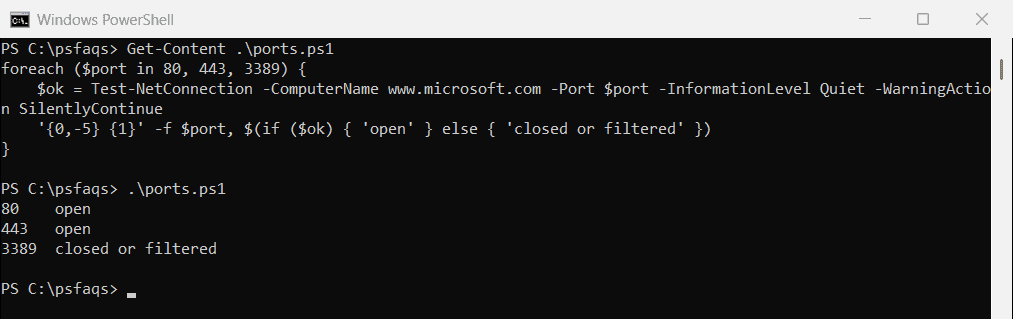
“Closed or filtered” can mean nothing listens on the port, or a firewall blocks it. From outside, you can’t tell which. Checking if a port is open covers more ways to test ports.
A failed ping doesn’t mean the host is down
Without -Port, Test-NetConnection sends a ping. Many servers and firewalls block ping, so a working website can still fail it:
$result = Test-NetConnection -ComputerName learn.microsoft.com -Port 443 -WarningAction SilentlyContinue
"Ping succeeded: $($result.PingSucceeded)"
"Port 443 open:  $($result.TcpTestSucceeded)"
Output:
Ping succeeded: False
Port 443 open:  True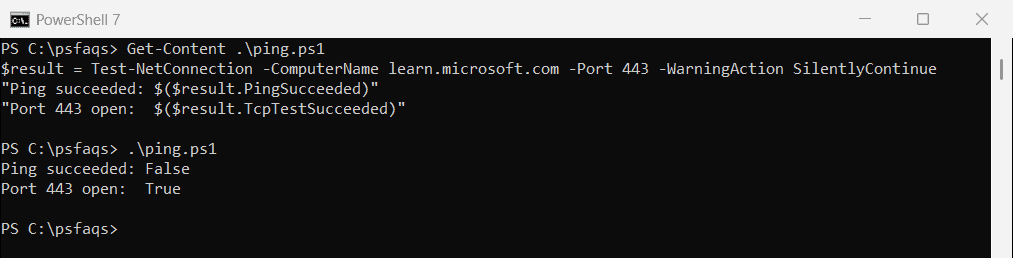
Always test the port the service actually uses. Ping only tells you whether ICMP is allowed on the network.
Use the built-in port names
-CommonTCPPort takes a name instead of a number for the most common ports:
(Get-Command -Name Test-NetConnection).Parameters['CommonTCPPort'].Attributes.ValidValues -join ', 'Output:
HTTP, RDP, SMB, WINRMHTTP is 80, RDP is 3389, SMB is 445 and WINRM is 5985. For example, Test-NetConnection -ComputerName Server01 -CommonTCPPort RDP.
Trace the route
-TraceRoute lists each router between you and the host, like tracert. Add -Hops to stop after a set number:
Test-NetConnection -ComputerName learn.microsoft.com -TraceRoute -Hops 15The first hops are your own network, so be careful when sharing this output. Test-NetConnection’s other parameters are in the Test-NetConnection reference.
Test-Connection -TcpPort in PowerShell 7
PowerShell 7 added -TcpPort to Test-Connection. It returns just True or False, but it doesn’t exist in Windows PowerShell 5.1:
Test-Connection -TargetName learn.microsoft.com -TcpPort 443Output in PowerShell 7.6:
TrueUse Test-NetConnection in scripts that must run in both versions. Microsoft covers the PowerShell 7 option in the Test-Connection reference.
Test many servers at once
Put the names in an array and collect the results as objects, so you can sort them or export them to CSV:
$servers = 'web01', 'web02', 'sql01'
$servers | ForEach-Object {
    [pscustomobject]@{
        Server = $_
        Https  = Test-NetConnection -ComputerName $_ -Port 443 -InformationLevel Quiet -WarningAction SilentlyContinue
    }
}
Frequently Asked Questions
How do I test if a port is open with PowerShell?
Run Test-NetConnection -ComputerName server01 -Port 443. TcpTestSucceeded is True when the port accepts connections.
How do I get just True or False from Test-NetConnection?
Add -InformationLevel Quiet. It returns a single Boolean you can use in if statements.
Why does Test-NetConnection fail the ping when the site works?
The server or a firewall blocks ICMP ping. Test the real service port with -Port instead.
How do I hide the warning for closed ports?
Add -WarningAction SilentlyContinue to the command.
What is the difference between Test-NetConnection and Test-Connection?
Test-NetConnection tests ports and routes and works in both versions. Test-Connection pings, and in PowerShell 7 it can also test a port with -TcpPort.
Other network tasks with PowerShell:

Bijay Kumar is an esteemed author and the mind behind PowerShellFAQs.com, where he shares his extensive knowledge and expertise in PowerShell, with a particular focus on SharePoint projects. Recognized for his contributions to the tech community, Bijay has been honored with the prestigious Microsoft MVP award. With over 15 years of experience in the software industry, he has a rich professional background, having worked with industry giants such as HP and TCS. His insights and guidance have made him a respected figure in the world of software development and administration. Read more.