
Say your online store exports every order to an orders.xml file at night, and the finance team wants it in Excel by 8 AM.
To convert XML to Excel using PowerShell, load the file with [xml], turn each order into a [pscustomobject] row, and pipe the rows to Export-Excel or Export-Csv.
In this tutorial, I’ll show you three ways to do it with one sample order file from start to finish, plus the encoding and number traps I hit in PowerShell 7 and Windows PowerShell 5.1.
The sample XML file we’ll use
Here’s the orders.xml file the whole post works with, a nightly export from a made-up outdoor store with four October 2026 orders in USD. Two of them are shown:
<?xml version="1.0" encoding="utf-8"?>
<Orders store="Harbor & Pine Outfitters" exported="2026-10-16">
<Order id="SO-10422" status="Processing">
<Date>2026-10-03</Date>
<Customer>
<Name>Tom Baker</Name>
<City>Denver</City>
<State>CO</State>
</Customer>
<Items>
<Item sku="BTL-32" qty="3" price="18.00">Insulated Bottle 32 oz</Item>
</Items>
<Total currency="USD">54.00</Total>
</Order>
<Order id="SO-10423" status="Shipped">
<Date>2026-10-07</Date>
<Customer>
<Name>José Martínez</Name>
<City>San Antonio</City>
<State>TX</State>
</Customer>
<Items>
<Item sku="JKT-RN" qty="1" price="129.00">Rain Shell Jacket</Item>
<Item sku="SCK-WL" qty="4" price="12.75">Wool Hiking Socks</Item>
<Item sku="SPG-CK" qty="1" price="21.00">Salt & Pepper Camp Set</Item>
</Items>
<Total currency="USD">201.00</Total>
</Order>
<!-- SO-10421 and SO-10424 have the same shape -->
</Orders>It’s small, but it has the parts that trip up most conversions:
- Attributes: the order
idandstatus, andcurrencyon<Total>. - Nested data: a
<Customer>block and one to three<Item>lines. - Non-ASCII text: José Martínez from San Antonio, and an ampersand in the store name.
A worksheet is flat, so the real job is deciding which XML parts become rows and columns. To just look at the data first, try viewing XML as a table in PowerShell.
Step 1: Load the XML file into PowerShell
The [xml] type accelerator is short for the .NET System.Xml.XmlDocument class. Once the file is an XmlDocument, you walk it with dot notation, like $xml.Orders.Order.
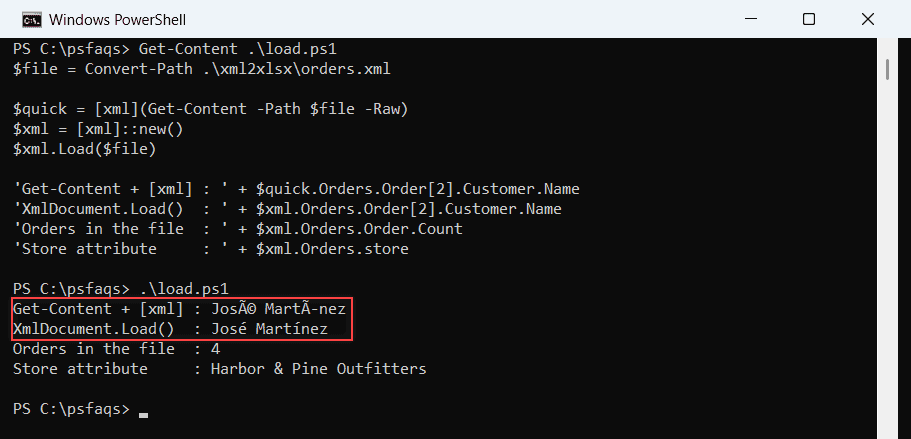
Most scripts load it with [xml](Get-Content ...). Here’s that next to the Load() method:
$file = Convert-Path .\xml2xlsx\orders.xml

$quick = [xml](Get-Content -Path $file -Raw)
$xml = [xml]::new()
$xml.Load($file)

'Get-Content + [xml] : ' + $quick.Orders.Order[2].Customer.Name
'XmlDocument.Load()  : ' + $xml.Orders.Order[2].Customer.Name
'Orders in the file  : ' + $xml.Orders.Order.Count
'Store attribute     : ' + $xml.Orders.store
Output:
Get-Content + [xml] : José Martínez
XmlDocument.Load()  : José Martínez
Orders in the file  : 4
Store attribute     : Harbor & Pine Outfitters
That’s PowerShell 7, where both lines are right. Windows PowerShell 5.1 prints José MartÃnez on the Get-Content line:
How does this code work?
Convert-Path makes