
To convert a string to an integer in PowerShell, cast it with [int]. After that, math works as numbers instead of text:
$licenses = [int]'25'
"$licenses licenses, doubled: $($licenses * 2), type $($licenses.GetType().Name)"
Output:
25 licenses, doubled: 50, type Int32Use [decimal] for money and [double] for other fractions. Below I cover safe conversion, rounding, commas, characters and scientific notation. I ran every example in PowerShell 7.6 and Windows PowerShell 5.1, with the same results.
Convert safely with TryParse or -as
A cast throws an error when the text isn’t a number. TryParse returns True or False instead, and -as returns $null:
foreach ($text in '42', '12a', '') {
    $number = 0
    if ([int]::TryParse($text, [ref]$number)) { "'$text' is the number $number" }
    else { "'$text' is not a whole number" }
}
"'12a' -as [int] gives: [$('12a' -as [int])]"
Output:
'42' is the number 42
'12a' is not a whole number
'' is not a whole number
'12a' -as [int] gives: []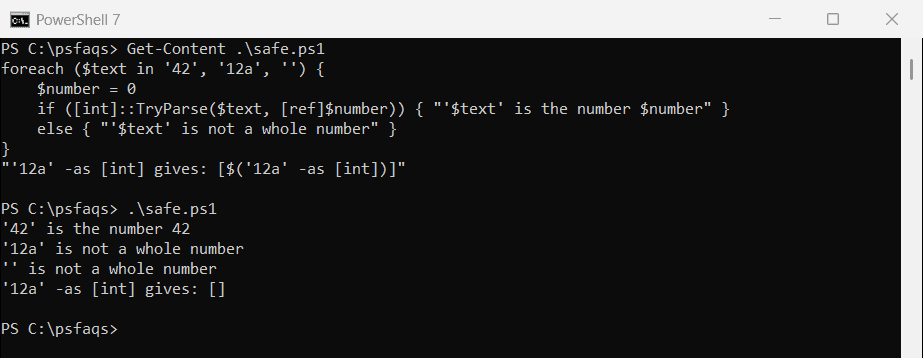
Use TryParse for user input and CSV values, where bad data is expected.
Empty text casts to 0
A plain cast turns an empty string or $null into 0 without any error, so a missing value can look like a real zero:
"[int]''    = $([int]'')"
"[int]`$null = $([int]$null)"
Output:
[int]''    = 0
[int]$null = 0
Check for empty values first, or use TryParse, which reports them as failures.
Decimals: [int] rounds instead of cutting
Casting text with a decimal point to [int] rounds it. An exact .5 goes to the nearest even number:
"[int]'42.7' = $([int]'42.7')"
"[int]'2.5'  = $([int]'2.5')"
"[int]'3.5'  = $([int]'3.5')"
"Truncate 42.7 = $([Math]::Truncate([double]'42.7'))"
Output:
[int]'42.7' = 43
[int]'2.5'  = 2
[int]'3.5'  = 4
Truncate 42.7 = 42
Use [Math]::Truncate to drop the decimals instead. Rounding numbers in PowerShell explains the .5 rule.
Convert a string to a decimal or double
[decimal] stores cents exactly, which makes it the right type for prices. [double] is fine for rates and measurements:
$price = [decimal]'19.99'
$rate  = [double]'0.0825'

"Price: $price ($($price.GetType().Name))"
"Rate:  $rate ($($rate.GetType().Name))"
"Total with tax: {0:C}" -f ($price * [decimal]$rate + $price)
Output:
Price: 19.99 (Decimal)
Rate:  0.0825 (Double)
Total with tax: $21.64
Convert the double rate to [decimal] before mixing the two, as shown, so the result stays exact.
Numbers with commas and dollar signs
PowerShell casts ignore commas, treating them as thousands separators. That’s fine for 1,234 but wrong for European decimals like 1,5:
"[int]'1,234'     = $([int]'1,234')"
"[double]'1,5'    = $([double]'1,5')"
"Currency text    = $([decimal]::Parse('$1,234.50', 'Currency', [cultureinfo]'en-US'))"
Output:
[int]'1,234'     = 1234
[double]'1,5'    = 15
Currency text    = 1234.50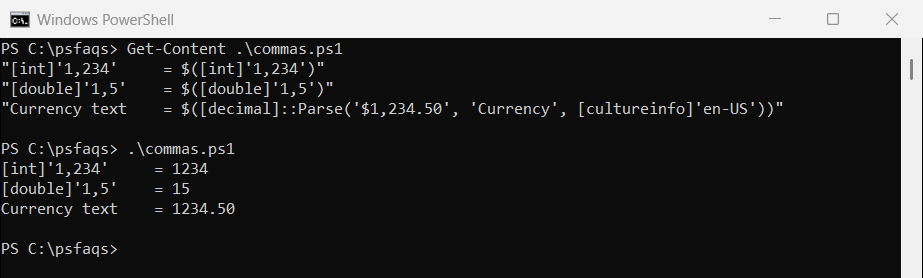
For text with a dollar sign, use [decimal]::Parse with the Currency style and the en-US culture.
Numbers too big for [int]
[int] stops at a little over 2.1 billion. Use [long] for bigger values, like file sizes in bytes:
try { [int]'3000000000' } catch { "Too big for [int], which stops at $([int]::MaxValue)" }
"[long]: $([long]'3000000000')"
Output:
Too big for [int], which stops at 2147483647
[long]: 3000000000
Convert a character to an integer
Casting a character to [int] gives its character code, not its digit value. The digit ‘7’ has the code 55:
$digit = '7'[0]

"[int]`$digit:             $([int]$digit)"
"GetNumericValue:          $([char]::GetNumericValue($digit))"
"[int][string]`$digit:     $([int][string]$digit)"
"Letter code for 'A':      $([int][char]'A')"
Output:
[int]$digit:             55
GetNumericValue:          7
[int][string]$digit:     7
Letter code for 'A':      65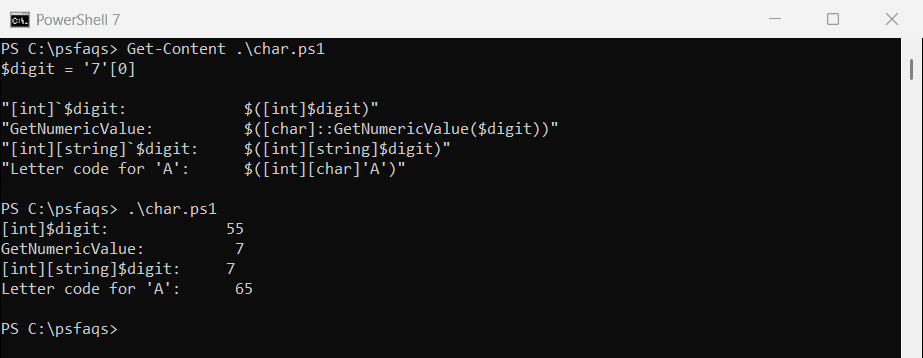
Use [char]::GetNumericValue, or convert the character to a string first. The code point is useful for letters, like 65 for A.
Convert a double to an integer
[int] rounds, Truncate drops the decimals, and Floor always goes down. They differ most for negative numbers:
foreach ($d in 2.5, 3.5, -2.7) {
    '{0,5}  [int]: {1,3}  Truncate: {2,3}  Floor: {3,3}' -f $d, [int]$d, [Math]::Truncate($d), [Math]::Floor($d)
}
Output:
  2.5  [int]:   2  Truncate:   2  Floor:   2
  3.5  [int]:   4  Truncate:   3  Floor:   3
 -2.7  [int]:  -3  Truncate:  -2  Floor:  -3
Scientific notation
Casts understand scientific notation like 1.5E+3. Large doubles also print that way, so format them for reports:
$value = [double]'1.5E+3'
"'1.5E+3' as a double:  $value"
"'1.5E+3' as a decimal: $([decimal]'1.5