
Need to check if a string contains special characters in PowerShell? Use -match with a negated character class. It returns True as soon as one character that isn’t a letter or digit shows up:
'Order#1042' -match '[^a-zA-Z0-9]' # TrueThe catch is deciding what “special” means. Spaces, underscores and accented letters like é all change the answer, and the -like trick you’ll see online doesn’t work at all.
Check if a string contains special characters with -match
Here are four values: a city with a year, an order number, a full name and an email address. Each one is tested against [^a-zA-Z0-9]:
$values = 'Austin2026', 'Order#1042', 'Maria Lopez', 'tom@baker.com'

foreach ($v in $values) {
    if ($v -match '[^a-zA-Z0-9]') {
        "{0,-14} has a special character: '{1}'" -f $v, $Matches[0]
    }
    else {
        "{0,-14} letters and digits only" -f $v
    }
}
Output:
Austin2026     letters and digits only
Order#1042     has a special character: '#'
Maria Lopez    has a special character: ' '
tom@baker.com  has a special character: '@'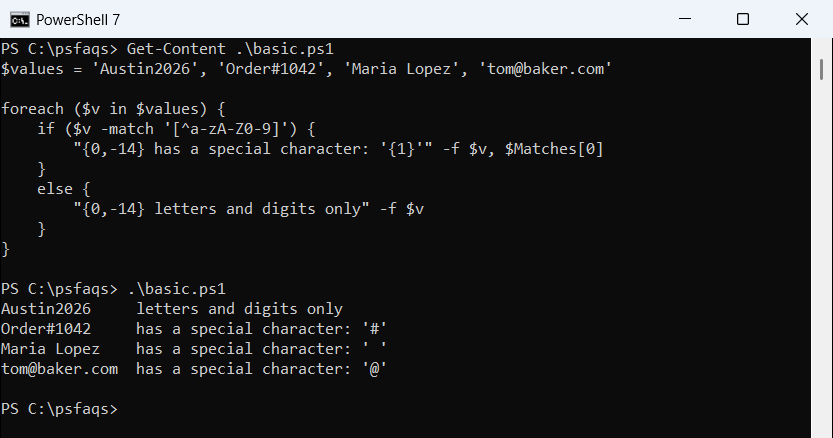
The ^ inside the brackets means “anything not in this list”. When -match succeeds, $Matches[0] holds the first character it found, so you get the culprit for free.
A space counts as special here. The PowerShell -match operator guide covers $Matches and the other return values in more detail.
What counts as a special character: [^a-zA-Z0-9] vs \W
\W looks like a shortcut for the same thing, but it isn’t. It means “not a word character”, and .NET treats the underscore and every Unicode letter as word characters:
$tests = 'Order#1042', 'first_name', 'José', 'Maria Lopez'

'{0,-12} {1,-12} {2,-6} {3}' -f 'Value', 'a-zA-Z0-9', '\W', 'Letters'
foreach ($s in $tests) {
    $ascii   = $s -match '[^a-zA-Z0-9]'
    $word    = $s -match '\W'
    $unicode = $s -match '[^\p{L}\p{Nd}]'
    '{0,-12} {1,-12} {2,-6} {3}' -f $s, $ascii, $word, $unicode
}
Output:
Value        a-zA-Z0-9    \W     Letters
Order#1042   True         True   True
first_name   True         False  True
José         True         False  False
Maria Lopez True True True![PowerShell special characters with [^a-zA-Z0-9] vs \W vs Unicode letters](https://powershellfaqs.com/wp-content/uploads/2026/10/powershell-special-characters-w-vs-ascii-class.png)
So first_name has no special characters according to \W, and José has none according to \W or \p{L}. Only the strict ASCII class flags both.
Pick the class that fits your data. For names typed by people, [^\p{L}\p{Nd}] is fairer, because it accepts accented letters but still catches spaces and symbols. The PowerShell regex guide lists the other classes.
How do I find which special characters a string contains?
-match stops at the first hit. To list every special character and its position, use [regex]::Matches. I added \s to the class so spaces are ignored:
$text  = 'Invoice #4471 (Denver) - $1,250.00'
$found = [regex]::Matches($text, '[^a-zA-Z0-9\s]')

"Found $($found.Count) special characters:"
$found | ForEach-Object { "  '$($_.Value)' at index $($_.Index)" }
Output:
Found 7 special characters:
  '#' at index 8
  '(' at index 14
  ')' at index 21
  '-' at index 23
  '$' at index 25
  ',' at index 27
  '.' at index 31
Each match has a Value and an Index, counted from 0. To get rid of them instead of listing them, see removing characters from strings.
For a unique list, pipe the values to Sort-Object -Unique. That’s where PowerShell 7 and Windows PowerShell 5.1 disagree:
$password = 'Pa$$w0rd!_2026#'
$chars = [regex]::Matches($password, '[^a-zA-Z0-9]').Value

"All:    $($chars -join ' ')"
"Unique: $(($chars | Sort-Object -Unique) -join ' ')"
Output:
All:    $ $ ! _ #
Unique: _ ! # $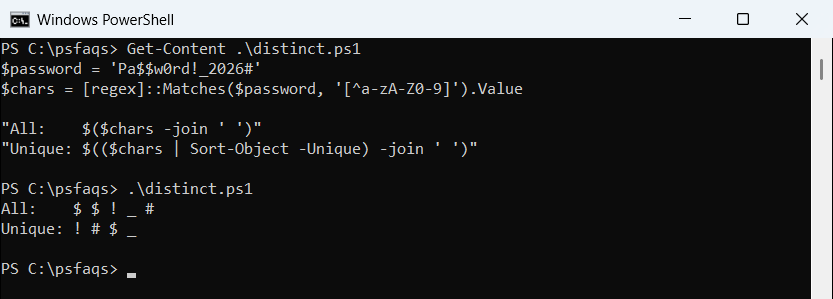
PowerShell 7 puts _ first; 5.1 prints ! # $ _, as the screenshot shows. Same set, different sort order, so don’t compare the joined text across versions.
Check for a specific set of special characters
Sometimes only a few characters are a problem. Build a character class from your own list, and run it through [regex]::Escape so $, # and [ are taken literally:
$blocked = '$#%[]\'

$broken = '[' + [regex]::Escape($blocked) + ']'
$fixed  = '[' + ([regex]::Escape($blocked) -replace ']', '\]') + ']'

"Escape only: $broken  ->  $('Report[final].xlsx' -match $broken)"
"With \]:     $fixed ->  $('Report[final].xlsx' -match $fixed)"
"Clean name:  $('Q4 summary.xlsx' -match $fixed)"
Output:
Escape only: [\$\#%\[]\\]  ->  False
With \]:     [\$\#%\[\]\\] ->  True
Clean name:  False
Escape alone isn’t enough. It escapes [ but not ], so the class closes early and the test quietly returns False. Adding -replace ‘]’, ‘\]’ fixes it.
That’s regex escaping. Escaping $ or a backtick inside a PowerShell string is a different job, covered in escaping special characters in variables.