Convert Strings to Uppercase, Lowercase and Title Case in PowerShell

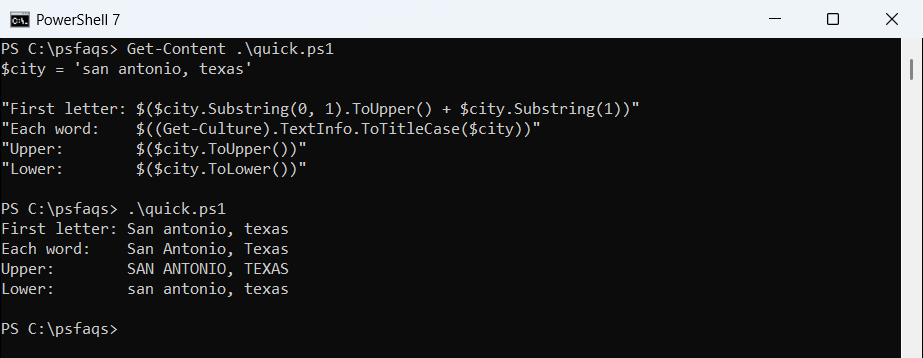
To convert a string to uppercase or lowercase in PowerShell, call its .ToUpper() or .ToLower() method. Both return a new string and leave the original alone:

$city = 'Washington, D.C.'

"Upper: $($city.ToUpper())"
"Lower: $($city.ToLower())"

Output:

Upper: WASHINGTON, D.C.
Lower: washington, d.c.
PowerShell convert a string to uppercase and lowercase
ToUpper() and ToLower() (PowerShell 7)

Title case and camelCase take a bit more work, and one common trick behaves differently in Windows PowerShell 5.1. I ran every example in PowerShell 7.6 and 5.1.

Convert every string in an array

Call the method on the array itself. PowerShell runs it on each item and returns a new array:

$states = 'texas', 'Colorado', 'NEW YORK'

$states.ToUpper() -join ', '
$states.ToLower() -join ', '

Output:

TEXAS, COLORADO, NEW YORK
texas, colorado, new york

Convert a string to title case

For title case, use the ToTitleCase() method of the current culture’s TextInfo. Watch how it treats words in capitals:

$textInfo = (Get-Culture).TextInfo
$headline = 'the FBI and NASA report on new york traffic'

"ToTitleCase:          $($textInfo.ToTitleCase($headline))"
"ToLower, then title:  $($textInfo.ToTitleCase($headline.ToLower()))"
"All caps input:       $($textInfo.ToTitleCase('NEW YORK CITY'))"

Output:

ToTitleCase:          The FBI And NASA Report On New York Traffic
ToLower, then title:  The Fbi And Nasa Report On New York Traffic
All caps input:       NEW YORK CITY
PowerShell ToTitleCase keeps all-caps words unchanged
ToTitleCase leaves words in capitals alone (Windows PowerShell 5.1)

ToTitleCase leaves words that are already all caps alone, so FBI stays FBI, but so does NEW YORK CITY. Lowercasing first fixes shouted text but turns acronyms into Fbi and Nasa. Pick the version that suits your data.

It also capitalizes small words like and and on, which US headline style usually doesn’t. Microsoft’s ToTitleCase documentation notes that it isn’t linguistically correct.

Capitalize only the first letter

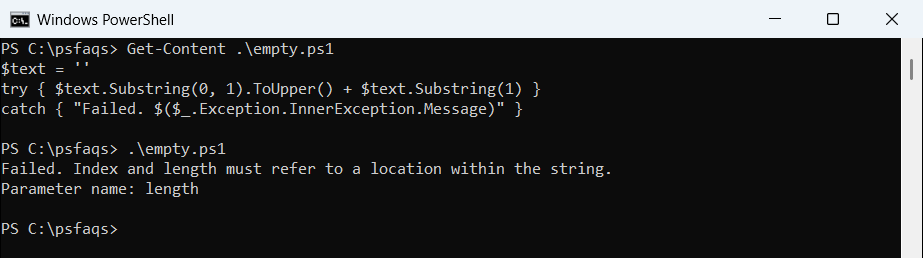
For sentence case, uppercase the first character and lowercase the rest. Check for an empty string first, or Substring will fail:

function ConvertTo-SentenceCase {
    param([string]$Text)
    if ([string]::IsNullOrEmpty($Text)) { return $Text }
    $Text.Substring(0, 1).ToUpper() + $Text.Substring(1).ToLower()
}

ConvertTo-SentenceCase -Text 'pAYMENT RECEIVED FOR ORDER 1042'
ConvertTo-SentenceCase -Text 'a'
"[$(ConvertTo-SentenceCase -Text '')]"

Output:

Payment received for order 1042
A
[]

Uppercase the first letter of each word

A regex that matches the first letter of each word does this without touching the rest. But the popular -replace version only works in PowerShell 7:

$name = 'alice johnson-smith'

"-replace with a script block: $($name -replace '\b(\w)', { $_.Value.ToUpper() })"
"[regex]::Replace:             $([regex]::Replace($name, '\b(\w)', { param($m) $m.Value.ToUpper() }))"

Output in PowerShell 7:

-replace with a script block: Alice Johnson-Smith
[regex]::Replace:             Alice Johnson-Smith

Output in Windows PowerShell 5.1:

-replace with a script block:  alice johnson-smith.Value.ToUpper() lice  alice johnson-smith.Value.ToUpper() ohnson- alice johnson-smith.Value.ToUpper() mith
[regex]::Replace:             Alice Johnson-Smith
PowerShell -replace with a script block returns wrong text in Windows PowerShell 5.1
-replace with a script block in Windows PowerShell 5.1: no error, wrong result

In 5.1, -replace turns the script block into text instead of running it, and there’s no error to warn you. [regex]::Replace() gives the right answer in both versions, so use it in scripts that might run on 5.1.

Convert to camelCase, PascalCase, snake_case or kebab-case

These styles all start the same way: split the text into words, then join them back in the new style. This function handles spaces, punctuation and existing camelCase:

function Split-Words ([string]$Text) {
    ($Text -creplace '([a-z])([A-Z])', '$1 $2') -split '[^A-Za-z0-9]+' | Where-Object { $_ }
}

function ConvertTo-Case {
    param([string]$Text, [ValidateSet('camel', 'pascal', 'snake', 'kebab')] [string]$Style)
    $words = @(Split-Words $Text | ForEach-Object { $_.ToLower() })
    switch ($Style) {
        'snake'  { $words -join '_' }
        'kebab'  { $words -join '-' }
        default {
            $cap = $words | ForEach-Object { $_.Substring(0, 1).ToUpper() + $_.Substring(1) }
            if ($Style -eq 'camel') { $cap[0] = $words[0] }
            $cap -join ''
        }
    }
}

$text = 'Monthly sales report 2026'
foreach ($style in 'camel', 'pascal', 'snake', 'kebab') {
    '{0,-7} {1}' -f $style, (ConvertTo-Case -Text $text -Style $style)
}

Output:

camel   monthlySalesReport2026
pascal  MonthlySalesReport2026
snake   monthly_sales_report_2026
kebab   monthly-sales-report-2026

camelCase is common for variable names, PascalCase for PowerShell function names, and snake_case and kebab-case for file names and URLs. The helper first splits camelCase text, so it can convert in either direction.

Compare text without converting case

You often don’t need to convert at all. PowerShell’s -eq, -like and -match already ignore case, and the c versions don’t:

$answer = 'YES'

"-eq 'yes':   $($answer -eq 'yes')"
"-ceq 'yes':  $($answer -ceq 'yes')"
"All caps:    $($answer -ceq $answer.ToUpper())"

Output:

-eq 'yes':   True
-ceq 'yes':  False
All caps:    True

Comparing a string with its own ToUpper() version is a quick way to check whether it’s all caps. Microsoft lists the case-sensitive operators in about_Comparison_Operators.

Frequently Asked Questions

How do I convert a string to uppercase in PowerShell?

Use $text.ToUpper(). For lowercase, use $text.ToLower(). Both work on arrays too, like $names.ToUpper().

How do I convert a string to title case in PowerShell?

Use (Get-Culture).TextInfo.ToTitleCase($text). Call .ToLower() first if the text is in all caps, but note that acronyms will change too.

How do I capitalize the first letter of a string in PowerShell?

Use $text.Substring(0,1).ToUpper() + $text.Substring(1), and check that the string isn’t empty first.

Why doesn’t -replace with a script block work in PowerShell 5.1?

Script block replacements were added in PowerShell 6. In 5.1, use [regex]::Replace($text, $pattern, { param($m) ... }) instead.

Is PowerShell string comparison case-sensitive?

No. -eq, -like and -match ignore case. Use -ceq, -clike or -cmatch when case matters.

More string guides from this series: