
To check if a string contains a substring in PowerShell, use the -like operator with a * wildcard on each side. It returns True or False and ignores case:
$message = 'Backup completed on WEB01 at 2:30 AM'

$message -like '*WEB01*'
$message -like '*web01*'
$message -clike '*web01*'
Output:
True
True
False
Use -clike when case matters. For most checks, like looking for a server name or an error word in a log line, the case-insensitive -like is what you want.
I ran every example in PowerShell 7.6 and Windows PowerShell 5.1. One method only works in PowerShell 7, and I show the 5.1 alternative right after it.
Use the Contains() method
Strings have a .Contains() method too. It’s case-sensitive, so it doesn’t match web01:
$message = 'Backup completed on WEB01 at 2:30 AM'

$message.Contains('WEB01')
$message.Contains('web01')
Output:
True
False
In PowerShell 7, you can pass a comparison type to ignore case:
$message = 'Backup completed on WEB01 at 2:30 AM'
$message.Contains('web01', [System.StringComparison]::OrdinalIgnoreCase)
Output in PowerShell 7:
TrueWindows PowerShell 5.1 runs on the older .NET Framework, which doesn’t have that option. It fails with a “Cannot find an overload” error. IndexOf() works in both versions and returns -1 when the text isn’t found:
$message = 'Backup completed on WEB01 at 2:30 AM'
$message.IndexOf('web01', [System.StringComparison]::OrdinalIgnoreCase) -ge 0
Output:
TrueDon’t confuse this method with -contains, which checks arrays, as explained in the PowerShell -contains operator.
Why -contains doesn’t work on strings
-contains sounds right, but it checks whether a collection holds an item. On a single string, it only matches the entire string:
$message = 'Backup completed on WEB01 at 2:30 AM'
$message -contains 'WEB01'

$servers = 'WEB01', 'WEB02', 'SQL01'
$servers -contains 'WEB01'
Output:
False
True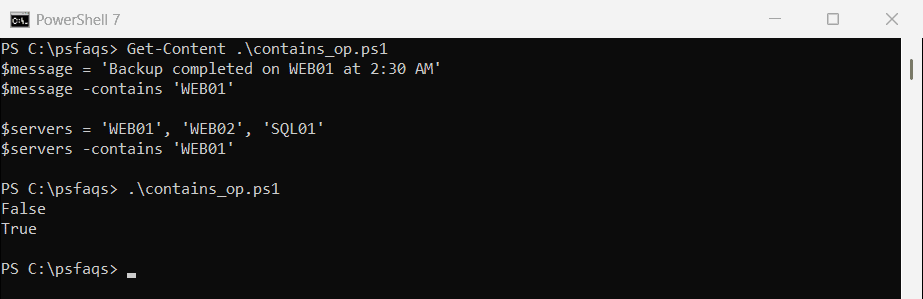
So use -like or .Contains() for text inside a string, and -contains or -in for items in an array. More on the second case in how to check if an array contains a value.
Use -match for patterns
-match takes a regular expression, which is great for patterns but trips people up with plain text. Characters like $ and . have special meanings:
$line = 'Invoice 1042 total: $1,249.50'

$line -match '$1,249.50'
$line -match [regex]::Escape('$1,249.50')
$line.Contains('$1,249.50')
Output:
False
True
True![PowerShell -match fails on a dollar amount until you use [regex]::Escape](https://powershellfaqs.com/wp-content/uploads/2026/09/powershell-match-special-characters-regex-escape.png)
The first check failed because $ means “end of the text” in a regular expression. [regex]::Escape() turns the text into a safe pattern, and .Contains() doesn’t use patterns at all.
How do I check if a string contains one of several values?
Join the values with | in a -match pattern. $Matches[0] then tells you which one was found:
$logLine = 'Backup of SQL01 failed after 3 retries'

if ($logLine -match 'error|failed|timeout') {
    "Problem found: $($Matches[0])"
}
Output:
Problem found: failedIf the values might contain special characters, like drive letters or percentages, escape each one before joining them:
$logLine = 'Disk usage on D:\ reached 95.5%'
$words   = 'D:\', '95.5%', 'C:\'

$pattern = ($words | ForEach-Object { [regex]::Escape($_) }) -join '|'
$pattern
$logLine -match $pattern
Output:
D:\\|95\.5%|C:\\
True
The first line is the escaped pattern PowerShell built. Without escaping, PowerShell stops with “Illegal \ at end of pattern”, because the backslash in C:\ starts an escape sequence.
Check if a string contains all of several values
Go through the values and collect the ones that are missing. An empty result means everything was found:
$message  = 'Backup completed on WEB01 at 2:30 AM'
$required = 'WEB01', 'completed', 'PM'

$missing = $required | Where-Object { $message -notlike "*$_*" }
if ($missing) { "Missing: $($missing -join ', ')" } else { 'All values found' }
Output:
Missing: PM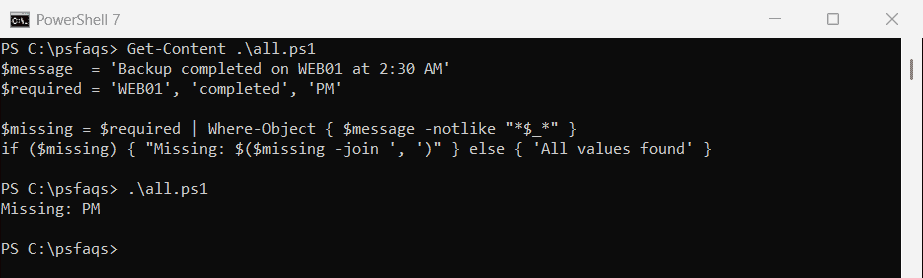
Reporting what’s missing is more useful than a plain False, especially when you’re checking log lines or file names in a loop.
Check if a string contains a space
Use -match '\s' for any whitespace, or .Contains(' ') for a regular space only. The difference shows up with tabs:
$names = 'MariaGarcia', 'Maria Garcia', "Maria`tGarcia"

foreach ($name in $names) {
    '{0,-14} -match \s: {1,-5}  .Contains(" "): {2}' -f $name, ($name -match '\s'), $name.Contains(' ')
}
Output:
MariaGarcia    -match \s: False  .Contains(" "): False
Maria Garcia   -match \s: True   .Contains(" "): True
Maria	Garcia   -match \s: True   .Contains(" "): False