
To get the BIOS serial number using PowerShell, read the SerialNumber property of the Win32_BIOS class. One line does it, with no admin rights needed:
(Get-CimInstance -ClassName Win32_BIOS).SerialNumberOutput:
ABC1234XYZ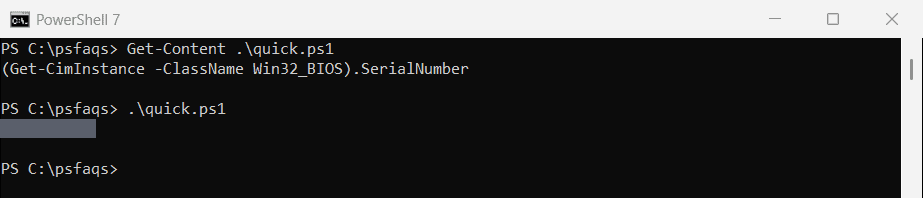
That’s the same number printed on the sticker of most laptops and desktops. Below I compare the other places Windows stores serials, replace the old wmic command, and collect serials from many PCs. My real hardware details are masked in every output.
BIOS, enclosure and motherboard serial numbers
Windows reports serials from several classes. On most PCs, three of them match and the motherboard has its own:
$bios      = Get-CimInstance -ClassName Win32_BIOS
$enclosure = Get-CimInstance -ClassName Win32_SystemEnclosure
$product   = Get-CimInstance -ClassName Win32_ComputerSystemProduct
$board     = Get-CimInstance -ClassName Win32_BaseBoard

"BIOS serial:        $($bios.SerialNumber)"
"Enclosure serial:   $($enclosure.SerialNumber)"
"Product ID number:  $($product.IdentifyingNumber)"
"Motherboard serial: $($board.SerialNumber)"
"Model:              $($product.Name)"
Output:
BIOS serial:        ABC1234XYZ
Enclosure serial:   ABC1234XYZ
Product ID number:  ABC1234XYZ
Motherboard serial: PKCTSO0A1B2C3D
Model:              Contoso Laptop 14 G3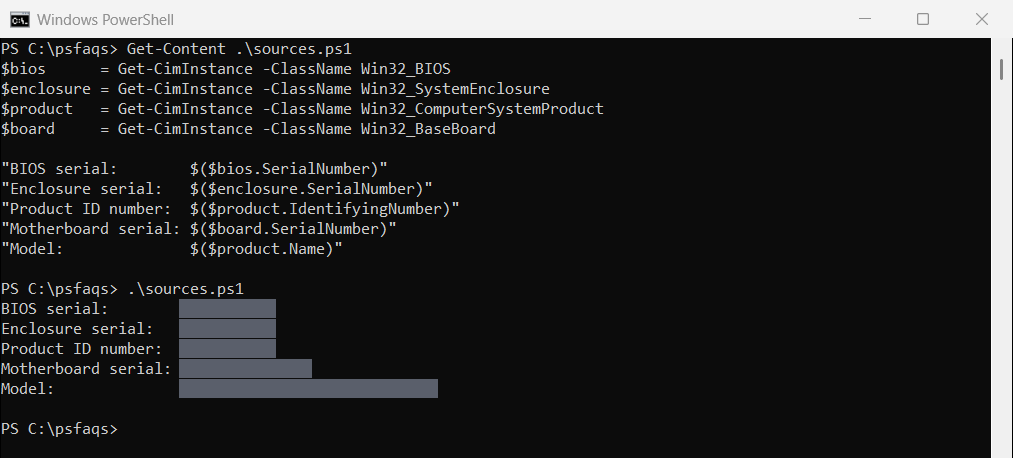
Use the BIOS serial for asset tags and warranty lookups. The motherboard serial matters mostly for repairs, since it changes when the board is replaced.
Replace wmic bios get serialnumber
Older guides use wmic bios get serialnumber. Microsoft removed WMIC from Windows 11 24H2 and later, so on current PCs it fails:
"WMIC installed: $([bool](Get-Command -Name wmic -ErrorAction SilentlyContinue))"
$result = cmd.exe /c "wmic bios get serialnumber" 2>&1 | ForEach-Object { $_.ToString().Trim() }
"wmic in cmd: Failed. $($result -join ' ')"
Output:
WMIC installed: False
wmic in cmd: Failed. 'wmic' is not recognized as an internal or external command, operable program or batch file.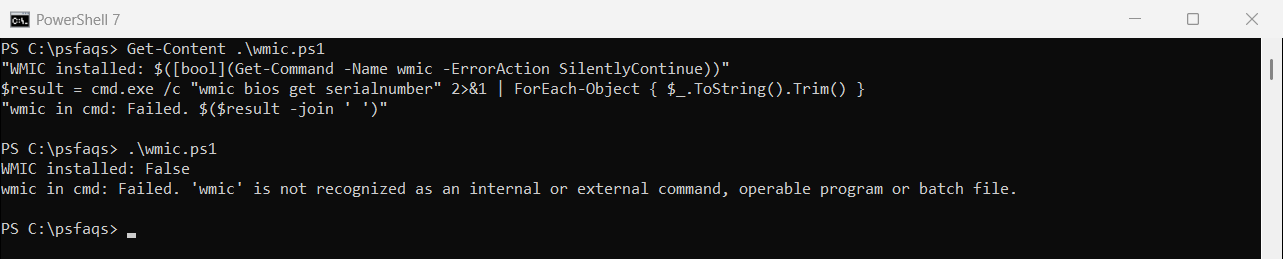
Get-CimInstance reads the same WMI data and works in PowerShell 7 and 5.1. Microsoft explains the change on its WMIC page.
Check if the serial number is real
Virtual machines and some custom-built PCs return placeholder text instead of a serial. This check catches the common ones:
$serial = (Get-CimInstance -ClassName Win32_BIOS).SerialNumber
$placeholders = 'To be filled by O.E.M.', 'Default string', 'System Serial Number', '0', 'None'

"Serial number: $serial"
"Looks real:    $(-not [string]::IsNullOrWhiteSpace($serial) -and $serial.Trim() -notin $placeholders)"
Output:
Serial number: ABC1234XYZ
Looks real:    True
If you get “To be filled by O.E.M.” or “Default string”, the maker didn’t program a serial into the firmware. Use the motherboard serial or the UUID from Win32_ComputerSystemProduct instead. The Win32_BIOS reference lists every property.
Get the serial number from remote computers
Add -ComputerName to query other PCs over WinRM. You need admin rights on each one:
$computers = 'PC-SALES-07', 'PC-SALES-08', 'PC-HR-02'
Get-CimInstance -ClassName Win32_BIOS -ComputerName $computers |
    Select-Object -Property PSComputerName, SerialNumber, SMBIOSBIOSVersion |
    Export-Csv -Path C:\Reports\serials.csv -NoTypeInformation
PSComputerName tells you which PC each row came from. Microsoft covers the options in the Get-CimInstance reference.
Keep serial numbers private
Serial numbers identify a specific device and can be used for warranty claims. Don’t post them in forums or public tickets.
Frequently Asked Questions
How do I get the BIOS serial number using PowerShell?
Run (Get-CimInstance -ClassName Win32_BIOS).SerialNumber. It works without admin rights.
What replaces wmic bios get serialnumber?
Use Get-CimInstance -ClassName Win32_BIOS | Select-Object SerialNumber. WMIC is removed from Windows 11 24H2 and later.
How do I get the motherboard serial number?
Run (Get-CimInstance -ClassName Win32_BaseBoard).SerialNumber. It’s usually different from the BIOS serial.
Why does my serial number say To be filled by O.E.M.?
The manufacturer didn’t store a serial in the firmware. This is common on virtual machines and custom-built PCs.
How do I get serial numbers from multiple computers?
Pass a list to Get-CimInstance -ClassName Win32_BIOS -ComputerName $computers and export the results to CSV.
More hardware and system info:
- Get the BIOS version
- Retrieve the Windows product key
- Get the Windows version
- Collect Autopilot hardware hashes

Bijay Kumar is an esteemed author and the mind behind PowerShellFAQs.com, where he shares his extensive knowledge and expertise in PowerShell, with a particular focus on SharePoint projects. Recognized for his contributions to the tech community, Bijay has been honored with the prestigious Microsoft MVP award. With over 15 years of experience in the software industry, he has a rich professional background, having worked with industry giants such as HP and TCS. His insights and guidance have made him a respected figure in the world of software development and administration. Read more.