
To convert a variable to a string in PowerShell, cast it with [string], call its ToString() method, or put it inside double quotes. For a number, all three give the same text:
$orderId = 1042

$a = [string]$orderId
$b = $orderId.ToString()
$c = "$orderId"

"$a, $b, $c are all $($a.GetType().Name), $($b.GetType().Name), $($c.GetType().Name)"
Output:
1042, 1042, 1042 are all String, String, StringThey don’t always agree, though. Dates, decimals, arrays and $null each behave a little differently depending on which one you use, and that’s what this guide covers.
I ran the examples in PowerShell 7.6 and Windows PowerShell 5.1 on a US-English Windows 11 PC, and both versions printed the same results.
Convert a number to a formatted string
ToString() accepts a format code, which is the easiest way to get currency, thousands separators or leading zeros. The -f operator does the same inside a longer message:
$price = 1249.56

$price.ToString('C')
$price.ToString('N0')
(7).ToString('D3')
(255).ToString('X2')
'{0} licenses at {1:C} each' -f 3, 19.99
Output:
$1,249.56
1,250
007
FF
3 licenses at $19.99 each| Format | Meaning | Example result |
|---|---|---|
C | Currency, using the current culture | $1,249.56 |
N0, N2 | Number with separators and 0 or 2 decimals | 1,250 |
D3 | Whole number padded with zeros to 3 digits | 007 |
X2 | Hexadecimal, 2 digits | FF |
Microsoft lists every code in Standard numeric format strings. For rounding before you format, see how to round to 2 decimal places.
Convert a date to a string
This is where the three methods split. Inside double quotes, PowerShell writes the date in a fixed format. ToString() follows the PC’s regional settings:
$date = Get-Date -Year 2026 -Month 9 -Day 28 -Hour 14 -Minute 30 -Second 0

"Inside quotes:   $date"
"ToString():      $($date.ToString())"
"Custom format:   $($date.ToString('MMMM d, yyyy h:mm tt'))"
Output:
Inside quotes:   09/28/2026 14:30:00
ToString():      9/28/2026 2:30:00 PM
Custom format:   September 28, 2026 2:30 PM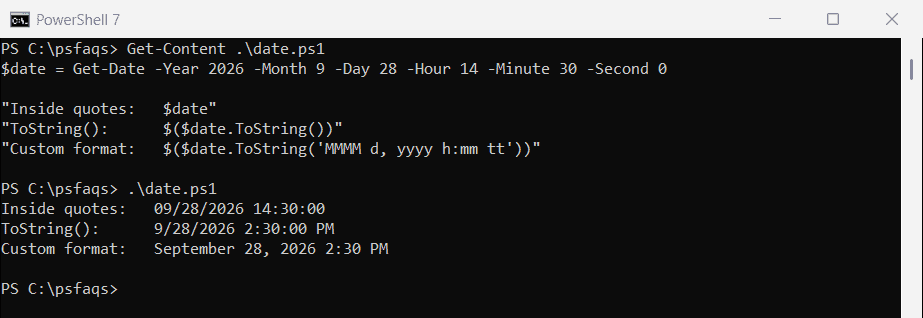
The first line is always month/day/year with a 24-hour clock, on any PC. When the text goes into a report or a file name, pass your own format to ToString() so you know exactly what you’ll get.
More patterns are in how to format dates in PowerShell.
Why does ToString() give a different result on another PC?
[string] and double quotes use the invariant culture, which never changes. ToString() uses the current culture. Here’s the same number on a PC set to German:
[System.Threading.Thread]::CurrentThread.CurrentCulture = 'de-DE'
$amount = 1234.5

"[string] cast:  $([string]$amount)"
"ToString():     $($amount.ToString())"
"Fixed culture:  $($amount.ToString([cultureinfo]::InvariantCulture))"
Output:
[string] cast:  1234.5
ToString():     1234,5
Fixed culture: 1234.5![PowerShell ToString() uses the current culture while a [string] cast does not](https://powershellfaqs.com/wp-content/uploads/2026/09/powershell-tostring-vs-string-cast-culture.png)
Germany uses a comma for decimals, so ToString() wrote 1234,5. If a script builds CSV files or SQL values that another system reads, use the cast or pass InvariantCulture, and the output stays the same wherever the script runs.
How do I convert an array to a string?
Calling ToString() on an array returns its type name, not its contents. Casting joins the items with spaces, and -join lets you pick the separator:
$servers = 'WEB01', 'WEB02', 'SQL01'

"ToString():  $($servers.ToString())"
"[string]:    $([string]$servers)"
"-join:       $($servers -join ', ')"
Output:
ToString():  System.Object[]
[string]:    WEB01 WEB02 SQL01
-join: WEB01, WEB02, SQL01![PowerShell convert an array variable to a string with ToString, [string] and -join](https://powershellfaqs.com/wp-content/uploads/2026/09/powershell-convert-array-variable-to-string.png)
I’d use -join every time. It says exactly what you want, and it doesn’t depend on the $OFS variable, which controls the separator for casts.
Out-String adds a line break
Out-String turns output into the text you’d see in the console. It also adds a line break at the end, which shows up when you put the result inside something else:
$text = 'WEB01', 'WEB02' | Out-String

"Length: $($text.Length)"
"[$text]"
"Trimmed: [$($text.Trim())]"
Output:
Length: 14
[WEB01
WEB02
]
Trimmed: [WEB01
WEB02]
Call .Trim() on the result when you only want the text.
Convert an object to a string
An object in double quotes becomes a hashtable-style summary. For something you can read back later, use JSON. For a readable table, use Out-String:
$user = [pscustomobject]@{ Name = 'Maria'; Department = 'Finance' }

"Inside quotes: $user"
$user | ConvertTo-Json -Compress
($user | Out-String).Trim()
Output:
Inside quotes: @{Name=Maria; Department=Finance}
{"Name":"Maria","Department":"Finance"}
Name  Department
----  ----------
Maria Finance
JSON is the best choice for logs and files other scripts will read. See PowerShell ConvertTo-Json for nested objects.
Converting $null to a string
A variable that’s $null can be cast safely, but calling a method on it throws an error:
$value = $null

"[string] cast: [$([string]$value)]"
try {
    $value.ToString()
}
catch {
    "ToString(): $($_.Exception.Message)"
}
Output:
[string] cast: []
ToString(): You cannot call a method on a null-valued expression.
When a value might be missing, like a property that isn’t always set, use the cast. You get an empty string instead of a stopped script.
Frequently Asked Questions
How do I convert a variable to a string in PowerShell?
Use [string]$value, $value.ToString() or "$value". For numbers they give the same result; for dates, arrays and $null they differ.
How do I convert a number to a string with commas?
Use $number.ToString('N0') for no decimals or ToString('N2') for two. '{0:N2}' -f $number does the same inside a longer string.
Why does ToString() show a comma instead of a decimal point?
ToString() follows the PC’s regional settings. Cast with [string] or pass [cultureinfo]::InvariantCulture to always get a decimal point.
How do I convert an array to a comma-separated string?
Use $array -join ', '. Calling $array.ToString() only returns System.Object[].
Why does Out-String add a blank line?
Out-String ends its text with a line break. Call .Trim() on the result to remove it.
Other conversion guides you may find useful:
- Convert a string to an integer
- Convert a string to a date
- Concatenate a string and a variable
- Single vs double quotes in PowerShell

Bijay Kumar is an esteemed author and the mind behind PowerShellFAQs.com, where he shares his extensive knowledge and expertise in PowerShell, with a particular focus on SharePoint projects. Recognized for his contributions to the tech community, Bijay has been honored with the prestigious Microsoft MVP award. With over 15 years of experience in the software industry, he has a rich professional background, having worked with industry giants such as HP and TCS. His insights and guidance have made him a respected figure in the world of software development and administration. Read more.