
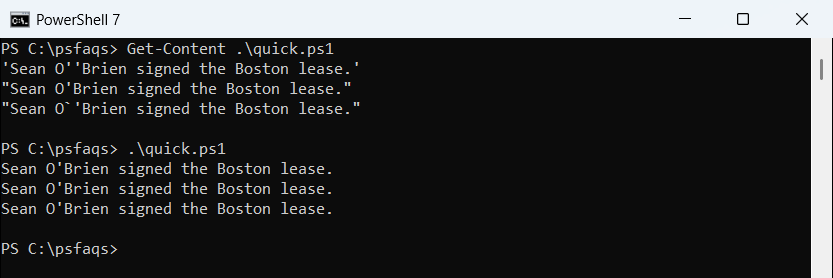
Inside a single-quoted string, you escape a single quote in PowerShell by typing it twice: 'Sean O''Brien'. Or wrap the text in double quotes, where an apostrophe needs no escaping at all:
'Sean O''Brien signed the Boston lease.'
"Sean O'Brien signed the Boston lease."
"Sean O`'Brien signed the Boston lease."
Output:
Sean O'Brien signed the Boston lease.
Sean O'Brien signed the Boston lease.
Sean O'Brien signed the Boston lease.
All three lines print the same name. Which one you pick depends on the bigger rule of PowerShell single vs double quotes: single quotes keep text as typed, and double quotes expand variables.
In this tutorial, I’ll show you how to escape single quotes in PowerShell strings, variables, here-strings, SQL queries, generated code, .exe arguments and cmd /c. I ran every snippet in PowerShell 7.6 and Windows PowerShell 5.1.
What is the difference between single and double quotes in PowerShell?
A single-quoted string is verbatim: PowerShell passes it exactly as typed. A double-quoted string is expandable, so every $variable inside is replaced with its value:
$city = 'Boston'

'Single quotes: Hello from $city'
"Double quotes: Hello from $city"
Output:
Single quotes: Hello from $city
Double quotes: Hello from Boston
Use single quotes for fixed text and double quotes when a value must go inside. For other ways to combine a string and a variable, the + operator and -f work too.
That one rule also decides how you escape quotes. Inside single quotes, nothing is special except the single quote itself.
How do you escape a single quote in PowerShell?
You have three options, and the first example showed all of them:
- Double it:
''inside a single-quoted string becomes one apostrophe. This is the method Microsoft documents. - Switch to double quotes:
"O'Brien"needs no escaping, but variables and $ now expand. - Backtick in double quotes:
"O`'Brien"works, though the backtick isn’t needed there.
I default to doubling when the text has a $ sign or no variables, and to double quotes when it needs a value from a variable.
Why a backtick doesn’t work inside single quotes
Several tutorials show 'O`'Brien'. That fails, because a backtick is a plain character inside single quotes. I asked the PowerShell parser to read it:
$errors = $null
$code = "'Sean