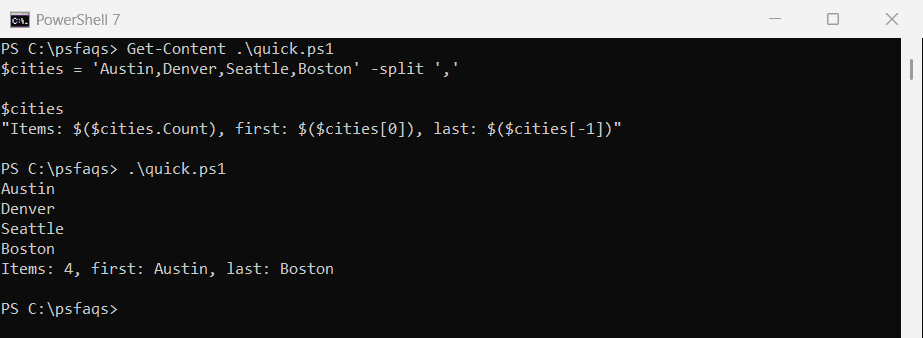
One of my clients recently required me to split strings into smaller substrings, so I suggested using PowerShell. This tutorial will explore various methods to split strings in PowerShell with examples.
To split a string in PowerShell, you can use the -split operator or the .Split() method from the .NET String class. The -split operator is straightforward and supports regular expressions for complex splits, e.g., $string -split “\s+” splits on whitespace. The .Split() method allows for multiple delimiters and limits on the number of substrings, e.g., $string.Split(“,”, 2) splits on commas and returns only two substrings.
There are multiple methods to split a string in PowerShell.
Split a String using The Split Operator in PowerShell
First, let us see how to split a string in PowerShell by using the -split operator. This operator splits a string into an array of substrings based on a delimiter.
Here is a basic example. Suppose we have a string containing a list of names separated by commas like this:
$string = "John Doe,Jane Smith,Michael Johnson"
$names = $string -split ","In this example, the string $string is split into an array $names using the comma , as the delimiter. The resulting array will contain the following elements:
- John Doe
- Jane Smith
- Michael Johnson
You can see the output in the screenshot below after I executed the PowerShell script using VS code.

Examples Of Split Operator
Now, let me show you a few examples of how to use the split operator to split string in PowerShell.
1. Splitting on Multiple Characters
You can also split a string based on multiple characters. For example, if the names are separated by a comma and a space, you can use the following syntax:
$string = "John Doe, Jane Smith, Michael Johnson"
$names = $string -split ", "2. Using Regular Expressions
The -split operator supports regular expressions, allowing for more complex splitting rules. For instance, if you want to split a string on any whitespace character, you can use the following:
$string = "John Doe Jane Smith Michael Johnson"
$names = $string -split "\s+"In this case, the regular expression \s+ matches one or more whitespace characters.
3. Split Strings by Delimiter Using PowerShell
The -split operator in PowerShell can be used to split a string into an array based on a delimiter.
Suppose you have a string containing a string of addresses separated by semicolons:
$addresses = "123 Main St; 456 Oak St; 789 Pine St; 101 Maple Ave"To split this string into individual addresses with a semicolon as the delimiter:
$splitAddresses = $addresses -split "; "
$splitAddressesThe output will be:
123 Main St
456 Oak St
789 Pine St
101 Maple Ave4. split string by multiple delimiters in PowerShell
Here’s an example of how to split a string by multiple delimiters using the -split operator in PowerShell.
Suppose you have a string that contains a list of names separated by both commas and semicolons:
$names = "John Doe, Jane Smith; Robert Johnson, Emily Davis; Michael Brown"To split this string by both commas and semicolons using the -split operator, you can use a regular expression pattern that matches either a comma or a semicolon. The pattern [;,] matches any occurrence of a comma or a semicolon.
Here’s how you can do it:
$names = "John Doe, Jane Smith; Robert Johnson, Emily Davis; Michael Brown"
$splitNames = $names -split '[;,]'
$splitNamesRunning the script above using VS code will give you the output in the screenshot below. I executed the above script.

Here:
- The
-splitoperator is used to split the string. - The pattern
[;,]is a regular expression that matches either a comma (,) or a semicolon (;). - The result is an array of strings, each representing a name separated by a comma or a semicolon.
If you want to remove any leading or trailing spaces from the split results, you can use the Trim() method on each element of the array. Here’s how you can do it:
$splitNames = ($names -split '[;,]').ForEach({ $_.Trim() })
$splitNames5. Split a string and keep the delimiter
Here’s an example of how to split a string in PowerShell while keeping the delimiter using a regular expression.
Suppose you have a string that contains a list of names separated by commas and semicolons, and you want to split the string but keep the delimiters in the result:
$names = "John Doe, Jane Smith; Robert Johnson, Emily Davis; Michael Brown"You can use a regular expression with a positive lookahead assertion to achieve this. The pattern (?=[;,]) will match any position that is followed by a comma or a semicolon without consuming the delimiter.
Here’s how you can do it:
$names = "John Doe, Jane Smith; Robert Johnson, Emily Davis; Michael Brown"
$splitNames = $names -split '(?=[;,])'
$splitNamesThe output will be:
John Doe
, Jane Smith
; Robert Johnson
, Emily Davis
; Michael Brown- The
-splitoperator is used to split the string. - The pattern
(?=[;,])is a regular expression that uses a positive lookahead assertion. It matches any position in the string that is immediately followed by a comma (,) or a semicolon (;), but does not consume these characters. - The result is an array of strings where the delimiters are kept at the beginning of the subsequent substrings
If you want to remove any leading spaces from the split results while keeping the delimiters, you can use the TrimStart() method on each element of the array. Here’s how you can do it:
$names = "John Doe, Jane Smith; Robert Johnson, Emily Davis; Michael Brown"
$splitNames = ($names -split '(?=[;,])').ForEach({ $_.TrimStart() })
$splitNamesThe output will be:
John Doe
,Jane Smith
;Robert Johnson
,Emily Davis
;Michael BrownThe above code ensures that the delimiters are kept and any leading spaces are removed from the split results.
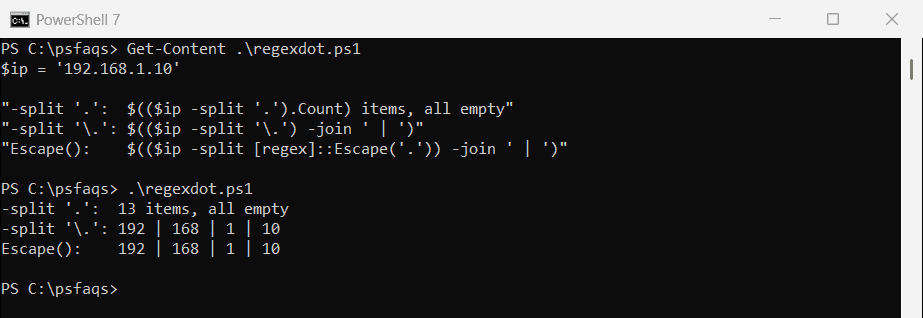
6. Split a String by dot in PowerShell
Here’s an example of splitting a string by a dot (.) delimiter in PowerShell.
Suppose you have a string that represents a version number or a domain name, and you want to split it by the dot (.) delimiter:
$version = "10.0.19041.685"To split this string into its individual components using the dot as the delimiter, you can use the -split operator:
$splitVersion = $version -split '\.'
$splitVersionThe output will be:
10
0
19041
685Here:
- The
-splitoperator is used to split the string. - The pattern
\.is a regular expression where\is an escape character, and.is the dot character. This ensures that the split occurs specifically at the dot characters. - The result is an array of strings, each representing a part of the version number.
Here is another example: Consider a string representing a domain name:
$domain = "www.example.com"To split this domain name into its individual components:
$splitDomain = $domain -split '\.'
$splitDomainSplit a String using The Split() Method in PowerShell
PowerShell also provides the .Split() method from the .NET String class, which we can use to split a string.
Here is a simple example of how to use PowerShell’s .split() method to split a string.
$string = "John Doe,Jane Smith,Michael Johnson"
$names = $string.Split(",")
$namesThe screenshot below shows the output; it is the same as the above method.

Examples Of Split() Method
Let me show you a few examples of splitting a string in PowerShell using the Split() method.
1. Split on Multiple Delimiters
The .Split() method allows you to specify an array of delimiters. For example, if you want to split a string into both commas and spaces, you can do the following:
$string = "John Doe, Jane Smith, Michael Johnson"
$delimiters = @(",", " ")
$names = $string.Split($delimiters, [System.StringSplitOptions]::RemoveEmptyEntries)2. Limit the Number of Substrings
You can also limit the number of substrings returned by the .Split() method. For example, if you only want the first two substrings:
$string = "John Doe, Jane Smith, Michael Johnson"
$names = $string.Split(",", 2)In this case, the resulting array will contain:
- John Doe
- Jane Smith, Michael Johnson
Conclusion
In this PowerShell tutorial, I have explained how to split a string in PowerShell using the—split operator and the .Split() method.
We also covered various examples of splitting a string in PowerShell.
You may like the following tutorials;
- Split an Array into Smaller Arrays in PowerShell
- Split Path Into Array In PowerShell
- Concatenate Strings in PowerShell
- Check if a File Contains a String in PowerShell
- Split String by Tab Character in PowerShell
- How to Split a String and Get the First and Last Element in PowerShell?
- How to Split Strings by Newlines in PowerShell?
- PowerShell Split String by Comma
- How to Split String by Space in PowerShell
- How to Split a String and Get the Second Element in PowerShell?
- How to Split a String by Semicolon in PowerShell
Bijay Kumar is an esteemed author and the mind behind PowerShellFAQs.com, where he shares his extensive knowledge and expertise in PowerShell, with a particular focus on SharePoint projects. Recognized for his contributions to the tech community, Bijay has been honored with the prestigious Microsoft MVP award. With over 15 years of experience in the software industry, he has a rich professional background, having worked with industry giants such as HP and TCS. His insights and guidance have made him a respected figure in the world of software development and administration. Read more.