
PowerShell has no built-in chunk cmdlet, so to split an array into smaller arrays you step through it with a for loop and slice each piece with a range. The comma keeps every chunk as its own array:
for ($i = 0; $i -lt $users.Count; $i += 4) { , $users[$i..($i + 3)] }I’ll also wrap it in a function, show the one-chunk trap, and cover LINQ Chunk, a set number of parts and splitting by a condition.
Split an array into chunks with a for loop
Say an API accepts four user names per request and you have ten. The PowerShell for loop jumps four positions at a time, and the range $i..($i + 3) grabs one batch:
$users = 'mlopez', 'tbaker', 'dreyes', 'jkim', 'apatel',
         'swright', 'cnguyen', 'bfoster', 'kmiller', 'rhayes'
$size = 4
$batches = for ($i = 0; $i -lt $users.Count; $i += $size) {
    , $users[$i..($i + $size - 1)]
}
"Batches: $($batches.Count)"
for ($b = 0; $b -lt $batches.Count; $b++) {
    'Batch {0}: {1}' -f ($b + 1), ($batches[$b] -join ', ')
}
Output:
Batches: 3
Batch 1: mlopez, tbaker, dreyes, jkim
Batch 2: apatel, swright, cnguyen, bfoster
Batch 3: kmiller, rhayes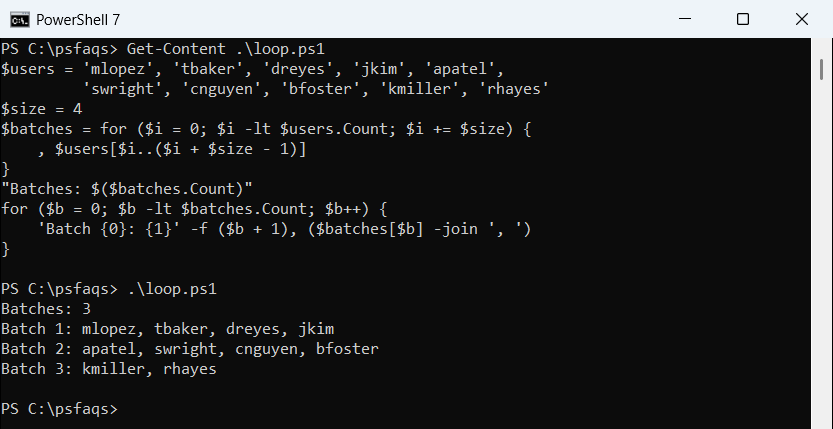
The last batch has only two names. A range past the end of the array returns only the items that exist, with no error, in both versions.
Why does each chunk need a leading comma?
PowerShell unrolls arrays that a loop or function outputs. Without the unary comma, the chunks melt back into one flat list:
$users = 'mlopez', 'tbaker', 'dreyes', 'jkim', 'apatel',
         'swright', 'cnguyen', 'bfoster', 'kmiller', 'rhayes'
$size = 4
$flat = for ($i = 0; $i -lt $users.Count; $i += $size) { $users[$i..($i + $size - 1)] }
$kept = for ($i = 0; $i -lt $users.Count; $i += $size) { , $users[$i..($i + $size - 1)] }
"Without the comma: $($flat.Count) items"
"With the comma:    $($kept.Count) arrays"
Output:
Without the comma: 10 items
With the comma:    3 arrays
The comma wraps each slice in a one-item array, so the pipeline unrolls the wrapper instead of your chunk. It’s the same rule behind how PowerShell functions return values.
Create a reusable Split-Array function
Put the loop in a function to reuse it with any array and size. Watch what happens with one chunk:
function Split-Array {
    param([object[]]$InputArray, [int]$Size)
    for ($i = 0; $i -lt $InputArray.Count; $i += $Size) {
        , $InputArray[$i..($i + $Size - 1)]
    }
}
$users = 'mlopez', 'tbaker', 'dreyes', 'jkim', 'apatel',
         'swright', 'cnguyen', 'bfoster', 'kmiller', 'rhayes'

$chunks = Split-Array -InputArray $users -Size 3
"Size 3:  $($chunks.Count) chunks, last one has $($chunks[-1].Count) item"

$one = Split-Array -InputArray $users -Size 20
"Size 20: Count = $($one.Count)"

$one = @(Split-Array -InputArray $users -Size 20)
"Size 20 with @(): Count = $($one.Count)"
Output:
Size 3:  4 chunks, last one has 1 item
Size 20: Count = 10
Size 20 with @(): Count = 1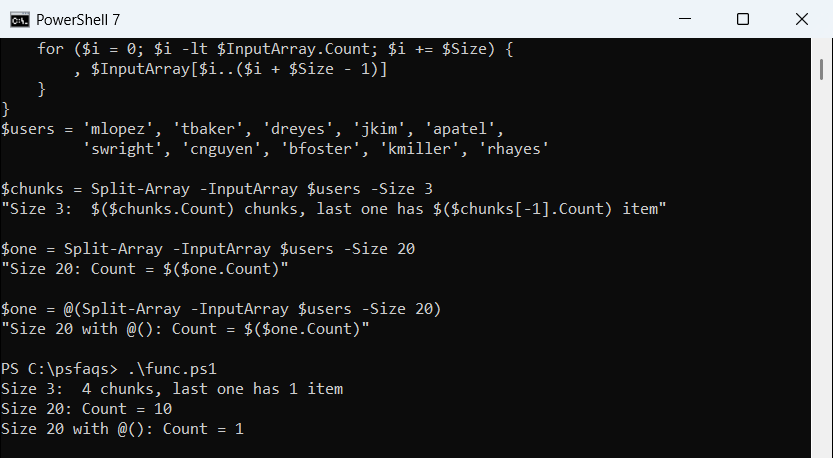
With size 20 there’s only one chunk, and the assignment unrolls it into 10 names. Wrapping the call in @() always gives you an array of chunks. See writing functions in PowerShell for more on parameters.
Use LINQ Chunk in PowerShell 7
PowerShell 7.2 and later run on .NET 6 or newer, which added Enumerable.Chunk. Cast to a typed array so PowerShell picks the right generic method:
$users = 'mlopez', 'tbaker', 'dreyes', 'jkim', 'apatel',
         'swright', 'cnguyen', 'bfoster', 'kmiller', 'rhayes'
try {
    $chunks = [System.Linq.Enumerable]::Chunk([string[]]$users, 4)
    foreach ($c in $chunks) { "$($c.GetType().Name): $($c -join ', ')" }
}
catch { "Failed. $($_.Exception.Message)" }
Output:
String[]: mlopez, tbaker, dreyes, jkim
String[]: apatel, swright, cnguyen, bfoster
String[]: kmiller, rhayes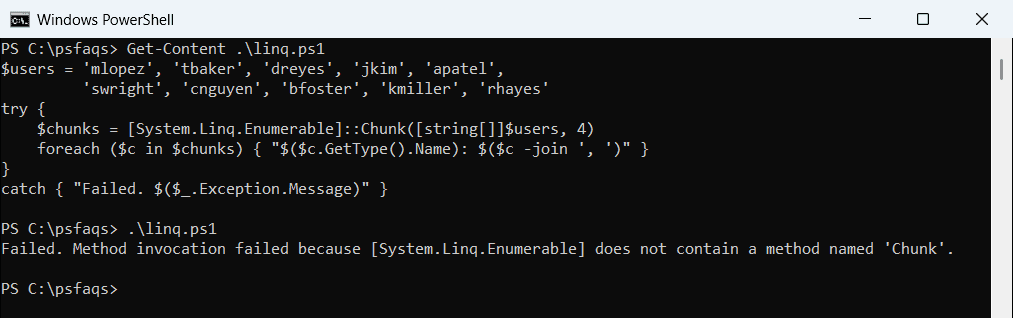
That’s PowerShell 7, where each chunk is a real String[]. Windows PowerShell 5.1 runs on .NET Framework, so the same line printed “Failed. Method invocation failed because [System.Linq.Enumerable] does not contain a method named ‘Chunk’.”
Stick with the for loop for scripts that must run in both.
Split an array into a set number of parts
Sometimes you know how many parts you want, not how big each one is. Divide the array length by the number of parts and round up with [math]::Ceiling:
$users = 'mlopez', 'tbaker', 'dreyes', 'jkim', 'apatel',
         'swright', 'cnguyen', 'bfoster', 'kmiller', 'rhayes'
$parts = 3
$size  = [math]::Ceiling($users.Count / $parts)
"Chunk size: $size"
for ($i = 0; $i -lt $users.Count; $i += $size) {
    $users[$i..($i + $size - 1)] -join ', '
}
Output:
Chunk size: 4
mlopez, tbaker, dreyes, jkim
apatel, swright, cnguyen, bfoster
kmiller, rhayes
Rounding up means you never get a fourth, leftover part.
How do I split an array into two arrays by a condition?
If you want to split by value instead of size, use the Where() method with the Split mode. It returns the matching items first and the rest second:
$orders = 120, 45, 310, 80, 999, 15, 260
$large, $small = $orders.Where({ $_ -ge 100 }, 'Split')
"Large: $($large -join ', ')"
"Small: $($small -join ', ')"
Output:
Large: 120, 310, 999, 260
Small: 45, 80, 15
Assigning to $large, $small catches both in one line, faster than running Where-Object twice, on