
To check if a file contains a string in PowerShell, run Select-String with -Quiet. It returns True or False, so it fits straight into an if statement:
$found = Select-String -Path C:\psfaqs\Logs\web01.log -Pattern 'ERROR' -Quiet

if ($found) { 'web01.log contains ERROR' } else { 'No errors in web01.log' }
"-Quiet returned: $found"
Output:
web01.log contains ERROR
-Quiet returned: True
The match ignores case, and the pattern is a regular expression. I ran every example in PowerShell 7.6 and Windows PowerShell 5.1 on a sample Logs folder, with the same results.
Check many files and list the ones that match
With a wildcard path, -Quiet still returns a single True if any file matches. To see which files contain the string, use -List, which stops at the first match in each file:
"Any .log file has ERROR: $(Select-String -Path C:\psfaqs\Logs\*.log -Pattern 'ERROR' -Quiet)"

'Files that contain ERROR:'
Select-String -Path C:\psfaqs\Logs\*.log -Pattern 'ERROR' -List | ForEach-Object { "  $($_.Filename) (line $($_.LineNumber))" }
Output:
Any .log file has ERROR: True
Files that contain ERROR:
  sql01.log (line 2)
  web01.log (line 2)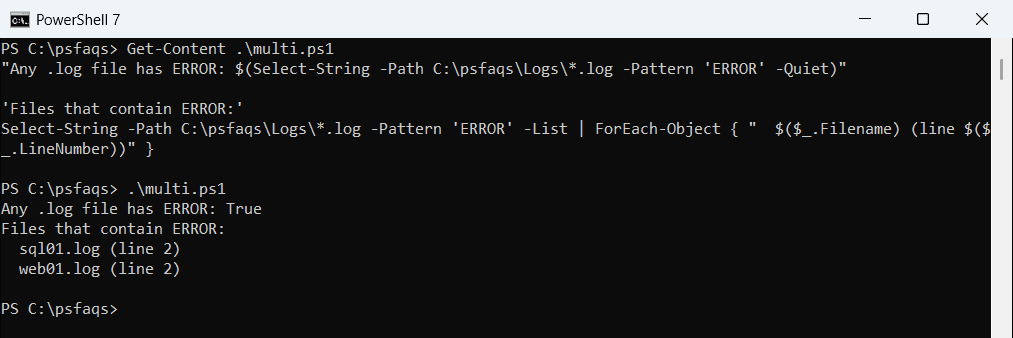
sql01.log matched because its line says “error” in lowercase. Add -CaseSensitive when case matters.
Find files that don’t contain a string
-NotMatch sounds like the answer, but it returns every line that doesn’t match, from every file. Test each file with -Quiet instead:
'Files without ERROR:'
Get-ChildItem -Path C:\psfaqs\Logs\*.log |
    Where-Object { -not (Select-String -Path $_.FullName -Pattern 'ERROR' -Quiet) } |
    ForEach-Object { "  $($_.Name)" }

"-NotMatch returned $((Select-String -Path C:\psfaqs\Logs\*.log -Pattern 'ERROR' -NotMatch).Count) lines, not file names"
Output:
Files without ERROR:
  web02.log
-NotMatch returned 5 lines, not file names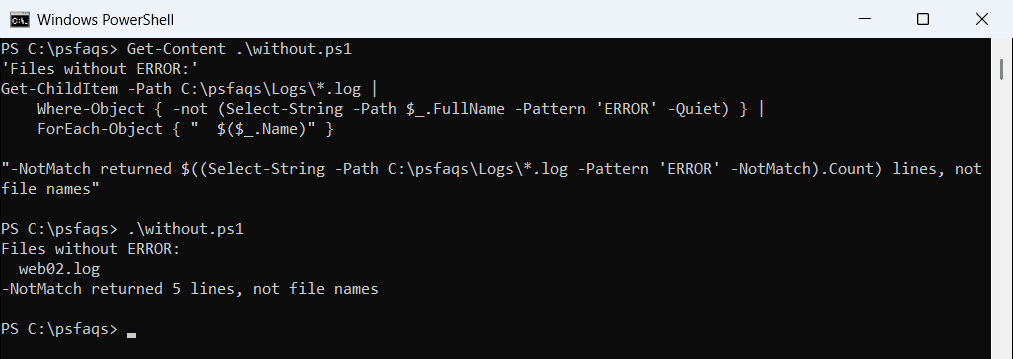
This is handy for checks like “which servers didn’t log a successful backup today”.
-contains doesn’t search inside lines
A common mistake is (Get-Content file) -contains 'ERROR'. Get-Content returns lines, and -contains only matches a whole line. Read the file as one string and use -match or -like instead:
$lines = Get-Content -Path C:\psfaqs\Logs\web01.log
$text  = Get-Content -Path C:\psfaqs\Logs\web01.log -Raw

"-contains on lines:   $($lines -contains 'ERROR')"
"-match on the text:   $($text -match 'ERROR')"
"-like on the text:    $($text -like '*ERROR*')"
Output:
-contains on lines:   False
-match on the text:   True
-like on the text:    True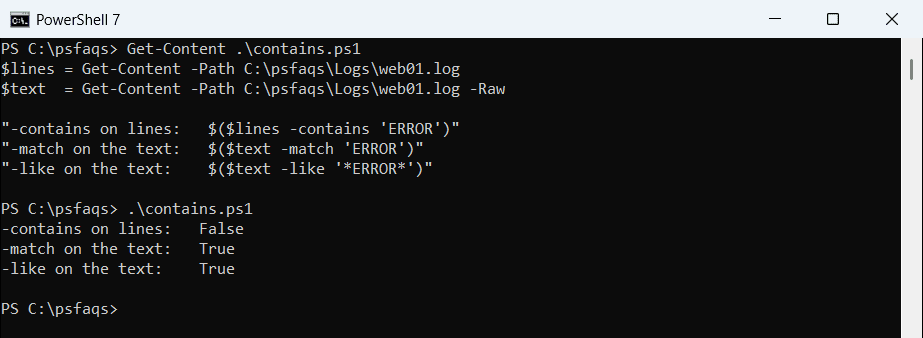
Case-sensitive checks
.Contains() is case-sensitive, while -match and Select-String aren’t. sql01.log only has “error” in lowercase:
$text = Get-Content -Path C:\psfaqs\Logs\sql01.log -Raw

".Contains('ERROR'):        $($text.Contains('ERROR'))"
"-match 'ERROR':            $($text -match 'ERROR')"
"Select-String -CaseSensitive: $(Select-String -Path C:\psfaqs\Logs\sql01.log -Pattern 'ERROR' -CaseSensitive -Quiet)"
Output:
.Contains('ERROR'):        False
-match 'ERROR':            True
Select-String -CaseSensitive: False
Pick the one that matches your intent, and say so in a comment, since the difference isn’t obvious to the next reader.
Check for several strings
Several values in -Pattern mean OR, so a file matches if it has any of them. For AND, check each string separately:
'Files with ERROR or WARN:'
(Select-String -Path C:\psfaqs\Logs\*.log -Pattern 'ERROR', 'WARN' -List).Filename

'Files with both INFO and ERROR:'
Get-ChildItem -Path C:\psfaqs\Logs\*.log | Where-Object {
    (Select-String -Path $_.FullName -Pattern 'INFO' -Quiet) -and (Select-String -Path $_.FullName -Pattern 'ERROR' -Quiet)
} | ForEach-Object Name
Output:
Files with ERROR or WARN:
sql01.log
web01.log
Files with both INFO and ERROR:
web01.log
Search subfolders
Select-String doesn’t recurse on its own. Pipe Get-ChildItem -Recurse into it:
Get-ChildItem -Path C:\psfaqs\Logs -Filter *.log -Recurse |
    Select-String -Pattern 'ERROR' -CaseSensitive -List |
    ForEach-Object { '{0}: {1}' -f $_.Path.Replace('C:\psfaqs\Logs\', ''), $_.Line }
Output:
web01.log: 09:20 ERROR Disk D is full
Archive\web01-aug.log: 08:44 ERROR Certificate expired
To see every matching line with line numbers and context, see finding a string in a file and returning the line. Special characters like [ and \ need -SimpleMatch, which that guide also covers.
The Select-String documentation lists the other switches, like -Encoding and -Context.
Frequently Asked Questions
How do I check if a file contains a string in PowerShell?
Run Select-String -Path file.txt -Pattern 'text' -Quiet. It returns True or False.
How do I find which files contain a string?
Use -List: Select-String -Path C:\Logs\*.log -Pattern 'ERROR' -List | Select-Object Filename.
How do I find files that don’t contain a string?
Filter files where -Quiet is False: Get-ChildItem *.log | Where-Object { -not (Select-Strin