
To remove duplicates from an array in PowerShell, pipe it to Select-Object -Unique. It keeps the first copy of each value, in the original order:
$cities = 'Austin', 'Denver', 'austin', 'Miami', 'Denver'

($cities | Select-Object -Unique) -join ', '
Output:
Austin, Denver, austin, MiamiNotice that Austin and austin both stayed. Select-Object -Unique is case-sensitive, and each method treats case and order differently. I ran every example in PowerShell 7.6 and Windows PowerShell 5.1.
Select-Object, Sort-Object and Get-Unique compared
The three built-in ways to get unique values give three different answers on the same list:
$cities = 'Austin', 'Denver', 'austin', 'Miami', 'Denver'

"Select-Object -Unique: $(($cities | Select-Object -Unique) -join ', ')"
"Sort-Object -Unique:   $(($cities | Sort-Object -Unique) -join ', ')"
"Get-Unique (unsorted): $(($cities | Get-Unique) -join ', ')"
Output in PowerShell 7:
Select-Object -Unique: Austin, Denver, austin, Miami
Sort-Object -Unique:   Austin, Denver, Miami
Get-Unique (unsorted): Austin, Denver, austin, Miami, Denver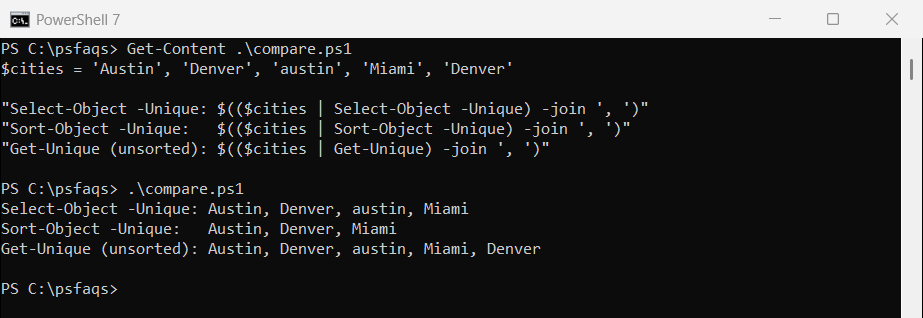
Output in Windows PowerShell 5.1:
Select-Object -Unique: Austin, Denver, austin, Miami
Sort-Object -Unique:   austin, Denver, Miami
Get-Unique (unsorted): Austin, Denver, austin, Miami, Denver
Sort-Object -Unique ignores case but sorts the list, and each version keeps a different spelling. Get-Unique only compares neighbors, so it needs sorted input, as the Get-Unique documentation notes.
Remove duplicates, ignore case and keep the order
For most lists of names, you want “austin” and “Austin” treated as one and the original order kept. An ordered hashtable does both, in either version:
$cities = 'Austin', 'Denver', 'austin', 'Miami', 'Denver'

$seen = [ordered]@{}
foreach ($city in $cities) {
    if (-not $seen.Contains($city)) { $seen[$city] = $true }
}
$seen.Keys -join ', '
Output:
Austin, Denver, MiamiHashtable keys ignore case, so the first spelling wins. Hashtables and dictionaries explains how keys work.
PowerShell 7: -CaseInsensitive
PowerShell 7 added -CaseInsensitive to Select-Object, which gives the same result in one line. Windows PowerShell 5.1 doesn’t have it:
$cities = 'Austin', 'Denver', 'austin', 'Miami', 'Denver'

($cities | Select-Object -Unique -CaseInsensitive) -join ', '
Output in PowerShell 7:
Austin, Denver, MiamiHashSet for large lists
A .NET HashSet keeps only unique values and is very fast. Pass a comparer to ignore case:
$cities = 'Austin', 'Denver', 'austin', 'Miami', 'Denver'

$exact  = [System.Collections.Generic.HashSet[string]]::new([string[]]$cities)
$ignore = [System.Collections.Generic.HashSet[string]]::new([string[]]$cities, [StringComparer]::OrdinalIgnoreCase)

"HashSet:                   $($exact -join ', ')"
"HashSet, OrdinalIgnoreCase: $($ignore -join ', ')"
Output:
HashSet:                   Austin, Denver, austin, Miami
HashSet, OrdinalIgnoreCase: Austin, Denver, Miami
For 30,000 numbers it was far faster than Select-Object -Unique:
$ids = 1..30000 | ForEach-Object { $_ % 5000 }

$t1 = Measure-Command { $null = $ids | Select-Object -Unique }
$t2 = Measure-Command { $null = [System.Collections.Generic.HashSet[int]]::new([int[]]$ids) }
"HashSet was more than 10 times faster: $($t1.TotalMilliseconds / $t2.TotalMilliseconds -gt 10)"
Output:
HashSet was more than 10 times faster: TrueMicrosoft’s HashSet reference covers union and intersection too.
Remove duplicate objects
With objects, plain Select-Object -Unique is unreliable. Here it collapsed three orders, two of them different, into one:
$orders = @(
    [pscustomobject]@{ Id = 1001; State = 'TX' }
    [pscustomobject]@{ Id = 1001; State = 'TX' }
    [pscustomobject]@{ Id = 1002; State = 'CO' }
)

"Select-Object -Unique:               $(@($orders | Select-Object -Unique).Count) object(s)"
"Select-Object -Property ... -Unique: $(@($orders | Select-Object -Property Id, State -Unique).Count) object(s)"
"Sort-Object -Property Id -Unique:    $(@($orders | Sort-Object -Property Id -Unique).Count) object(s)"
Output:
Select-Object -Unique:               1 object(s)
Select-Object -Property ... -Unique: 2 object(s)
Sort-Object -Property Id -Unique:    2 object(s)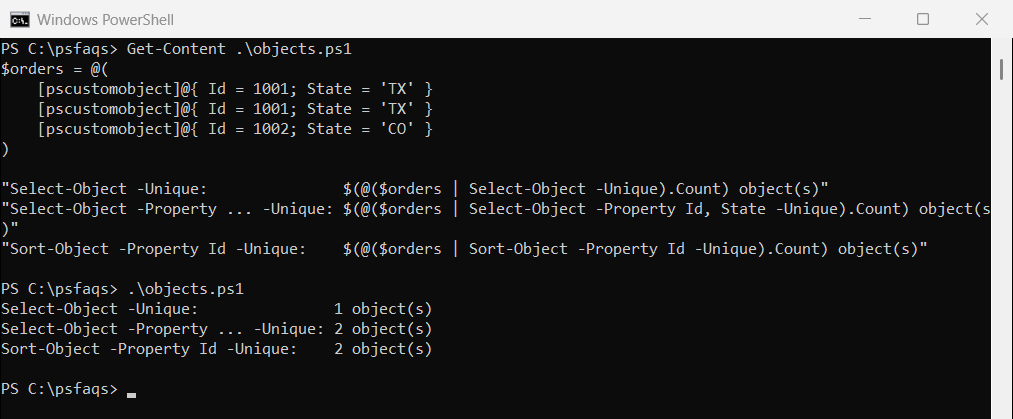
Always name the properties that define a duplicate, with Select-Object -Property … -Unique or Sort-Object -Property … -Unique. The Select-Object documentation describes -Unique.
Find the duplicate values
To see which values repeat instead of removing them, group the list and keep groups with more than one item:
$cities = 'Austin', 'Denver', 'austin', 'Miami', 'Denver'

'Values that appear more than once:'
$cities | Group-Object | Where-Object Count -gt 1 |
    ForEach-Object { '  {0} ({1} times: {2})' -f $_.Name, $_.Count, ($_.Group -join ', ') }
Output:
Values that appear more than once:
  Austin (2 times: Austin, austin)
  Denver (2 times: Denver, Denver)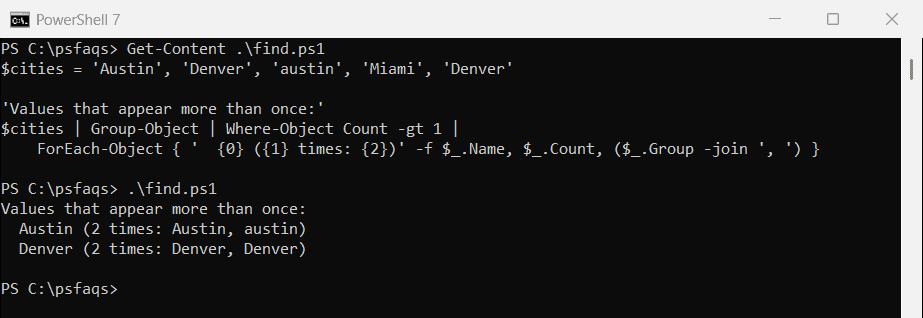
Group-Object ignores case, so both spellings of Austin landed in one group. Sorting an array covers the related -Unique switch on Sort-Object.
Frequently Asked Questions
How do I remove duplicates from an array in PowerShell?
Use $array | Select-Object -Unique. It keeps t