
“Access to the path is denied” in PowerShell means Windows refused the file operation, usually because of a read-only file, a lock held by another program, an NTFS deny rule or a folder path used as a file. For read-only files, -Force fixes it:
Remove-Item -Path .\budget-2026.xlsx -ForceThe trick is figuring out which cause you’ve hit, because each one needs a different fix. I reproduced every case below on test files in PowerShell 7 and Windows PowerShell 5.1, and the two versions don’t always word the error the same way.
Why does PowerShell say access to the path is denied?
Start by catching the error and reading its ID. Here a plain Remove-Item call hits a read-only spreadsheet:
$file = 'C:\psfaqs\t\rw_access_denied\budget-2026.xlsx'
"Read-only: $((Get-Item $file).IsReadOnly)"

try {
    Remove-Item -Path $file -ErrorAction Stop
}
catch {
    "Failed. $($_.Exception.Message)"
    "Error ID: $($_.FullyQualifiedErrorId)"
}
Output:
Read-only: True
Failed. You do not have sufficient access rights to perform this operation or the item is hidden, system, or read only.
Error ID: RemoveFileSystemItemUnAuthorizedAccess,Microsoft.PowerShell.Commands.RemoveItemCommand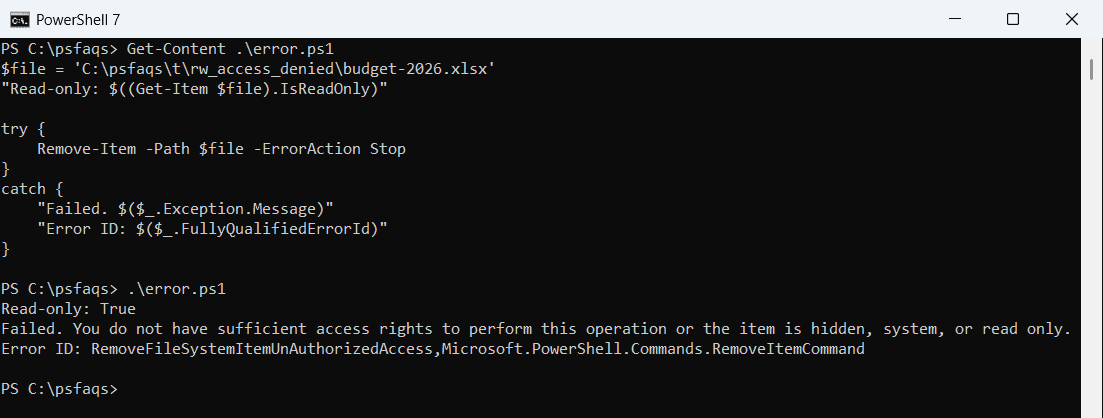
PowerShell 7 adds “or the item is hidden, system, or read only” to the message. Windows PowerShell 5.1 stops after “perform this operation”, so the hint is easy to miss there.
The error ID is the same in both, and it’s the part worth logging. A UnAuthorizedAccess ID on Remove-Item usually points at attributes, while a deny rule or a lock produces a different message, as you’ll see below.
Delete read-only and hidden files with -Force
Without -Force, Remove-Item won’t delete read-only or hidden files. Add the switch and the same file goes away:
$file = 'C:\psfaqs\t\rw_access_denied\budget-2026.xlsx'
Remove-Item -Path $file -Force
"Still there: $(Test-Path $file)"
Output:
Still there: FalseFor a whole folder, I’d rather see what’s flagged before deleting it. This finds read-only and hidden files, clears the attributes, then removes the folder:
$folder = 'C:\psfaqs\t\rw_access_denied\Archive'
$stuck = Get-ChildItem $folder -Recurse -Force -File |
    Where-Object { $_.Attributes -match 'ReadOnly|Hidden' }
"Read-only or hidden: $($stuck.Name -join ', ')"

$stuck | ForEach-Object { $_.Attributes = 'Normal' }
Remove-Item -Path $folder -Recurse
"Folder removed: $(-not (Test-Path $folder))"
Output:
Read-only or hidden: b.txt, invoices.csv
Folder removed: True
Get-ChildItem needs -Force to see the hidden file at all. That’s also how you list hidden files in PowerShell when you’re auditing a folder.
One thing -Force can’t do is override permissions. Microsoft’s docs say it plainly, and the deny-rule test further down proves it.
Writing to a folder path instead of a file
This one confuses a lot of people because the folder exists and you have full rights to it. Out-File, Export-Csv and Set-Content need a file name, and pointing them at the folder itself fails:
$folder = 'C:\psfaqs\t\rw_access_denied\Reports'

try { 'Q3 totals' | Out-File -FilePath $folder -ErrorAction Stop }
catch { "Out-File    -> $($_.Exception.Message)" }

try { Set-Content -Path $folder -Value 'Q3 totals' -ErrorAction Stop }
catch { "Set-Content -> $($_.Exception.Message)" }

$target = Join-Path $folder 'q3-totals.txt'
'Q3 totals' | Out-File -FilePath $target
"Saved: $(Test-Path $target)"
Output:
Out-File    -> Access to the path 'C:\psfaqs\t\rw_access_denied\Reports' is denied.
Set-Content -> Unable to clear content of 'C:\psfaqs\t\rw_access_denied\Reports' because it is a directory. Clear-Content is only supported on files.
Saved: True
In Windows PowerShell 5.1, both cmdlets report the same misleading error:
Out-File    -> Access to the path 'C:\psfaqs\t\rw_access_denied\Reports' is denied.
Set-Content -> Access to the path 'C:\psfaqs\t\rw_access_denied\Reports' is denied.
Saved: True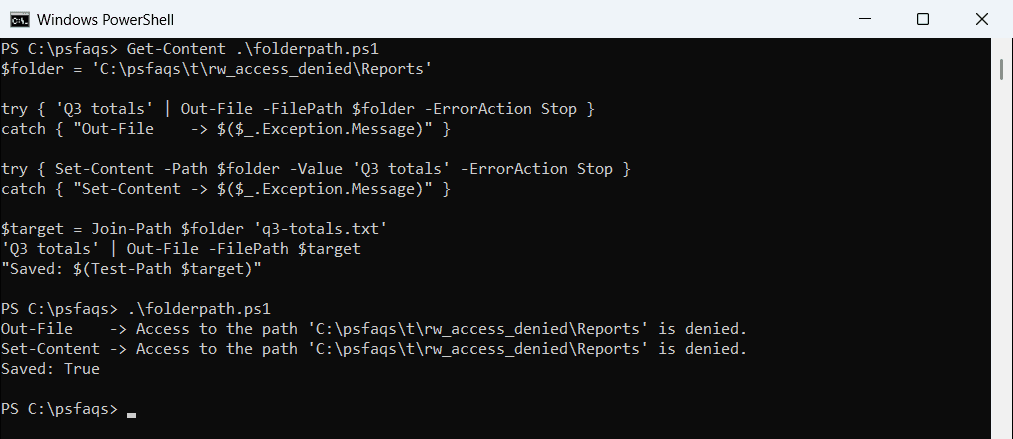
PowerShell 7 is kinder to Set-Content and says the path is a directory. Out-File still says access denied in both, so check the path first whenever you write output with Out-File.
Join-Path is the fix: build the full file path from the folder and a name. The same rule applies when you export data with Export-Csv.
Is the file locked by another process?
A file that’s open in Excel, a log writer or a service can’t be deleted. To simulate that, I opened the file with no sharing allowed, then tried to remove it:
$file   = 'C:\psfaqs\t\rw_access_denied\q3-sales.csv'
$stream = [System.IO.File]::Open($file, 'Open', 'Read', 'None')   # another program holding it

try { Remove-Item -Path $file -ErrorAction Stop }
catch { "Failed. $($_.Exception.Message)" }

$stream.Close()                                                  # the program lets go
Remove-Item -Path $file
"Deleted after the lock: $(-not (Test-Path $file))"
Output:
Failed. The process cannot access the file 'C:\psfaqs\t\rw_access_denied\q3-sales.csv' because it is being used by another process.
Deleted after the lock: True
This message is clearer: it names the lock, not the permissions. Close the program, or stop the service that owns the file, then delete it.
When you don’t know who’s holding it, find the process locking the file first. For a service, restart the Windows service after the cleanup.
Fix NTFS permissions with icacls
If an access control entry denies you Delete, nothing above helps, not even -Force. I added a deny rule for my own account on a test PDF, then removed it with icacls /remove:d:
$file = 'C:\psfaqs\t\rw_access_denied\Payroll\w2-2026.pdf'
(icacls $file) -match 'DENY'

try { Remove-Item -Path $file -Force -ErrorAction Stop }
catch { "Failed. $($_.Exception.Message)" }

icacls $file /remove:d $env:USERNAME /q | Out-Null
Remove-Item -Path $file
"Deleted after removing the deny rule: $(-not (Test-Path $file))"