
To join arrays in PowerShell, use the plus operator. It returns a new array with every item from the first array followed by every item from the second:
$all = $west + $eastIf you want one string instead of one array, use $all -join ', '. I’ll cover both below, plus the traps I hit when one side holds a single value.
Join two arrays with the + operator
Here are two small arrays of cities joined into one:
$west = 'Seattle', 'Denver'
$east = 'Boston', 'Miami'

$all = $west + $east
$all
"Count: $($all.Count)"
Output:
Seattle
Denver
Boston
Miami
Count: 4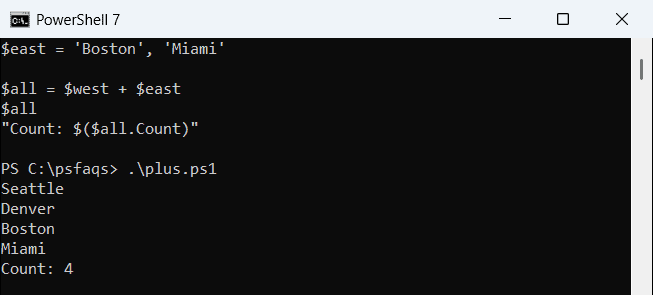
The original arrays don’t change. If you started from an empty array, the result simply holds the other array’s items.
For three or more arrays, chain the operator or wrap them in @() with semicolons:
$west = 'Seattle', 'Denver'
$east = 'Boston', 'Miami'

$south = 'Austin', 'Dallas'
$all = @($west; $east; $south)
"Count: $($all.Count)"
Output:
Count: 6Why does adding a single value to an array return a string?
The left side decides what + does. When it’s a string, PowerShell concatenates text instead of building an array:
$east = 'Boston', 'Miami'
$hq = 'Austin'
$bad = $hq + $east
"Bad:  $bad ($($bad.GetType().Name))"
$good = @($hq) + $east
"Good: $($good.Count) items"
Output:
Bad:  AustinBoston Miami (String)
Good: 3 items
Wrapping the first value in @() forces an array. I do this whenever a variable might hold one item, such as a filtered command result.
The comma operator is the other trap. It nests the two arrays instead of flattening them:
$west = 'Seattle', 'Denver'
$east = 'Boston', 'Miami'

$nested = $west, $east
"Comma: $($nested.Count) items"
"Plus:  $(($west + $east).Count) items"
Output:
Comma: 2 items
Plus:  4 items
You end up with two items, each one an array. That’s a jagged array, which the multidimensional arrays guide explains.
Merge arrays without duplicates
Pipe the joined array to Select-Object -Unique or Sort-Object -Unique. They don’t agree on letter case:
$a = 'Austin', 'denver'
$b = 'austin', 'Denver', 'Boston'
($a + $b | Select-Object -Unique) -join ', '
($a + $b | Sort-Object -Unique) -join ', '
Output:
Austin, denver, austin, Denver, Boston
Austin, Boston, denver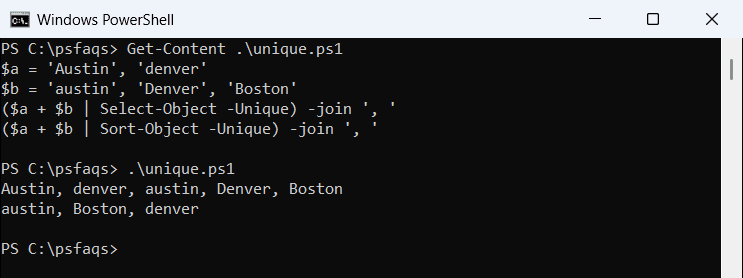
Select-Object -Unique is case-sensitive, so Austin and austin both stay. Sort-Object -Unique ignores case but sorts the result. In PowerShell 7 it kept “Austin”; Windows PowerShell 5.1 kept “austin”.
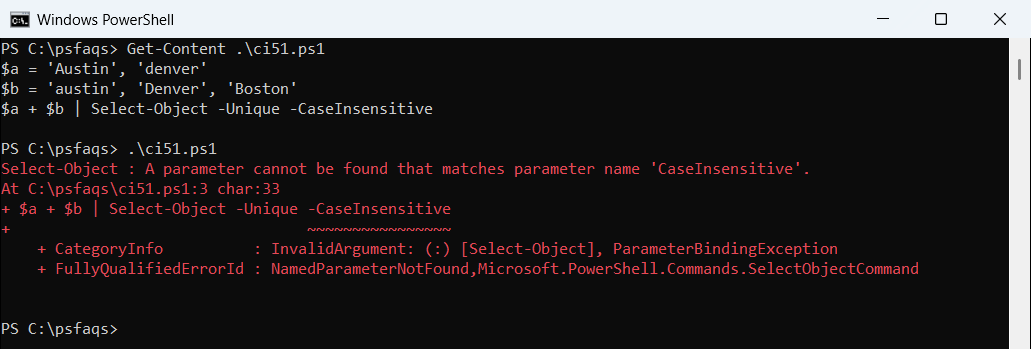
PowerShell 7.4 added -CaseInsensitive, which keeps the original order:
$a = 'Austin', 'denver'
$b = 'austin', 'Denver', 'Boston'
$a + $b | Select-Object -Unique -CaseInsensitive
Output:
Austin
denver
Boston
Windows PowerShell 5.1 stops with “A parameter cannot be found that matches parameter name ‘CaseInsensitive'”:
More ways to remove duplicates from an array are in that guide.
Append arrays in a loop: += vs a List
$all += $more works, but each += copies the whole array into a new one. In a long loop, a generic List with AddRange is much faster:
$all = [System.Collections.Generic.List[string]]::new()
foreach ($file in 'jan', 'feb', 'mar') {
    $all.AddRange([string[]]@("$file-1", "$file-2"))
}
"Count: $($all.Count)"
Output:
Count: 6The array vs ArrayList comparison shows timings, and the append to array guide covers adding single items.
How do I join array elements into a string?
The -join operator and the .NET Join method both take a separator:
$west = 'Seattle', 'Denver'
$east = 'Boston', 'Miami'

$all = $west + $east
$all -join ', '
[string]::Join(' | ', $all)
Output:
Seattle, Denver, Boston, Miami
Seattle | Denver | Boston | Miami
PowerShell 7 also has Join-String, which can quote each item:
$west = 'Seattle', 'Denver'
$east = 'Boston', 'Miami'

$west + $east | Join-String -Separator ', ' -SingleQuote
Output:
'Seattle', 'Denver', 'Boston', 'Miami'Join-String arrived in PowerShell 6.2, not 7, and Windows PowerShell 5.1 reports it isn’t recognized. For scripts that run on both, stick with -join. The guide to converting an array to a string covers newlines and object properties.
Pair two arrays element by element
Sometimes “join” means matching items by position. A for loop over the indexes does it:
$names = 'Maria Lopez', 'Tom Baker'
$cities = 'Austin', 'Denver'
for ($i = 0; $i -lt $names.Count; $i++) {
    "$($names[$i]) - $($cities[$i])"
}
Output:
Maria Lopez - Austin
Tom Baker - Denver
Check that both arrays have the same array length first, or the extra items come out blank.
Frequently Asked Questions
How do I combine two arrays in PowerShell?
Use the pl