
To convert a SecureString to plain text in PowerShell 7, use ConvertFrom-SecureString with the -AsPlainText switch:
ConvertFrom-SecureString -SecureString $secure -AsPlainTextWindows PowerShell 5.1 doesn’t have that switch, so there you’d use the NetworkCredential trick instead. I tested all of these methods in both versions, with sample passwords only.
Convert a SecureString with ConvertFrom-SecureString -AsPlainText
Printing a SecureString only shows its type name. Passing it to ConvertFrom-SecureString -AsPlainText gives you the actual text back:
$secure = ConvertTo-SecureString -String 'Austin#2026!' -AsPlainText -Force

"Secure string: $secure"
try {
    $plain = ConvertFrom-SecureString -SecureString $secure -AsPlainText -ErrorAction Stop
    "Plain text:    $plain"
}
catch {
    "Failed. $($_.Exception.Message)"
}
Output:
Secure string: System.Security.SecureString
Plain text:    Austin#2026!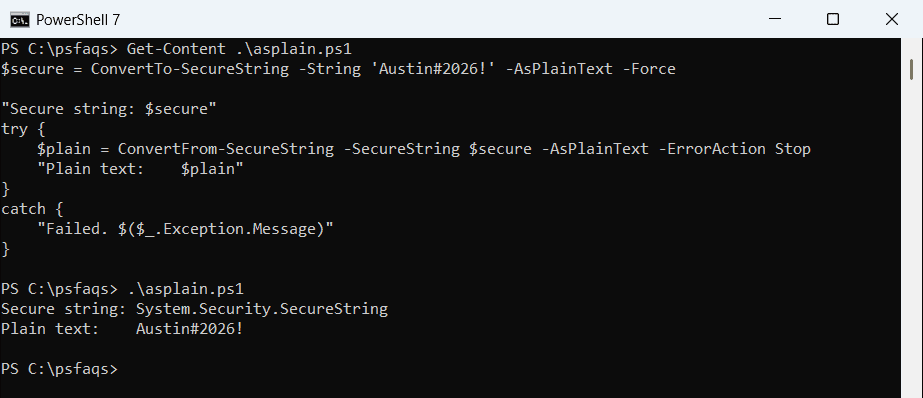
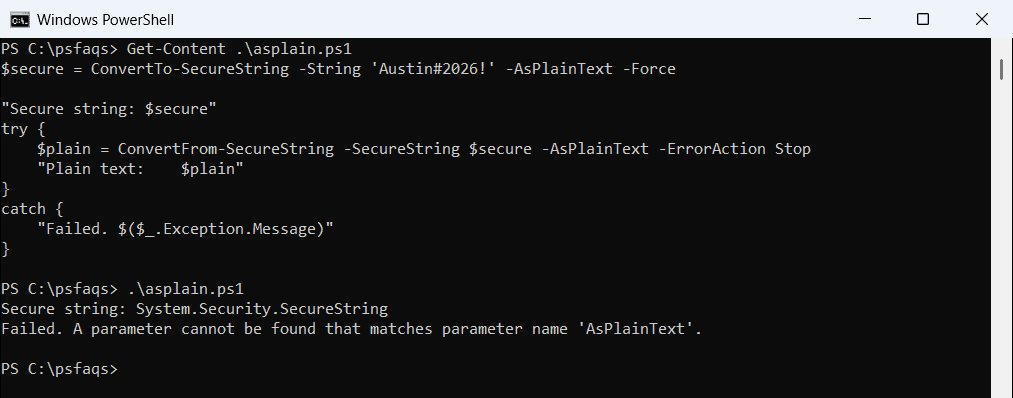
Microsoft added -AsPlainText in PowerShell 7.0. Run the same script in Windows PowerShell 5.1 and the parameter doesn’t exist:
Not sure which version runs your script? Checking the PowerShell version takes one line.
Use NetworkCredential in any PowerShell version
The NetworkCredential class accepts a SecureString and hands back its Password property as a normal string. It works the same in 7 and 5.1:
$secure = ConvertTo-SecureString -String 'Austin#2026!' -AsPlainText -Force

$plain = [System.Net.NetworkCredential]::new('', $secure).Password
"Plain text: $plain"
Output:
Plain text: Austin#2026!The empty first argument is the user name, which we don’t need here. This is my default in scripts that must run on older servers too. On your own PC, you can also update PowerShell on Windows 11 to get -AsPlainText.
Use the Marshal class and clear the memory
The Marshal method copies the text into unmanaged memory, reads it, and then wipes that memory. Microsoft pairs SecureStringToBSTR with ZeroFreeBSTR for exactly this reason:
$secure = ConvertTo-SecureString -String 'Austin#2026!' -AsPlainText -Force

$bstr = [System.Runtime.InteropServices.Marshal]::SecureStringToBSTR($secure)
try {
    $plain = [System.Runtime.InteropServices.Marshal]::PtrToStringBSTR($bstr)
}
finally {
    [System.Runtime.InteropServices.Marshal]::ZeroFreeBSTR($bstr)
}
"Plain text: $plain"
Output:
Plain text: Austin#2026!Put ZeroFreeBSTR in a finally block so the copy is cleared even if something fails. The plain string in $plain still stays in memory until PowerShell cleans it up, though.
How do I get the password from a PSCredential object?
Credentials from Get-Credential or Import-Clixml store the password as a SecureString. GetNetworkCredential() returns it as text:
$secure = ConvertTo-SecureString -String 'Denver$Q3-2026' -AsPlainText -Force
$cred = [pscredential]::new('contoso\maria.lopez', $secure)

"User name:  $($cred.UserName)"
"Password:   $($cred.Password)"
"Plain text: $($cred.GetNetworkCredential().Password)"
Output:
User name:  contoso\maria.lopez
Password:   System.Security.SecureString
Plain text: Denver$Q3-2026
The Password property still shows only the type name. To build these objects in scripts, see creating a credential object.
A function that works in PowerShell 7 and 5.1
If one script has to run on both versions, check the major version and pick the method:
function ConvertFrom-SecureStringToPlainText ([securestring]$SecureString) {
    if ($PSVersionTable.PSVersion.Major -ge 7) {
        ConvertFrom-SecureString -SecureString $SecureString -AsPlainText
    }
    else {
        [System.Net.NetworkCredential]::new('', $SecureString).Password
    }
}

$secure = ConvertTo-SecureString -String 'Austin#2026!' -AsPlainText -Force
"PowerShell $($PSVersionTable.PSVersion.Major): $(ConvertFrom-SecureStringToPlainText $secure)"
Output:
PowerShell 7: Austin#2026!PowerShell 7 prints “PowerShell 7” and 5.1 prints “PowerShell 5”, with the same password. To return values from your own functions cleanly, see PowerShell function return values.
Save an encrypted password to a file and decrypt it later
Without a key, ConvertFrom-SecureString encrypts with Windows DPAPI. With a 16, 24 or 32-byte key, it uses AES, so another account or PC can decrypt it if they have the key:
$secure = ConvertTo-SecureString -String 'Austin#2026!' -AsPlainText -Force
$key = [byte[]](1..32)                      # 32 bytes = 256-bit AES key, keep it secret

ConvertFrom-SecureString -SecureString $secure -Key $key | Set-Content -Path .\svc-password.txt
$saved = Get-Content -Path .\svc-password.txt
"Saved text starts with: $($saved.Substring(0, 24))..."

$restored = ConvertTo-SecureString -String $saved -Key $key
"Decrypted: $([System.Net.NetworkCredential]::new('', $restored).Password)"

try {
    ConvertTo-SecureString -String $saved -Key ([byte[]](2..33)) -ErrorAction Stop | Out-Null
}
catch {
    "Wrong key: Failed. $($_.Exception.Message)"
}
Output:
Saved text starts with: 76492d1116743f0423413b16...
Decrypted: Austin#2026!
Wrong key: Failed. Padding is invalid and cannot be removed.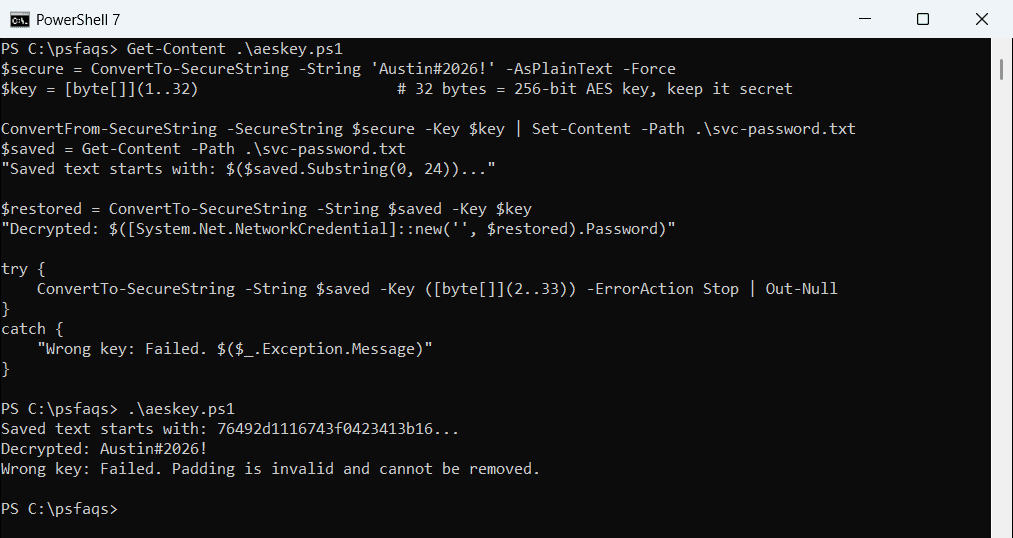
This works in Windows