
PowerShell single vs double quotes differ in one way: single quotes keep text exactly as typed, while double quotes expand variables and expressions, replacing $city with its value:
$city = 'Denver'

'Single quotes: Hello from $city'
"Double quotes: Hello from $city"
Output:
Single quotes: Hello from $city
Double quotes: Hello from Denver
Use single quotes for fixed text and double quotes when you need a value inside. Below I cover the rules that trip people up, all tested in PowerShell 7.6 and Windows PowerShell 5.1, with the same results.
Properties and array items need $()
Inside double quotes, PowerShell expands only the variable name. It stops at a dot or a bracket, so $user.Name prints the whole object followed by .Name:
$user = [pscustomobject]@{ Name = 'Emma Carter'; Office = 'Seattle' }
$servers = 'web01', 'web02', 'sql01'

"Without `$(): $user.Name works in $user.Office"
"With `$():    $($user.Name) works in $($user.Office)"
"Array without `$(): $servers[0]"
"Array with `$():    $($servers[0])"
"Math: 2 + 3 = $(2 + 3)"
Output:
Without $(): @{Name=Emma Carter; Office=Seattle}.Name works in @{Name=Emma Carter; Office=Seattle}.Office
With $():    Emma Carter works in Seattle
Array without $(): web01 web02 sql01[0]
Array with $():    web01
Math: 2 + 3 = 5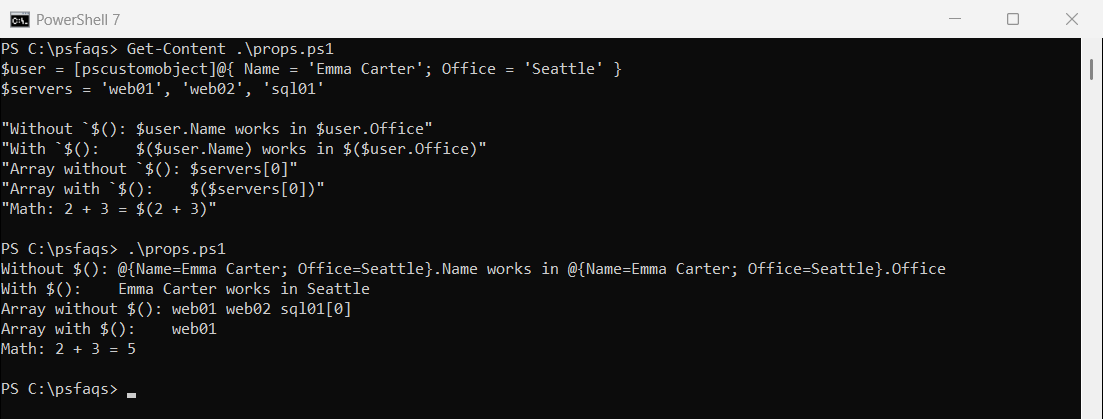
Wrap anything more than a plain variable in $(). That includes properties, array indexes, method calls and math.
Use ${} when text follows the variable
PowerShell reads as many letters as it can as the variable name. $stateville looks for a variable called stateville, which doesn’t exist. Braces mark where the name ends:
$state = 'Texas'
$drive = 'D'

"Wrong:  $stateville"
"Right:  ${state}ville"
"Drive:  ${drive}:\Reports"
Output:
Wrong:
Right:  Texasville
Drive:  D:\Reports
A colon after a variable
A colon right after a variable name is a special case. PowerShell reads $server: as a drive-style variable like $env:, and the script won’t even start:
try { [void][scriptblock]::Create('"Status for $server: online"'); 'Parsed fine' }
catch { 'Failed. PowerShell reads $server: as the start of a drive-qualified variable' }

$server = 'web01'
"Status for ${server}: online"
Output:
Failed. PowerShell reads $server: as the start of a drive-qualified variable
Status for web01: online
Write ${server}: or $($server): instead. This comes up a lot in log messages like “Status for web01: online”.
Escape characters with the backtick
In double quotes, the backtick escapes the next character. `t is a tab, `n a new line, `$ a literal dollar sign and `” a quote. In single quotes, the backtick is just a character:
"Tab:`tafter tab"
"Dollar sign: `$100 budget"
"Quote inside: She said `"ship it`""
'Backtick in single quotes stays: `t `$'
"Two lines:`nsecond line"
Output:
Tab:	after tab
Dollar sign: $100 budget
Quote inside: She said "ship it"
Backtick in single quotes stays: `t `$
Two lines:
second line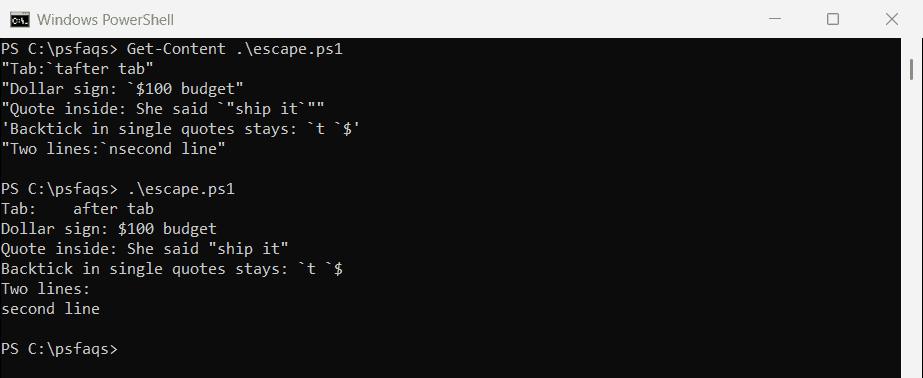
Microsoft lists every escape sequence in about_Special_Characters.
Quotes inside quotes
Double the quote to include it in the same kind of string. Or use the other kind of quote on the outside, which is easier to read:
'It''s ready'
"It's ready"
"She said ""ship it"""
'She said "ship it"'
Output:
It's ready
It's ready
She said "ship it"
She said "ship it"
Inside double quotes, you can also escape a quote with a backtick, as shown earlier.
Here-strings for multiple lines
Here-strings hold text across several lines. @” “@ expands variables and $() like double quotes, while @’ ‘@ keeps everything literal:
$name = 'Liam Brooks'

$expanded = @"
Hello $name,
Your report for $(Get-Date -Date '2026-09-29' -Format 'MMMM d') is ready.
"@

$literal = @'
Hello $name,
Nothing in here expands, not even $(Get-Date).
'@

$expanded
'---'
$literal
Output:
Hello Liam Brooks,
Your report for September 29 is ready.
---
Hello $name,
Nothing in here expands, not even $(Get-Date).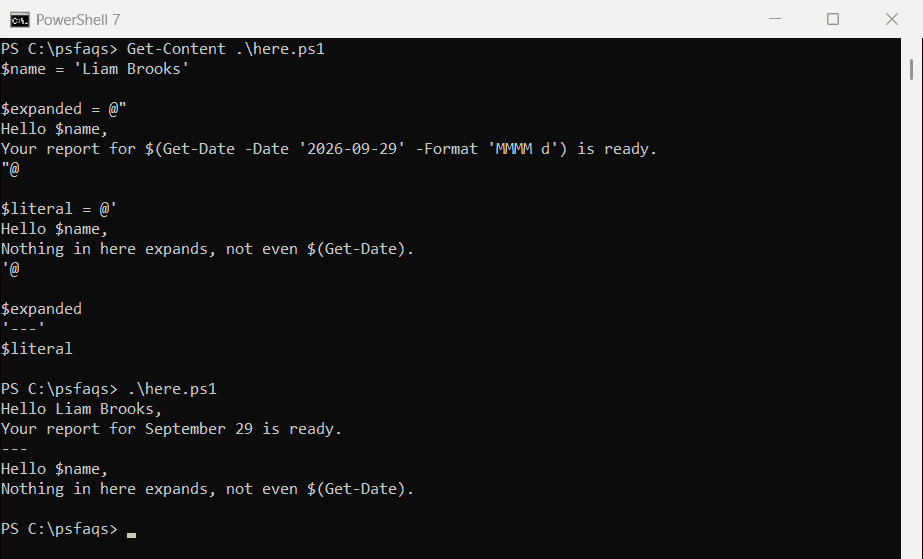
The closing “@ or ‘@ must be at the very start of its own line, with nothing before it.
Fill in a template later
Sometimes the text is written before the values exist. Keep it in single quotes and expand it later, or use the -f format operator with numbered placeholders:
$template = 'Dear $name, your order $order has shipped.'

$name = 'Olivia Reed'
$order = 58213
$ExecutionContext.InvokeCommand.ExpandString($template)

'Dear {0}, your order {1} has shipped.' -f 'Noah Diaz', 58214
Output:
Dear Olivia Reed, your order 58213 has shipped.
Dear Noah Diaz, your order 58214 has shipped.
ExpandString runs any $() in the text, so only use it on templates you wrote yourself. -f is the safer choice for text from files or users. Microsoft covers every rule in about_Quoting_Rules.
Frequently Asked Questions
What is the difference between single and double quotes in PowerShell?
Single quotes keep text exactly as typed. Double quotes replace variables and $() expressions with their values.
How do I put a variable’s property in a string?
Use a subexpression: "Name: $($user.Name)". Without $(), PowerShell prints the whole object.
How do I put a single quote inside a single-quoted string?
Double it: 'It''s ready'. Or use double quotes on the outside.
Why does “$server:” cause an error?
PowerShell reads $server: as a drive-style variable. Use ${server}: instead.
How do I write a dollar sign in double quotes?
Escape it with a backtick: "`$100". Or use single quotes, where $ is never expanded.
Once quoting makes sense, these string tasks are next:
- Combine strings and variables
- Add double quotes to a string
- Escape special characters
- Add a new line to a string

Bijay Kumar is an esteemed author and the mind behind PowerShellFAQs.com, where he shares his extensive knowledge and expertise in PowerShell, with a particular focus on SharePoint projects. Recognized for his contributions to the tech community, Bijay has been honored with the prestigious Microsoft MVP award. With over 15 years of experience in the software industry, he has a rich professional background, having worked with industry giants such as HP and TCS. His insights and guidance have made him a respected figure in the world of software development and administration. Read more.