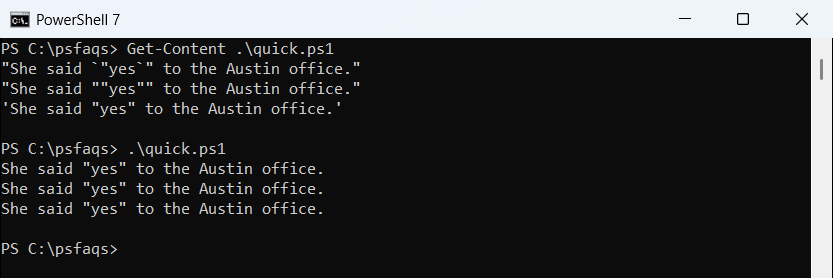
If you are a beginner in PowerShell, then you may find this tutorial interesting. Here, I will show you how to add double quotes to a string in PowerShell using different methods.
To add double quotes in a string in PowerShell, you can use escape characters, where backticks () are used to escape double quotes, like so:”The sign said, “Welcome to New York!””. Another method is to define the string with single quotes, allowing double quotes to be included directly:’The sign said, “Welcome to New York!”‘. Additionally, you can double the double quotes within a double-quoted string:”The sign said, “”Welcome to New York!”””`.
1. Using Escape Characters
You can use the escape character in PowerShell to include double quotes within a string. In PowerShell, the backtick (`) is used as an escape character.
Here is an example.
$string = "The sign said, `"Welcome to New York!`""
Write-Output $stringIn this example, the backtick before each double quote tells PowerShell to treat the quote as a literal character, not as a string delimiter. The output will be:
The sign said, "Welcome to New York!"You can see the output in the screenshot below after I executed the above PowerShell script.

Check out Escape Ampersands in URLs with PowerShell
2. Using Single Quotes
Another method of adding double quotes to a string is to define the string in PowerShell using single quotes. Single quotes in PowerShell do not interpret escape sequences, making it easier to include double quotes.
$string = 'The sign said, "Welcome to New York!"'
Write-Output $stringHere, the double quotes are treated as part of the string because the string itself is enclosed in single quotes. The output will be:
The sign said, "Welcome to New York!"Here is the output in the screenshot below:

Read Case Insensitive Strings Comparison in PowerShell
3. Using Double Quotes Inside Double Quotes
If you need to use double quotes within a string in PowerShell that is already enclosed in double quotes, you can double the double quotes to escape them.
Here is an example.
$string = "The sign said, ""Welcome to New York!"""
Write-Output $stringIn this case, doubling the double quotes tells PowerShell to treat them as literal characters. The output will be:

The sign said, "Welcome to New York!"4. Using Here-Strings
Here-Strings in PowerShell allow you to define a multi-line string and are particularly useful when dealing with strings that contain both single and double quotes.
Here is an example.
$string = @"
The sign said, "Welcome to New York!"
"@
Write-Output $stringHere-Strings are enclosed in @ symbols and allow for easy inclusion of double quotes. The output will be:
The sign said, "Welcome to New York!"Read Get String Length in Bytes in PowerShell
5. Using Concatenation
You can also concatenate strings to include double quotes in PowerShell.
Here is a complete example.
$part1 = 'The sign said, '
$part2 = '"Welcome to New York!"'
$string = $part1 + $part2
Write-Output $stringBy concatenating $part1 and $part2, you can build a string that includes double quotes. The output will be:
The sign said, "Welcome to New York!"6. Using Format Operator
The format operator -f in PowerShell can also be used to insert double quotes into a string.
Here is an example.
$city = "New York"
$string = "The sign said, `"{0}`"" -f $city
Write-Output $stringIn this example, the {0} placeholder is replaced with the value of $city, and the backticks are used to escape the double quotes. The output will be:
The sign said, "New York"Read Get Length of a String in PowerShell
Add double quotes to a string variable in PowerShell
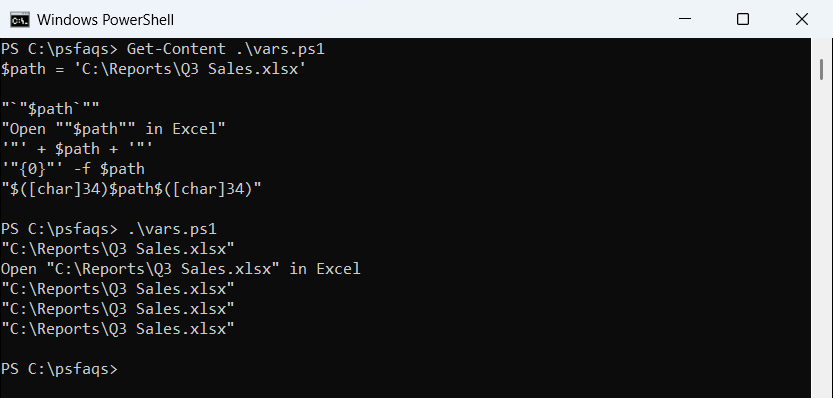
Sometimes, you may need to add double quotes to a string variable in PowerShell.
Here is a complete example.
$landmark = "Golden Gate Bridge"
$quotedLandmark = "`"$landmark`""
Write-Output $quotedLandmarkIn this example:
$landmarkis a variable that holds a string.$quotedLandmarkis a new variable where we add double quotes around the value of$landmarkby escaping the double quotes with backticks.
You can also see the output in the screenshot below:

Conclusion
I hope you now understand how to add double quotes to a string in PowerShell. Here, I have explained 6 different methods.
- Using Escape Characters
- Using Single Quotes
- Using Double Quotes Inside Double Quotes
- Using Here-Strings
- Using Concatenation
- Using Format Operator
I have also explained how to add double quotes to a string variable in PowerShell.
You may also like:
- Split a String into Variables in PowerShell
- Split a String and Get the First and Last Element in PowerShell
- Check if a String Contains Special Characters in PowerShell
- Escape Single Quotes in PowerShell
Bijay Kumar is an esteemed author and the mind behind PowerShellFAQs.com, where he shares his extensive knowledge and expertise in PowerShell, with a particular focus on SharePoint projects. Recognized for his contributions to the tech community, Bijay has been honored with the prestigious Microsoft MVP award. With over 15 years of experience in the software industry, he has a rich professional background, having worked with industry giants such as HP and TCS. His insights and guidance have made him a respected figure in the world of software development and administration. Read more.