
PowerShell’s escape character is the backtick (`), not the backslash. Inside double quotes, put a backtick before $ or ” to use it literally. Inside single quotes nothing is special, so double a single quote to include one:
$name = 'Alice'

"Hello $name, your total is `$25."
"She said `"approved`" at 9 AM."
'It''s already approved.'
"Folder: C:\Temp\new"
Output:
Hello Alice, your total is $25.
She said "approved" at 9 AM.
It's already approved.
Folder: C:\Temp\new
A backslash is just a normal character, so Windows paths need no escaping. I ran every example in PowerShell 7.6 and Windows PowerShell 5.1 and point out the differences.
Escape dollar signs
In double quotes, $ starts a variable name, and digits count as a name. A price like $5.00 quietly loses its first part:
"Without escaping: Cost: $5.00 each"
"With a backtick:  Cost: `$5.00 each"
'Single quotes:    Cost: $5.00 each'
"With -f:          Cost: {0:C} each" -f 5
Output:
Without escaping: Cost: .00 each
With a backtick:  Cost: $5.00 each
Single quotes:    Cost: $5.00 each
With -f:          Cost: $5.00 each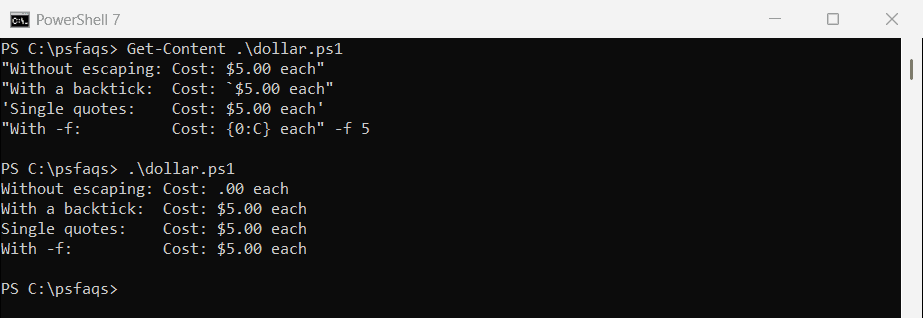
Use a backtick, single quotes, or the -f operator with the C format, which also adds the dollar sign and commas for you.
Escape single and double quotes
Pick the outer quotes that make the job easiest. When you need the same quote inside, double it, or use a backtick inside double quotes:
$city = "O'Fallon"

"Double quotes hold a single quote: $city"
'Two single quotes make one: O''Fallon'
"Two double quotes make one: ""Gateway City"""
"A backtick works too: `"Gateway City`""
Output:
Double quotes hold a single quote: O'Fallon
Two single quotes make one: O'Fallon
Two double quotes make one: "Gateway City"
A backtick works too: "Gateway City"
A backtick doesn’t work inside single quotes, because nothing is special there. 'It`'s' is a syntax error, so write 'It''s' instead. Microsoft covers both kinds of quotes in about_Quoting_Rules.
Special characters: tab, new line and Unicode
A backtick before some letters inserts a special character, like `t for a tab and `n for a new line. PowerShell 7 adds `u{...} for any Unicode character:
"Tab:[`t]  New line:[`n]" -replace "`n", '\n'
"Copyright: `u{00A9} 2026 Contoso"
Output in PowerShell 7:
Tab:[	]  New line:[\n]
Copyright: © 2026 Contoso
Output in Windows PowerShell 5.1:
Tab:[	]  New line:[\n]
Copyright: u{00A9} 2026 Contoso
In 5.1, use [char]0x00A9 instead. The full list of sequences is in about_Special_Characters.
Escape special characters in regex (-replace, -match, -split)
These operators use regular expressions, where $ and . have meanings of their own. The first replace below matches nothing and changes nothing, with no error:
$text = 'Total: $19.99 today'

"Unescaped: $($text -replace '$19.99', '$24.99')"
"Escaped:   $($text -replace [regex]::Escape('$19.99'), '$$24.99')"
Output:
Unescaped: Total: $19.99 today
Escaped:   Total: $24.99 today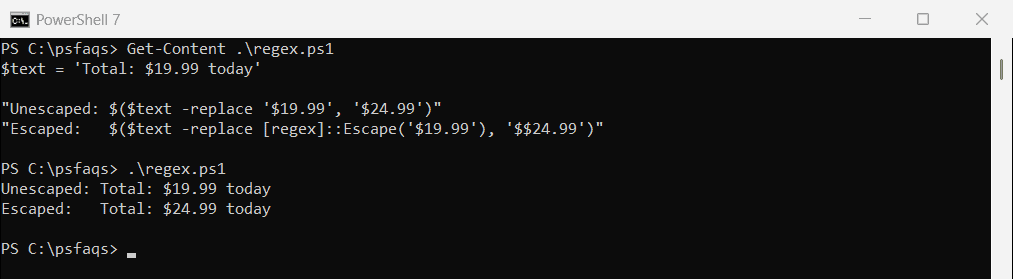
[regex]::Escape() fixes the pattern. In the replacement text, $ refers to capture groups, so write $$ for a literal dollar sign. Replacing text in strings covers -replace in depth.
File names with brackets
-Path treats [ and ] as wildcards, so a file like report[2026].txt isn’t found. Use -LiteralPath, or escape the name for -like:
$file = 'C:\psfaqs\Esc\report[2026].txt'

"Test-Path:              $(Test-Path -Path $file)"
"Test-Path -LiteralPath: $(Test-Path -LiteralPath $file)"
"Get-Content -LiteralPath: $(Get-Content -LiteralPath $file)"
"-like escaped: $('report[2026].txt' -like [WildcardPattern]::Escape('report[2026].txt'))"
Output:
Test-Path:              False
Test-Path -LiteralPath: True
Get-Content -LiteralPath: Q3 totals
-like escaped: True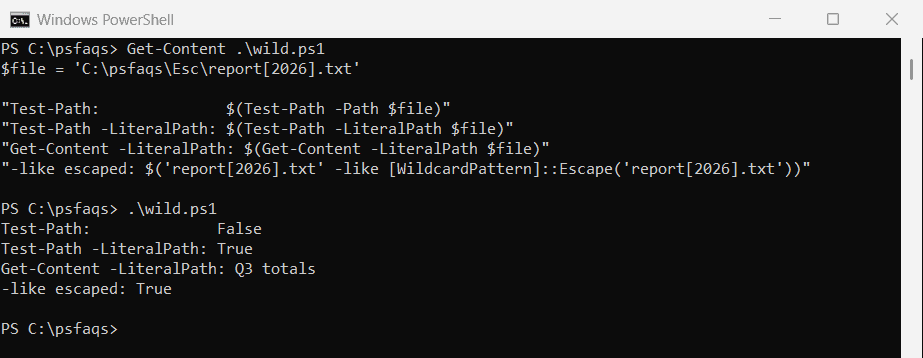
Most file cmdlets have a -LiteralPath parameter.
Escape ampersands and spaces in URLs
An ampersand inside a PowerShell string is just text. It only needs escaping inside a URL value, where it would start a new parameter:
$query = "Tom & Jerry's Cafe"

$url = "https://contoso.com/search?q=$([uri]::EscapeDataString($query))&state=TX"
$url
Output in PowerShell 7:
https://contoso.com/search?q=Tom%20%26%20Jerry%27s%20Cafe&state=TX[uri]::EscapeDataString() turns & into %26 and spaces into %20. In 5.1, it leaves the apostrophe as is, which most servers accept.
Escape text for JSON, HTML and XML
Don’t escape JSON by hand. ConvertTo-Json handles quotes and backslashes for you:
[ordered]@{ name = "Tom & Jerry's"; note = 'Say "hi"' } | ConvertTo-Json -CompressOutput in PowerShell 7:
{"name":"Tom & Jerry's","note":"Say \"hi\""}Windows PowerShell 5.1 writes & and ‘ as \u0026 and \u0027. That’s still valid JSON, and any JSON reader turns it back into the same text.
HTML and XML
"HTML