
To remove items from an array in PowerShell, build a new array without them and assign it back. Where-Object does this in one line:
$servers = 'WEB01', 'WEB02', 'SQL01', 'WEB02'

$servers = $servers | Where-Object { $_ -ne 'WEB02' }
$servers -join ', '
Output:
WEB01, SQL01PowerShell arrays have a fixed size, so you can’t delete an item in place. I ran every example in PowerShell 7.6 and Windows PowerShell 5.1 and note the one 7-only option.
Why .Remove() and $null don’t work
Arrays have a Remove method, but it always fails. Setting an item to $null doesn’t remove it either, it just leaves an empty slot:
$servers = 'WEB01', 'WEB02', 'SQL01'

try { $servers.Remove('SQL01') } catch { "Remove() failed: $($_.Exception.InnerException.Message)" }

$servers[1] = $null
"After setting item 1 to `$null, Count is still $($servers.Count)"
Output:
Remove() failed: Collection was of a fixed size.
After setting item 1 to $null, Count is still 3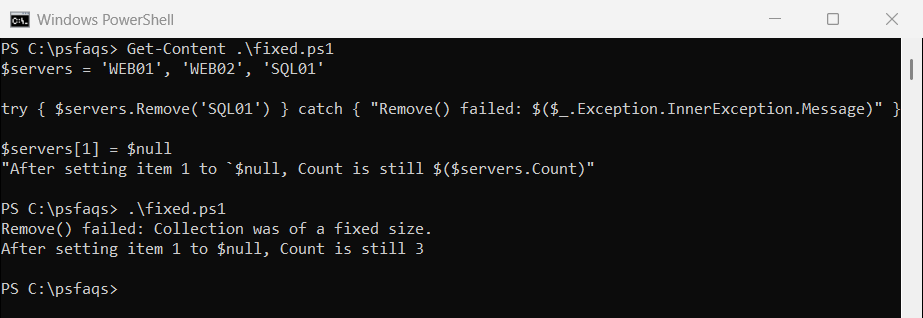
If you add and remove items often, switch to a List, shown further down. Microsoft’s guide to arrays explains why arrays work this way.
Remove items by value
-ne on an array returns every item that doesn’t match, so it removes all copies of a value. It ignores case, and -cne doesn’t:
$servers = 'WEB01', 'WEB02', 'SQL01', 'web02'

"-ne 'WEB02' removes both: $(($servers -ne 'WEB02') -join ', ')"
"-cne 'WEB02' keeps web02: $(($servers -cne 'WEB02') -join ', ')"
"Remove several values:    $(($servers | Where-Object { $_ -notin 'WEB02', 'SQL01' }) -join ', ')"
Output:
-ne 'WEB02' removes both: WEB01, SQL01
-cne 'WEB02' keeps web02: WEB01, SQL01, web02
Remove several values:    WEB01
Use -notin inside Where-Object to remove several values at once. The -ne operator explains why it filters arrays.
Use a List to remove items in place
A generic List can shrink. Remove deletes the first match and returns True or False, and RemoveAt deletes by position:
$servers = [System.Collections.Generic.List[string]]@('WEB01', 'WEB02', 'SQL01', 'WEB02')

"Remove('WEB02'): $($servers.Remove('WEB02')) -> $($servers -join ', ')"
"Remove('sql01'): $($servers.Remove('sql01')) -> $($servers -join ', ')"
$servers.RemoveAt(0)
"RemoveAt(0):     $($servers -join ', ')"
Output:
Remove('WEB02'): True -> WEB01, SQL01, WEB02
Remove('sql01'): False -> WEB01, SQL01, WEB02
RemoveAt(0):     SQL01, WEB02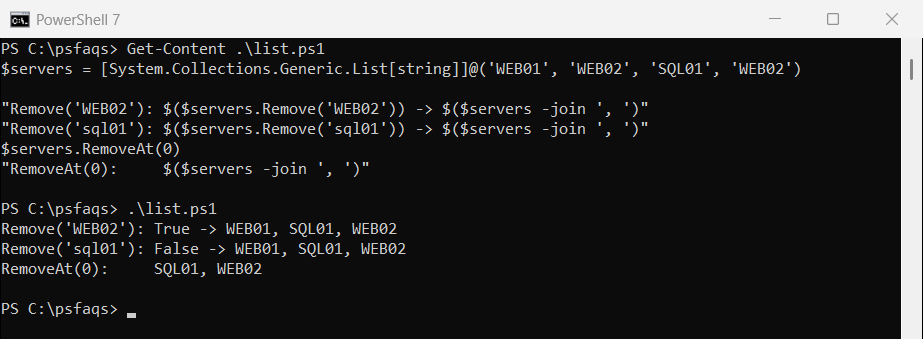
List.Remove is case-sensitive, so ‘sql01’ didn’t match SQL01. It also removes only the first WEB02.
Remove an element by index
A common trick slices the array around the index. It breaks for index 0, because 0..-1 means “item 0, then the last item”:
$servers = 'WEB01', 'WEB02', 'SQL01', 'FILE01'
$i = 0

"Slicing:      $(($servers[0..($i - 1)] + $servers[($i + 1)..($servers.Count - 1)]) -join ', ')"
"Index filter: $((0..($servers.Count - 1) | Where-Object { $_ -ne $i } | ForEach-Object { $servers[$_] }) -join ', ')"
Output:
Slicing:      WEB01, FILE01, WEB02, SQL01, FILE01
Index filter: WEB02, SQL01, FILE01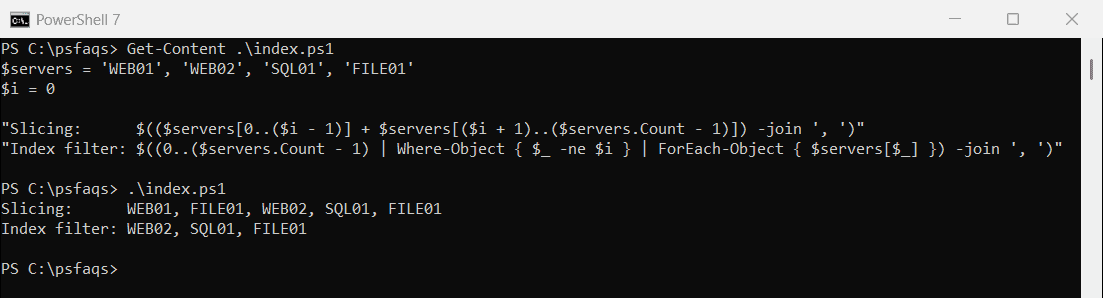
Filtering the index numbers works for every position. First and last array items shows the same 0..-1 trap.
PowerShell 7: Select-Object -SkipIndex
PowerShell 7 can skip positions directly. Windows PowerShell 5.1 doesn’t have -SkipIndex:
$servers = 'WEB01', 'WEB02', 'SQL01', 'FILE01'
($servers | Select-Object -SkipIndex 0, 2) -join ', '
Output in PowerShell 7:
WEB02, FILE01Remove the first or last element
Select-Object -Skip and -SkipLast work in both versions and handle short arrays correctly:
$servers = 'WEB01', 'WEB02', 'SQL01'

"Without the last:  $(($servers | Select-Object -SkipLast 1) -join ', ')"
"Without the first: $(($servers | Select-Object -Skip 1) -join ', ')"
Output:
Without the last:  WEB01, WEB02
Without the first: WEB02, SQL01
The Select-Object documentation lists -First, -Last, -Skip and -SkipLast.
Keep the result an array
If only one item is left, PowerShell returns that item, not a one-item array. Indexing a lone string then returns a character:
$servers = 'WEB01', 'SQL01'

$left = $servers | Where-Object { $_ -ne 'SQL01' }
"Without @(): a $($left.GetType().Name), first item [$($left[0])]"

$left = @($servers | Where-Object { $_ -ne 'SQL01' })
"With @():    a $($left.GetType().Name), first item [$($left[0])]"
Output:
Without @(): a String, first item [W]
With @():    a Object[], first item [WEB01]
Wrap the filter in @() whenever you plan to index the result or check its Count.
Remove items while looping
You can’t remove items from a List inside a foreach over the same List. RemoveAll with a condition does the whole job safely:
$servers = [System.Collections.Generic.List[string]]@('WEB01', 'WEB02', 'SQL01')

try { foreach ($s in $servers) { if ($s -like 'WEB*') { [void]$servers.Remove($s) } } }
catch { "Removing inside foreach failed: $($_.Exception.Message)" }

$servers = [System.Collections.Generic.List[string]]@('WEB01', 'WEB02', 'SQL01')
$removed = $servers.RemoveAll([Predicate[string]] { param($s) $s -like 'WEB*' })
"RemoveAll removed $removed, left: $($serv