
A PowerShell ordered array is usually an ordered hashtable: put [ordered] in front of @{} and the keys stay in the order you typed them. Plain arrays already keep their order, so they don’t need anything extra:
$offices = [ordered]@{ Austin = 3; Denver = 1; Seattle = 2 }
$offices.Keys    # Austin, Denver, Seattle
Below, I’ll add, insert, read and sort entries, then cover the collections that keep items sorted. I tested all of it in PowerShell 7.6 and Windows PowerShell 5.1.
What is an ordered array in PowerShell?
PowerShell has no separate “ordered array” type. A normal array keeps items in the order you add them, and [ordered] creates an ordered dictionary of key-value pairs:
$tickets = 'T-1042', 'T-1007', 'T-1019'
$tickets += 'T-1003'
"Array:   $($tickets -join ', ')"
$offices = [ordered]@{ Austin = 3; Denver = 1; Seattle = 2 }
"Ordered: $($offices.Keys -join ', ')"
$offices.GetType().FullName
Output:
Array:   T-1042, T-1007, T-1019, T-1003
Ordered: Austin, Denver, Seattle
System.Collections.Specialized.OrderedDictionary
The array kept T-1003 at the end, where I added it. To start an array from nothing, see how to create an empty array in PowerShell.
The dictionary is a System.Collections.Specialized.OrderedDictionary. You use it like a hashtable, and it works anywhere a cmdlet parameter expects a hashtable or dictionary.
Create an ordered hashtable with [ordered]
A plain hashtable doesn’t promise any key order. Here’s the same data stored both ways:
$plain = @{ Austin = 3; Denver = 1; Seattle = 2; Boston = 5; Miami = 4 }
$ordered = [ordered]@{ Austin = 3; Denver = 1; Seattle = 2; Boston = 5; Miami = 4 }
"Hashtable: $($plain.Keys -join ', ')"
"Ordered:   $($ordered.Keys -join ', ')"
Output:
Hashtable: Seattle, Denver, Austin, Boston, Miami
Ordered:   Austin, Denver, Seattle, Boston, Miami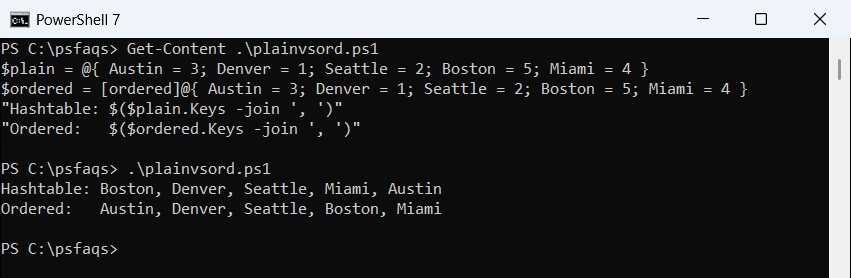
The ordered line matched the order I typed. The hashtable line is where PowerShell 7 and 5.1 behave differently.
In PowerShell 7, the hashtable order changed every time I ran the script. Windows PowerShell 5.1 printed this same order on every run:
Hashtable: Boston, Austin, Miami, Seattle, DenverDon’t rely on that stable 5.1 order either; it still isn’t the order you typed. For the wider picture, read the PowerShell hashtables and dictionaries guide.
Why does [ordered]$variable = @{} fail?
The [ordered] keyword only works directly in front of the @{ literal. Putting it before the variable name stops the script before it even runs:
[ordered]$offices = @{ Austin = 3; Denver = 1 }Both shells reported a parser error that says The ordered attribute can be specified only on a hash literal node. Move it to the right side: $offices = [ordered]@{ ... }.
The same rule applies when you build a hashtable from text, which you can learn in converting a string to a hashtable.
Add, insert, change and remove items
An ordered dictionary has the usual hashtable methods, plus Insert() and RemoveAt(), which work by position. Here’s all of it on one dictionary:
$offices = [ordered]@{ Austin = 3; Denver = 1; Seattle = 2 }
$offices.Add('Miami', 4)
$offices.Insert(0, 'Boston', 5)
$offices['Denver'] = 6
$offices.Remove('Seattle')
$offices.RemoveAt(1)
foreach ($entry in $offices.GetEnumerator()) {
    "$($entry.Key) = $($entry.Value)"
}
"Has Miami: $($offices.Contains('Miami'))"
Output:
Boston = 5
Denver = 6
Miami = 4
Has Miami: True
Add() put Miami at the end, and Insert(0, ...) put Boston first. Changing Denver’s value didn’t move it.
RemoveAt(1) then removed Austin, because Austin sat at position 1 after Boston was inserted. To walk the entries, I used a foreach loop in PowerShell over GetEnumerator().
How do I access an ordered dictionary by index?
Use a number in square brackets to get a value by position, and a string to get it by key. Getting the key name by position is where 5.1 trips people up:
$offices = [ordered]@{ Boston = 5; Austin = 3; Denver = 1 }
"By position: $($offices[0])"
"By key:      $($offices['Denver'])"
"Dot syntax:  $($offices.Austin)"
"Keys[0]:     $($offices.Keys[0])"
"@(Keys)[0]:  $(@($offices.Keys)[0])"
Output:
By position: 5
By key:      1
Dot syntax:  3
Keys[0]:     Boston
@(Keys)[0]:  Boston
Windows PowerShell 5.1 can’t index the Keys collection, so Keys[0] returned every key:
By position: 5
By key:      1
Dot syntax:  3
Keys[0]:     Boston Austin Denver
@(Keys)[0]: Boston![Windows PowerShell 5.1 ordered dictionary Keys[0] returning all keys](https://powershellfaqs.com/wp-content/uploads/2026/10/powershell-5-1-ordered-dictionary-keys-index.png)
Wrapping the keys in @() turns them into an array, which works in both versions. It’s the same trick you’d use to get the first element of an array.
One more trap: with integer keys, $offices[1] means position 1, not key 1. Use string keys when you can.
Insert errors in PowerShell 7 vs 5.1
Adding a key that already exists throws an error, and so does inserting past the end. Passing $offices.Count as the index appends the item instead:
$offices = [ordered]@{ Austin = 3; Denver = 1 }
try { $offices.Add('Austin', 9) }
catch { "Failed. $($_.Exception.InnerException.Message)" }
try { $offices.Insert(9, 'Miami', 4) }
catch { "Failed. $($_.Exception.InnerException.Message)" }
$offices.Insert($offices.Count, 'Miami', 4)
"Now: $($offices.Keys -join ', ')"
Output:
Failed. Item has already been added. Key in dictionary: 'Austin'  Key being added: 'Austin'
Failed. index ('9') must be less than or equal to '2'. (Parameter 'inde