
To make a PowerShell array parameter, give the parameter an array type such as [string[]]. Callers can then pass several values separated by commas, or just one value:
function Get-ServerReport {
    param(
        [string[]]$ComputerName
    )
    foreach ($computer in $ComputerName) {
        "Checking $computer"
    }
    "Total: $($ComputerName.Count)"
}

Get-ServerReport -ComputerName WEB01, WEB02, SQL01
Get-ServerReport -ComputerName WEB01
Output:
Checking WEB01
Checking WEB02
Checking SQL01
Total: 3
Checking WEB01
Total: 1
With [string[]], a single value still arrives as an array with one item, so the same foreach loop handles both calls.
I tested every example in PowerShell 7.6 and Windows PowerShell 5.1, and they behaved the same in both. Most of this guide is about the mistakes that make array parameters misbehave.
Pass an array to a function
Use the parameter name, then the values separated by commas. Don’t call a PowerShell function like a method with parentheses. Here’s what happens when you do:
function Send-Report {
    param([string[]]$To, [int]$Days)
    "To: $($To -join '; ') | Days: $Days"
}

Send-Report -To 'maria@contoso.com', 'it@contoso.com' -Days 7
Send-Report('maria@contoso.com', 'it@contoso.com', 7)
Output:
To: maria@contoso.com; it@contoso.com | Days: 7
To: maria@contoso.com; it@contoso.com; 7 | Days: 0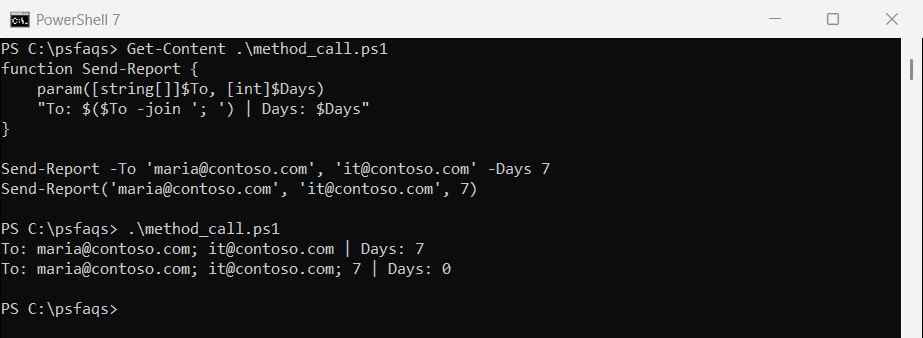
In the second call, PowerShell sees one array, ('maria@contoso.com', 'it@contoso.com', 7), and binds all of it to -To. The number 7 ends up in the email list, and -Days is left at 0.
In PowerShell, spaces separate arguments and commas build an array. Save the parentheses-and-commas style for .NET methods like $text.Replace('a', 'b').
Accept an array from the pipeline
Add ValueFromPipeline so you can pipe values into the function. But if you forget the process block, only the last item is used:
function Test-Server {
    param(
        [Parameter(ValueFromPipeline)]
        [string[]]$ComputerName
    )
    "Checking $ComputerName"
}

'WEB01', 'WEB02', 'SQL01' | Test-Server
Output:
Checking SQL01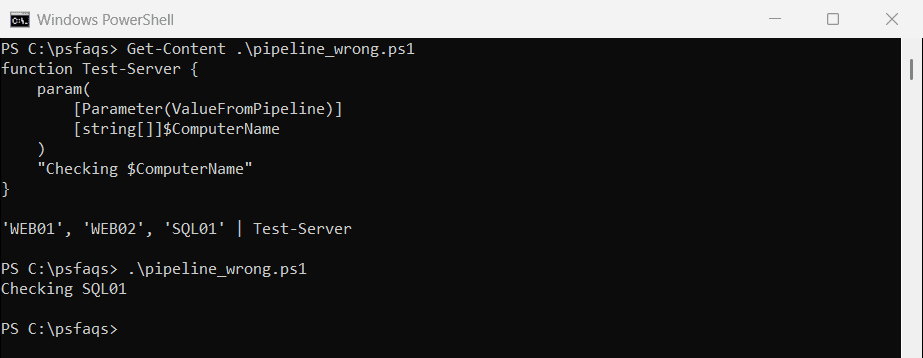
Code that isn’t in a named block runs once, after the pipeline has finished, when the parameter holds only the last value. Put the work in process, which runs once for each piped item:
function Test-Server {
    param(
        [Parameter(ValueFromPipeline)]
        [string[]]$ComputerName
    )
    process {
        foreach ($computer in $ComputerName) {
            "Checking $computer"
        }
    }
}

'WEB01', 'WEB02' | Test-Server
Test-Server -ComputerName SQL01, SQL02
Output:
Checking WEB01
Checking WEB02
Checking SQL01
Checking SQL02
The inner foreach is what makes the second call work. When you pass the array by name instead of piping it, process runs only once, with the whole array.
Validate the array
Validation attributes check every item in the array before your code runs. ValidateCount limits how many items are allowed, and ValidateSet limits which values:
function Restart-WebServer {
    param(
        [ValidateCount(1, 3)]
        [ValidateSet('WEB01', 'WEB02', 'WEB03')]
        [string[]]$ComputerName
    )
    "Would restart: $($ComputerName -join ', ')"
}

Restart-WebServer -ComputerName WEB01, WEB03
try {
    Restart-WebServer -ComputerName WEB01, SQL01
}
catch {
    $_.Exception.Message
}
Output:
Would restart: WEB01, WEB03
Cannot validate argument on parameter 'ComputerName'. The argument "SQL01" does not belong to the set "WEB01,WEB02,WEB03" specified by the ValidateSet attribute. Supply an argument that is in the set and then try the command again.
The error names the bad value, which is much friendlier than a script that fails halfway through a restart.
Make the array parameter mandatory
Mark it Mandatory and PowerShell prompts for the values when they’re missing, one item per line. Press Enter on an empty line to finish. Here’s what that looked like when I ran it and typed two names:
function Get-ServerReport {
    param(
        [Parameter(Mandatory)]
        [string[]]$ComputerName
    )
    "Checking $($ComputerName.Count) servers: $($ComputerName -join ', ')"
}

Get-ServerReport
Output:
cmdlet Get-ServerReport at command pipeline position 1
Supply values for the following parameters:
ComputerName[0]: WEB01
ComputerName[1]: WEB02
ComputerName[2]:
Checking 2 servers: WEB01, WEB02
This only works when someone is at the keyboard. In a scheduled task, pass the values on the command line instead.
Leaving a mandatory parameter out entirely gets you a prompt (or a MissingMandatoryParameter error in a non-interactive session). Typing the parameter name with nothing after it is a different problem, covered in how to fix the “Missing an argument for parameter” error.
Pass an array to a script from the command line
This catches people who call scripts from Task Scheduler or a batch file. With -File, a comma-separated list arrives as a single string. With -Command, it becomes a real array:
pwsh -NoProfile -File C:\psfaqs\report.ps1 -ComputerName WEB01,WEB02
pwsh -NoProfile -Command "& C:\psfaqs\report.ps1 -ComputerName WEB01,WEB02"
Output in PowerShell 7:
Count: 1 -> WEB01,WEB02
Count: 2 -> WEB01 | WEB02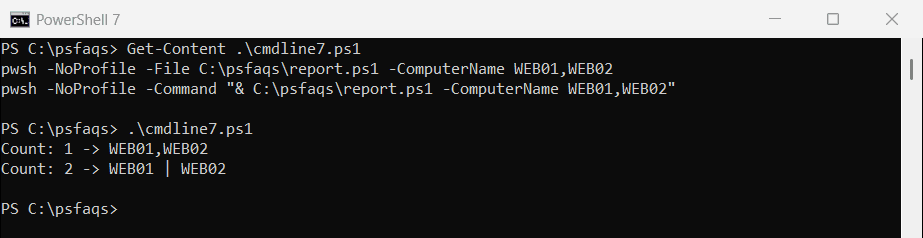
Windows PowerShell 5.1 printed exactly the same with powershell.exe. If you must use -File, split the value inside the script, for example with $ComputerName = $ComputerName -split ','.
For more on script arguments, see how to run a PowerShell script with parameters.
Can a function change the array you pass in?
Partly. The function gets the same array, so changing an item is visible to the caller. Adding with += builds a new array that the caller never sees:
function Update-List {
    param($List)
    $List[0] = 'DC01'
    $List += 'NEW01'
    "Inside: $($List -join ', ')"
}

$servers = 'WEB01', 'WEB02'
Update-List -List $servers
"Outside: $($servers -join ', ')"