
A multidimensional array in PowerShell is usually an array of arrays, called a jagged array. Each inner array is a row, and you read a value with two indexes, $array[row][column]:
$sales = @(
    @('Austin', 18250, 21400),
    @('Denver', 12400, 13900),
    @('Miami',  20975, 19800)
)

"Rows: $($sales.Count)"
"Row 1, column 0: $($sales[1][0])"
"Miami Q2 sales:  $($sales[2][2])"
Output:
Rows: 3
Row 1, column 0: Denver
Miami Q2 sales:  19800
PowerShell also has true two-dimensional arrays like [int[,]], covered further down. I ran every example in PowerShell 7.6 and Windows PowerShell 5.1, with the same results.
Use [row][column], not [row,column]
On a jagged array, a comma inside one pair of brackets means “these indexes”, so $sales[0,1] returns rows 0 and 1 instead of one value:
$sales = @(
    @('Austin', 18250, 21400),
    @('Denver', 12400, 13900),
    @('Miami',  20975, 19800)
)

"`$sales[0][1] is one value:  $($sales[0][1])"
"`$sales[0,1] is two rows:    $(($sales[0,1] | ForEach-Object { $_[0] }) -join ', ')"
Output:
$sales[0][1] is one value:  18250
$sales[0,1] is two rows: Austin, Denver![PowerShell jagged array $a[0][1] vs $a[0,1]](https://powershellfaqs.com/wp-content/uploads/2026/09/powershell-jagged-array-index-vs-comma.png)
The [row,column] form is only for true 2D arrays.
Add a row to a multidimensional array
Adding an array with + or += unrolls it, so the new row’s values become separate items. Put the unary comma in front to add it as one row:
$sales = @(
    @('Austin', 18250, 21400),
    @('Denver', 12400, 13900),
    @('Miami',  20975, 19800)
)

$wrong = $sales + @('Seattle', 15100, 16250)
"Adding @(...) gives $($wrong.Count) items, and item 3 is $($wrong[3])"

$sales += ,@('Seattle', 15100, 16250)
"Adding ,@(...) gives $($sales.Count) rows, and row 3 is $($sales[3] -join ' / ')"
Output:
Adding @(...) gives 6 items, and item 3 is Seattle
Adding ,@(...) gives 4 rows, and row 3 is Seattle / 15100 / 16250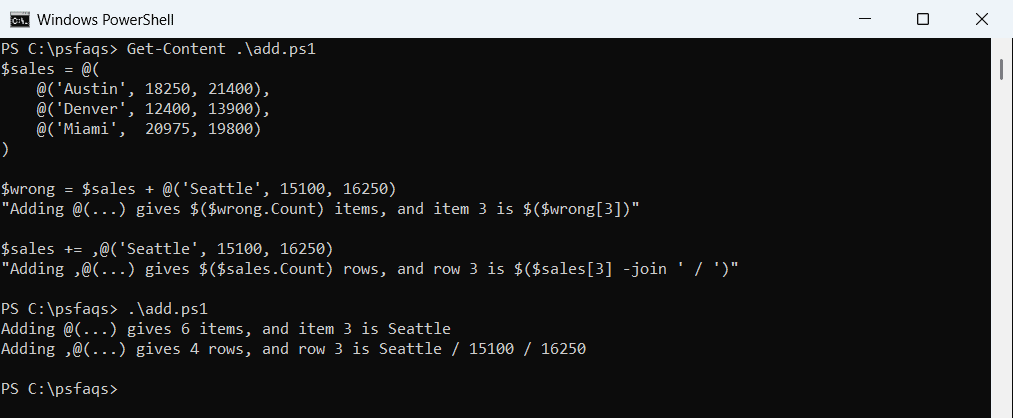
The comma operator wraps the row in a one-item array, which += then unwraps once.
A single row needs the comma too
For the same reason, @(@(…)) with only one row collapses into a flat array:
$one = @(@('Austin', 18250))
"Without a comma: $($one.Count) items, first is $($one[0])"

$one = ,@('Austin', 18250)
"With a comma:    $($one.Count) row, first is $($one[0] -join ' / ')"
Output:
Without a comma: 2 items, first is Austin
With a comma:    1 row, first is Austin / 18250
If you build rows in a loop, add each one with ,@() or use the List shown at the end.
True two-dimensional arrays
For a fixed grid, like a seat map, create a real 2D array with a type and size. Index it with [row, column], and use GetLength for each dimension:
$seats = [string[,]]::new(3, 4)
for ($r = 0; $r -lt $seats.GetLength(0); $r++) {
    for ($c = 0; $c -lt $seats.GetLength(1); $c++) { $seats[$r, $c] = '-' }
}
$seats[1, 2] = 'X'
$seats[0, 0] = 'X'

"Rank: $($seats.Rank), rows: $($seats.GetLength(0)), columns: $($seats.GetLength(1)), cells: $($seats.Count)"
for ($r = 0; $r -lt 3; $r++) {
    "Row $($r + 1): " + ((0..3 | ForEach-Object { $seats[$r, $_] }) -join ' ')
}
Output:
Rank: 2, rows: 3, columns: 4, cells: 12
Row 1: X - - -
Row 2: - - X -
Row 3: - - - -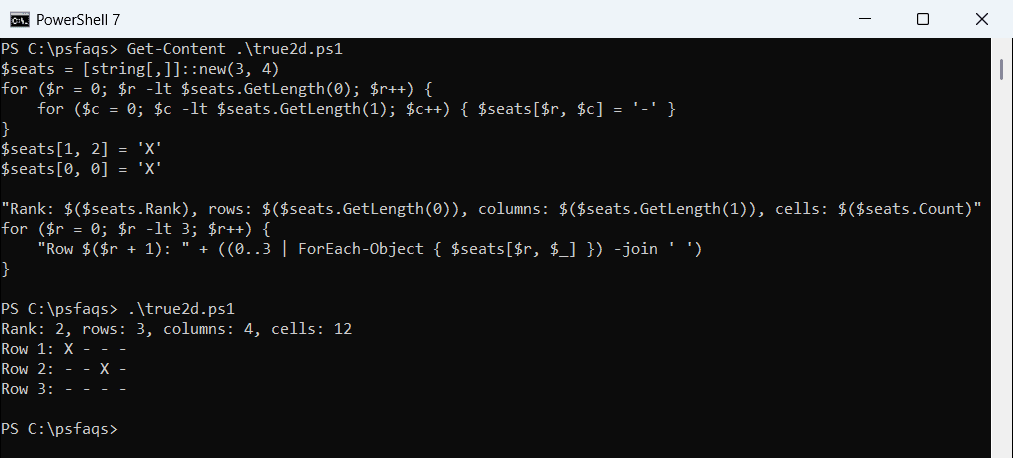
Count is the total number of cells, 12 here, not the number of rows. Rank tells you how many dimensions the array has.
2D arrays have a fixed size
You can’t add rows to a [,] array, and an index outside it throws an error:
$matrix = [int[,]]::new(2, 2)
try { $matrix[2, 0] = 5 } catch { 'Row 2 does not exist, a 2x2 array has rows 0 and 1' }
"Total cells stay fixed at $($matrix.Count)"
Output:
Row 2 does not exist, a 2x2 array has rows 0 and 1
Total cells stay fixed at 4
Pick a jagged array when rows can differ in length or grow, and a [,] array for grids whose size you know up front.
If your rows are really records, an array of objects is often easier to work with, as shown in creating an array of objects.
Loop through a multidimensional array
foreach over a jagged array gives you one row at a time:
$sales = @(
    @('Austin', 18250, 21400),
    @('Denver', 12400, 13900),
    @('Miami',  20975, 19800)
)

foreach ($row in $sales) {
    $total = $row[1] + $row[2]
    '{0,-7} Q1 {1,7:C0}  Q2 {2,7:C0}  Total {3,8:C0}' -f $row[0], $row[1], $row[2], $total
}
Output:
Austin  Q1 $18,250  Q2 $21,400  Total  $39,650
Denver  Q1 $12,400  Q2 $13,900  Total  $26,300
Miami   Q1 $20,975  Q2 $19,800  Total  $40,775
For a [,] array, use two for loops with GetLength(0) and GetLength(1), as in the seat map example.
A better option for tables: objects
If each row describes one thing, an array of objects is easier to read, sort and export than an array of arrays:
$sales = @(
    @('Austin', 18250, 21400),
    @('Denver', 12400, 13900),
    @('Miami',  20975, 19800)
)

$sales | ForEach-Object {
    [pscustomobject]@{ City = $_[0]; Q1 = $_[1]; Q2 = $_[2] }
} | Sort-Object -Property Q2 -Descending | Format-Table
Output:
City      Q1    Q2
----      --    --
Austin 18250 21400
Miami  20975 19800
Denver 12400 13900
Named properties replace magic column numbers like $_[2]. Creating an array of objects covers this in detail.
A growable list of rows
For rows you’ll add and remove often, use a List of arrays. Add takes the row as one item, with no comma needed:
$rows = [System.Collections.Generic.List[object[]]]::new()
$rows.Add(@('WEB01', 'Online'))
$rows.Add(@('SQL01', 'Offline'))

"Rows: $($rows.Count), second se