
To convert an array to a string in PowerShell, use the -join operator with the separator you want between the items:
$servers = 'WEB01', 'WEB02', 'SQL01'
$servers -join ', '
Output:
WEB01, WEB02, SQL01-join works with any separator, including none. It’s the method I’d reach for first, because it’s short, clear and works the same in every PowerShell version.
I ran every example in PowerShell 7.6 and Windows PowerShell 5.1. The only differences are the PowerShell 7 extras, which I point out.
Join with different separators
Put any text after -join. Put -join in front of the array instead, and the items are joined with nothing in between:
$servers = 'WEB01', 'WEB02', 'SQL01'

"Comma:     $($servers -join ',')"
"Semicolon: $($servers -join '; ')"
"Nothing:   $($servers -join '')"
"Unary:     $(-join $servers)"
Output:
Comma:     WEB01,WEB02,SQL01
Semicolon: WEB01; WEB02; SQL01
Nothing:   WEB01WEB02SQL01
Unary:     WEB01WEB02SQL01
To put each item on its own line, join with a line break:
$servers = 'WEB01', 'WEB02', 'SQL01'
$servers -join [Environment]::NewLine
Output:
WEB01
WEB02
SQL01
[Environment]::NewLine uses the right line ending for the system, which is carriage return plus line feed on Windows.
Cast the array or put it in quotes
Casting an array to [string], or putting it inside double quotes, also joins it. The separator comes from the $OFS variable, which is a space unless you change it:
$servers = 'WEB01', 'WEB02', 'SQL01'

"Cast:           $([string]$servers)"
"In quotes:      $servers"

$OFS = ' | '
"With `$OFS set: $servers"
Output:
Cast:           WEB01 WEB02 SQL01
In quotes:      WEB01 WEB02 SQL01
With $OFS set: WEB01 | WEB02 | SQL01
I’d avoid changing $OFS in scripts. It affects every array that’s turned into a string later on, which makes bugs hard to trace. Use -join where you need a separator.
The .NET Join method
[string]::Join() gives the same result as -join. You’ll see it in code copied from C#:
$servers = 'WEB01', 'WEB02', 'SQL01'
[string]::Join(', ', $servers)
Output:
WEB01, WEB02, SQL01Use Join-String in PowerShell 7
PowerShell 7 added Join-String, which works in the pipeline and can quote items or add a prefix for you:
$servers = 'WEB01', 'WEB02', 'SQL01'

$servers | Join-String -Separator ', '
$servers | Join-String -Separator ', ' -SingleQuote
$servers | Join-String -Separator ', ' -OutputPrefix 'Servers: '
Output in PowerShell 7:
WEB01, WEB02, SQL01
'WEB01', 'WEB02', 'SQL01'
Servers: WEB01, WEB02, SQL01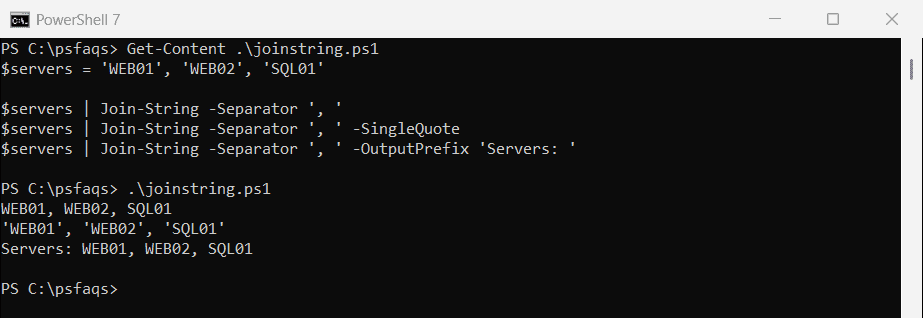
Windows PowerShell 5.1 doesn’t have it and stops with “The term ‘Join-String’ is not recognized”. Stick with -join in scripts that run on both.
Quote each item in 5.1
For a quoted list, for example to build a SQL IN (...) clause, join with the closing quote, separator and opening quote, then add one quote at each end:
$servers = 'WEB01', 'WEB02', 'SQL01'

"'" + ($servers -join "', '") + "'"
'"' + ($servers -join '", "') + '"'
Output:
'WEB01', 'WEB02', 'SQL01'
"WEB01", "WEB02", "SQL01"
Convert an array of objects to a string
This is the most common surprise. Joining custom objects doesn’t give you their values. It gives you almost nothing:
$users = @(
    [pscustomobject]@{ Name = 'Maria Garcia'; City = 'Austin' }
    [pscustomobject]@{ Name = 'James Smith'; City = 'Dallas' }
)

$users -join ', '
Output:
,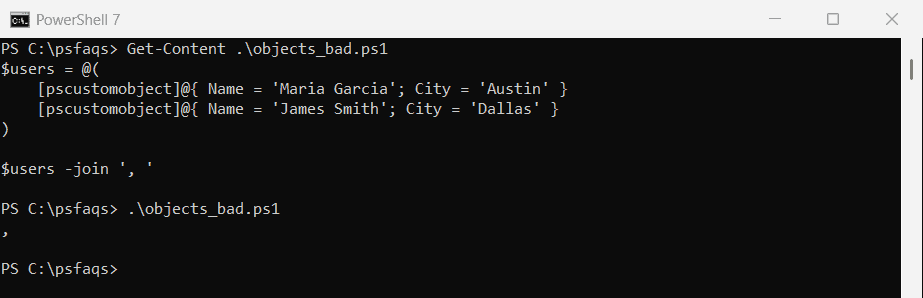
Each object turns into an empty string, so only the separator is left. Pick the property you want first, or build the text for each object yourself:
$users = @(
    [pscustomobject]@{ Name = 'Maria Garcia'; City = 'Austin' }
    [pscustomobject]@{ Name = 'James Smith'; City = 'Dallas' }
)

$users.Name -join ', '
($users | ForEach-Object { "$($_.Name) ($($_.City))" }) -join '; '
Output:
Maria Garcia, James Smith
Maria Garcia (Austin); James Smith (Dallas)
Get an array of strings from objects
When you need a list of strings rather than one string, Select-Object -ExpandProperty gives you exactly that:
$users = @(
    [pscustomobject]@{ Name = 'Maria Garcia'; City = 'Austin' }
    [pscustomobject]@{ Name = 'James Smith'; City = 'Dallas' }
)

$names = $users | Select-Object -ExpandProperty Name
"$($names.Count) names, each a $($names[0].GetType().Name)"
Output:
2 names, each a StringIn PowerShell 7, Join-String -Property picks the property and joins in one step:
$users = @(
    [pscustomobject]@{ Name = 'Maria Garcia'; City = 'Austin' }
    [pscustomobject]@{ Name = 'James Smith'; City = 'Dallas' }
)

$users | Join-String -Property Name -Separator ', '
Output in PowerShell 7:
Maria Garcia, James SmithMore on getting values out of objects in PowerShell Select-Object.
Skip empty values
Empty strings and $null still get a separator, which leaves gaps. Filter them out first:
$cities = 'Austin', '', $null, 'Dallas'

"As is:     $($cities -join ', ')"
"Filtered:  $(($cities | Where-Object { $_ }) -join ', ')"