
To print an array in PowerShell, type the variable name or pass it to Write-Output, and every item prints on its own line. For a single line, join the items with -join:
$cities = 'Austin', 'Denver', 'Seattle'
$cities                # one item per line
$cities -join ', '     # Austin, Denver, Seattle
That covers most cases, but arrays of objects, hashtables and files behave differently. I ran each example below in PowerShell 7 and Windows PowerShell 5.1, and I’ll point out where the two printed different results.
Print an array in PowerShell by typing its name
PowerShell sends anything you don’t capture to the output stream, so typing $cities prints the whole array. Write-Output (alias echo) does the same thing explicitly, which some people prefer in scripts. Here’s an array of four cities printed both ways:
$cities = 'Austin', 'Denver', 'Seattle', 'Boston'
$cities
Write-Output $cities
Output:
Austin
Denver
Seattle
Boston
Austin
Denver
Seattle
Boston
Both lines printed the same four items, one per line. Write-Output enumerates the array, which means it sends each item down the pipeline separately.
For a short array that’s all you need. The Write-Output cmdlet guide covers the rest of its options.
Print a single element, a range or the last item
Arrays are zero-based, so the first item is at index 0. A negative index counts from the end, and the range operator .. returns several items at once:
$cities = 'Austin', 'Denver', 'Seattle', 'Boston', 'Miami'
"First:  $($cities[0])"
"Last:   $($cities[-1])"
"Range:  $($cities[1..3])"
"Picked: $($cities[0, 4])"
Output:
First:  Austin
Last:   Miami
Range:  Denver Seattle Boston
Picked: Austin Miami
$cities[-1] returned Miami without any math, and $cities[1..3] returned items 2 through 4. A comma list such as [0, 4] picks specific positions.
When the range sits inside a string, the items print on one line separated by spaces. If you only need the first item, see getting the first element of an array.
How do I print an array on one line in PowerShell?
There are four quick ways, and each one gives you a different separator. Write-Host, -join, string expansion and the $OFS variable all print the array on a single line:
$cities = 'Austin', 'Denver', 'Seattle', 'Boston', 'Miami'
Write-Host $cities
Write-Host $cities -Separator ', '
$cities -join ' | '
"Offices: $cities"
$OFS = '; '
"With OFS: $cities"
Output:
Austin Denver Seattle Boston Miami
Austin, Denver, Seattle, Boston, Miami
Austin | Denver | Seattle | Boston | Miami
Offices: Austin Denver Seattle Boston Miami
With OFS: Austin; Denver; Seattle; Boston; Miami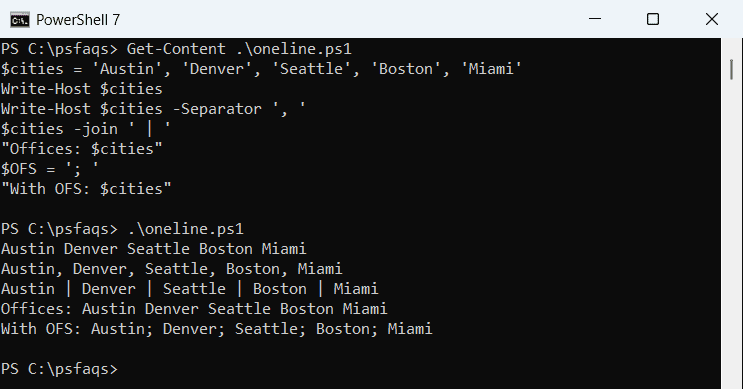
Write-Host prints a collection on one line with a single space between items. Its -Separator parameter swaps the space for any string you like, such as a comma and a space.
The -join operator builds a real string, so you can store it, compare it or send it on. To turn the array into a value rather than just display it, see converting an array to a string.
Putting $cities inside double quotes uses the Output Field Separator, $OFS. It doesn’t exist by default, so PowerShell uses a space, but setting it changes every array you expand in a string after that.
Write-Host vs Write-Output when you print an array
The two look alike on screen, but only one of them produces output you can keep. Write-Host writes straight to the host, while Write-Output writes to the pipeline:
$cities = 'Austin', 'Denver', 'Seattle'
$fromHost = Write-Host $cities
$fromOutput = Write-Output $cities
"Write-Host captured:   $($null -eq $fromHost) (nothing stored)"
"Write-Output captured: $($fromOutput.Count) items"
Output:
Austin Denver Seattle
Write-Host captured:   True (nothing stored)
Write-Output captured: 3 items
The cities still appeared on screen, yet $fromHost stayed empty. $fromOutput held all 3 items, because Write-Output sent them to the success stream.
Use Write-Host for messages a person reads, especially with colored Write-Host text. Use Write-Output or plain output when a script, file or another command needs the data. There’s a longer comparison in Write-Host vs Write-Output.
Print each array item with a foreach loop
A loop gives you full control over every line. PowerShell has three common options: the foreach statement, a for loop with an index, and the ForEach-Object cmdlet in a pipeline:
$tickets = 'T-1001', 'T-1002', 'T-1003'
foreach ($t in $tickets) { "Ticket: $t" }
for ($i = 0; $i -lt $tickets.Count; $i++) { "[$i] $($tickets[$i])" }
$tickets | ForEach-Object { "Piped: $_" }
Output:
Ticket: T-1001
Ticket: T-1002
Ticket: T-1003
[0] T-1001
[1] T-1002
[2] T-1003
Piped: T-1001
Piped: T-1002
Piped: T-1003
All three printed the same tickets. The for loop is the one to pick when you need the position, since $i gives you the index alongside the item.
The PowerShell foreach loop is the fastest choice for an array already in memory. ForEach-Object is better when items stream in from another command, as the ForEach-Object examples show.
Print array items with custom formatting
The format operator -f lines up columns and formats numbers. {1,-11} left-aligns text in 11 characters, and {2,9:C2} right-aligns a currency value with two decimals:
$items  = 'Keyboard', 'Monitor', 'Desk chair'
$prices = 49.99, 219.5, 135
for ($i = 0; $i -lt $items.Count; $i++) {
    '{0}. {1,-11}{2,9:C2}' -f ($i + 1), $items[$i], $prices[$i]
}
'Total: {0:C2}' -f ($prices | Measure-Object -Sum).Sum
Output:
1. Keyboard      $49.99
2. Monitor      $219.50
3. Desk chair   $135.00
Total: $404.49
The prices lined up on the right with dollar signs, even though 219.5 and 135 were stored without cents. The total came from Measure-Object, which added the same array.
C2 uses the current culture’s currency, so a US system shows dollars. For a fixed format on any machine, use {0:N2} USD instead.