
To pick random items from an array in PowerShell, pipe the array to Get-Random. Add -Count to get several different items at once:
$cities | Get-Random            # one random item
$cities | Get-Random -Count 3   # three different items
That covers most scripts. Below I’ll show repeats, shuffling, repeatable picks, weighted choices, and the places where Windows PowerShell 5.1 behaves differently from PowerShell 7.
How do I pick a random item from an array in PowerShell?
Get-Random returns a random number when you call it alone, but it switches to picking from a collection when you give it one. You can pipe the array in or pass it with -InputObject:
$cities = 'Austin', 'Denver', 'Seattle', 'Boston', 'Chicago'
$cities | Get-Random
Get-Random -InputObject $cities
Output:
Boston
Seattle
Each line is one pick, so your cities will differ from mine. Both forms do the same job; I pipe when the array comes from another command and use -InputObject when it’s already in a variable.
Get-Random returns the element itself, not a copy or an index. If you only ever need a fixed position, getting the first element of an array works the same way with an index.
Pick multiple random items without repeats using -Count
The -Count parameter picks several items in one call. Each item is returned only once, which is exactly what you want for a raffle or a test sample:
$names = 'Maria Lopez', 'Tom Baker', 'Dana Reyes', 'Kevin Price', 'Amy Chen'
$winners = $names | Get-Random -Count 3
$winners
"Picked $($winners.Count) different people"
Output:
Amy Chen
Dana Reyes
Kevin Price
Picked 3 different people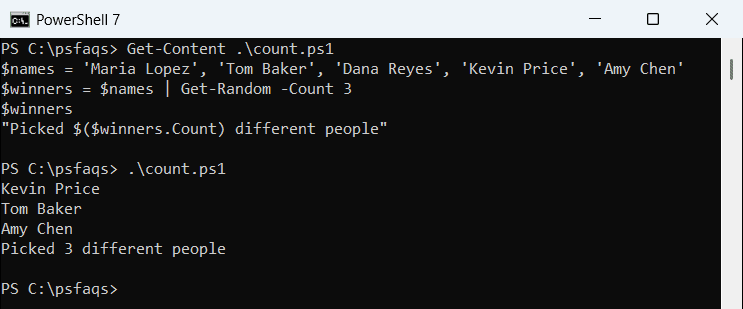
The three names are always different, and they come back in random order too. Run it again and you’ll get a new set.
What if you ask for more items than the array holds? Get-Random doesn’t throw an error. It simply returns every item in random order:
$cities = 'Austin', 'Denver', 'Seattle', 'Boston', 'Chicago'
$picked = $cities | Get-Random -Count 10
"Asked for 10, got $($picked.Count)"
Output:
Asked for 10, got 5Both PowerShell 7 and 5.1 printed the same line. If your script depends on an exact number of picks, check the array length before you call Get-Random.
Pick random items with repeats allowed
Sometimes repeats are fine, like simulating dice rolls or random test data. Call Get-Random once per draw inside a loop, so each draw sees the whole array:
$cities = 'Austin', 'Denver', 'Seattle', 'Boston', 'Chicago'
$draws = 1..6 | ForEach-Object { $cities | Get-Random }
$draws -join ', '
Output:
Denver, Austin, Austin, Chicago, Seattle, DenverHere Denver or Austin can show up twice, because every pick starts fresh. ForEach-Object is the shortest way to repeat a pick a set number of times.
How do I shuffle an array in PowerShell?
PowerShell 7.1 added the -Shuffle switch, which returns the whole collection in a random order:
$cities = 'Austin', 'Denver', 'Seattle', 'Boston', 'Chicago'
$cities | Get-Random -Shuffle
Output:
Austin
Boston
Denver
Seattle
Chicago
-Shuffle lives in its own parameter set, so you can’t combine it with -Count. Windows PowerShell 5.1 doesn’t have it at all and stops with this error:
Get-Random : A parameter cannot be found that matches parameter name 'Shuffle'.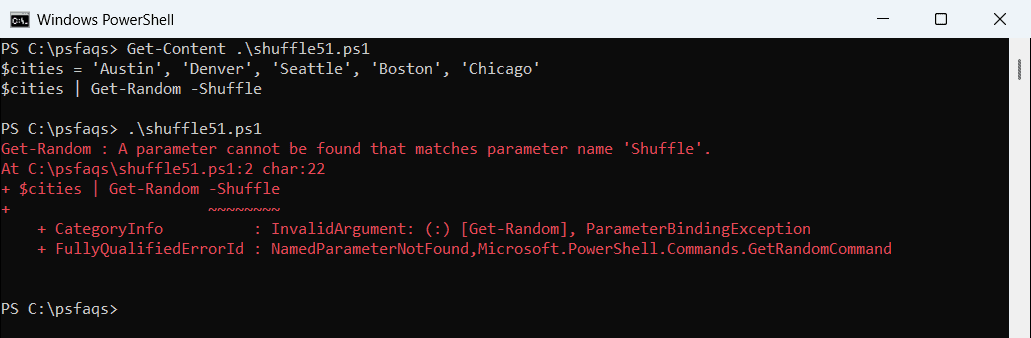
A shuffle that works in both versions is -Count set to the array’s length. Since Count returns every item once in random order, you get a full shuffle:
$cities = 'Austin', 'Denver', 'Seattle', 'Boston', 'Chicago'
$shuffled = $cities | Get-Random -Count $cities.Count
$shuffled -join ', '
Output:
Seattle, Denver, Boston, Chicago, AustinYou’ll also see $cities | Sort-Object { Get-Random } in older scripts. It works, but I prefer -Count because it says what it does. The Sort-Object guide covers sorting the shuffled result back if you need to.
Get a random index or use System.Random
If you need the position as well as the value, pick a random index. -Maximum is exclusive, so passing the array’s Count always gives a valid index:
$cities = 'Austin', 'Denver', 'Seattle', 'Boston', 'Chicago'
$i = Get-Random -Maximum $cities.Count
"Index $i -> $($cities[$i])"
Output:
Index 4 -> ChicagoThis is handy when you want to remove the picked item from the array afterward, since you already know where it sits.
The .NET System.Random class does the same thing without the cmdlet. I use it inside tight loops, where calling a cmdlet thousands of times adds up:
$cities = 'Austin', 'Denver', 'Seattle', 'Boston', 'Chicago'
$rng = [System.Random]::new()
$cities[$rng.Next($cities.Count)]
Output:
DenverCreate the Random object once and reuse it. Creating a new one in every loop pass is a common mistake that makes the picks less random.
Get the same random picks every time with -SetSeed
For tests and demos, -SetSeed makes Get-Random repeatable. The same seed always returns the same pick:
$cities