
The quickest way to clear an array in PowerShell is to assign it a new empty array with @(). The variable then holds zero items:
$cities = 'Austin', 'Denver', 'Seattle'
$cities = @()
$cities.Count    # 0
That isn’t the only option, and the obvious one, $cities.Clear(), doesn’t do what most people expect. I tested each method in PowerShell 7 and 5.1, and one works only in 7.
Clear an array in PowerShell with @()
A regular PowerShell array has a fixed size, so you can’t remove its items in place. Instead, you point the variable at a brand-new empty array. If the variable was declared with a type such as [int[]], that type stays:
$cities = 'Austin', 'Denver', 'Seattle'
"Before: $($cities.Count) items"
$cities = @()
"After:  $($cities.Count) items, type $($cities.GetType().Name)"
[int[]]$scores = 88, 92, 75
$scores = @()
"Typed:  $($scores.Count) items, type $($scores.GetType().Name)"
Output:
Before: 3 items
After:  0 items, type Object[]
Typed:  0 items, type Int32[]
The plain array went from 3 items to 0 and stayed an Object[]. The typed $scores variable also dropped to 0 items and kept its Int32[] type, so it still accepts only numbers.
This is the same @() you use to create an empty array in PowerShell. After the reset, the array’s Count property reads 0, which is the easiest way to confirm it worked.
What does the Clear() method do to a PowerShell array?
Arrays have a Clear() method, but it doesn’t empty the array. Microsoft’s documentation says it sets every element to the default value of its type and doesn’t change the size. Here’s what that looks like:
$cities = 'Austin', 'Denver', 'Seattle'
$cities.Clear()
"Count after Clear(): $($cities.Count)"
"Null items:          $(@($cities | Where-Object { $null -eq $_ }).Count)"
[int[]]$scores = 88, 92, 75
$scores.Clear()
"Int array now:       $($scores -join ', ')"
Output:
Count after Clear(): 3
Null items:          3
Int array now:       0, 0, 0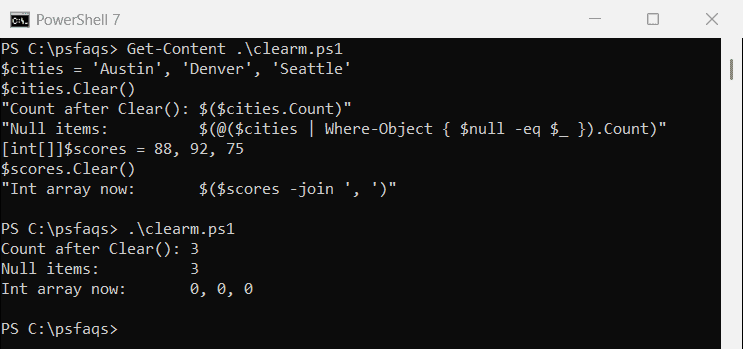
After Clear(), the city array still had 3 items, and all 3 were $null. The [int[]] array kept 3 items too, but each one became 0, because 0 is the default value for an integer.
That matters when you check if an array is empty later. A test on .Count -eq 0 fails after Clear(), since the array still reports 3 items. Both PowerShell 7 and 5.1 behaved the same way here.
@() vs Clear() when two variables share an array
Arrays are reference types. When you copy one variable into another, both names point to the same array in memory, so the clearing method you pick decides which variable changes:
$queue = 'T-1001', 'T-1002', 'T-1003'
$backup = $queue
$queue = @()
"Reassign -> queue $($queue.Count), backup $($backup.Count)"
$queue = 'T-1001', 'T-1002', 'T-1003'
$backup = $queue
$queue.Clear()
"Clear()  -> backup holds [$($backup -join ',')]"
Output:
Reassign -> queue 0, backup 3
Clear()  -> backup holds [,,]
Reassigning $queue to @() left $backup with all 3 tickets, because only $queue moved to a new array. Clear() changed the shared array itself, so $backup ended up with three empty slots.
If you want a safe copy before you clear something, use $backup = $queue.Clone() instead of a plain assignment. There’s more on how this works in PowerShell reference variables.
Clear an array or list inside a function
The same rule applies when you pass a collection to a function. Assigning @() to a parameter only changes the function’s own copy of the variable, while calling a method changes the caller’s object:
function Reset-Queue($list)  { $list = @() }
function Clear-Queue($list)  { $list.Clear() }
$queue = [System.Collections.Generic.List[string]]@('T-1001', 'T-1002')
Reset-Queue $queue
"After Reset-Queue: $($queue.Count