
To remove blank lines from an array in PowerShell, pipe the array to Where-Object and keep only items that aren’t null, empty or whitespace:
$clean = $lines | Where-Object { -not [string]::IsNullOrWhiteSpace($_) }I tested every example below in PowerShell 7 and Windows PowerShell 5.1, including a popular shortcut that crashes on null items.
Remove blank lines from an array with Where-Object
This array of office names has an empty string, spaces, a $null and a tab mixed in:
$lines = 'Austin', '', 'Denver', '   ', $null, "`t", 'Seattle'
"Before: $($lines.Count) items"
$clean = $lines | Where-Object { -not [string]::IsNullOrWhiteSpace($_) }
"After:  $($clean.Count) items"
$clean
Output:
Before: 7 items
After:  3 items
Austin
Denver
Seattle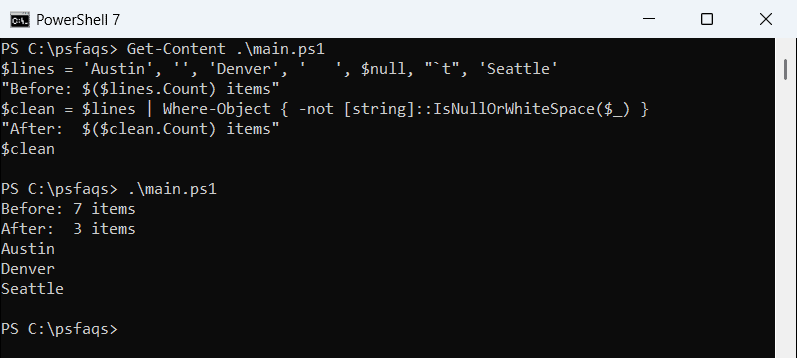
Seven items went in and three came out. IsNullOrWhiteSpace() is True for null, empty and whitespace-only strings, so -not keeps the rest.
The Where-Object cmdlet filters any array. For arrays of objects, test a property instead, as in Where-Object for null or empty values.
Why do Where-Object { $_ } and -ne ” leave blank lines?
Three common shortcuts fail in different ways. Here they are against the same seven items:
$lines = 'Austin', '', 'Denver', '   ', $null, "`t", 'Seattle'
$truthy = $lines | Where-Object { $_ }
$notEmpty = $lines -ne ''
"Where-Object { `$_ } kept: $($truthy.Count)"
"-ne '' kept:            $($notEmpty.Count)"
try {
    $null = $lines | Where-Object { $_.Trim() -ne '' } -ErrorAction Stop
} catch { "Trim() test: Failed. $($_.Exception.Message)" }
$qty = 10, 0, '', 25
"Numbers kept: $(($qty | Where-Object { $_ }) -join ', ')"
Output:
Where-Object { $_ } kept: 5
-ne '' kept:            6
Trim() test: Failed. You cannot call a method on a null-valued expression.
Numbers kept: 10, 25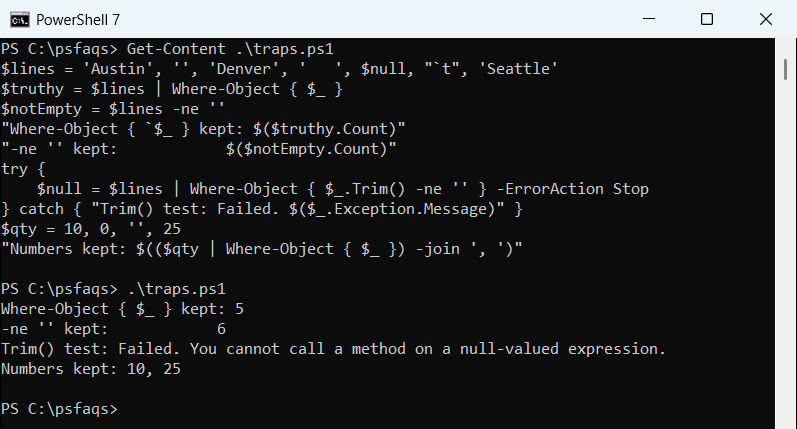
Where-Object { $_ } kept 5, because spaces or a tab count as True. It also dropped the quantity 0.
-ne '' kept 6. With an array on the left, a comparison operator returns matching items, and only truly empty strings fail the test.
$_.Trim() -ne '' threw an error on $null. The IsNullOrEmpty vs IsNullOrWhiteSpace comparison explains why the .NET method is safer.
Remove empty array elements with -match, .Where() or RemoveAll
The -match operator with '\S' keeps items containing a non-space character. The .Where() method and a list’s RemoveAll work too:
$lines = 'Austin', '', 'Denver', '   ', $null, "`t", 'Seattle'
"-match:    $(($lines -match '\S') -join ', ')"
"Where():   $($lines.Where({ $_ -and $_.Trim() }) -join ', ')"
$list = [System.Collections.Generic.List[string]]::new([string[]]$lines)
$gone = $list.RemoveAll({ param($s) [string]::IsNullOrWhiteSpace($s) })
"RemoveAll: removed $gone, left $($list -join ', ')"
Output:
-match:    Austin, Denver, Seattle
Where():   Austin, Denver, Seattle
RemoveAll: removed 4, left Austin, Denver, Seattle
RemoveAll changes the list in place and returns the number removed. The array vs ArrayList guide covers when a list fits better. To drop items by value, see removing items from an array.
Remove empty lines when you split a multi-line string
Splitting text is where PowerShell 7 and Windows PowerShell 5.1 disagreed:
$text = "Austin`r`n`r`nDenver`r`n   `r`nSeattle"
"Split(CRLF):  $($text.Split("`r`n").Count) items"
"-split regex: $(($text -split '\r?\n').Count) items"
$clean = $text -split '\r?\n' | Where-Object { $_.Trim() }
"Filtered:     $($clean -join ', ')"
try {
    $opt = [StringSplitOptions]'RemoveEmptyEntries,TrimEntries'
    "TrimEntries:  $($text.Split("`n", $opt) -join ', ')"
} catch { 'TrimEntries:  Failed. Not available in this version' }
Output:
Split(CRLF):  5 items
-split regex: 5 items
Filtered:     Austin, Denver, Seattle
TrimEntries:  Austin, Denver, Seattle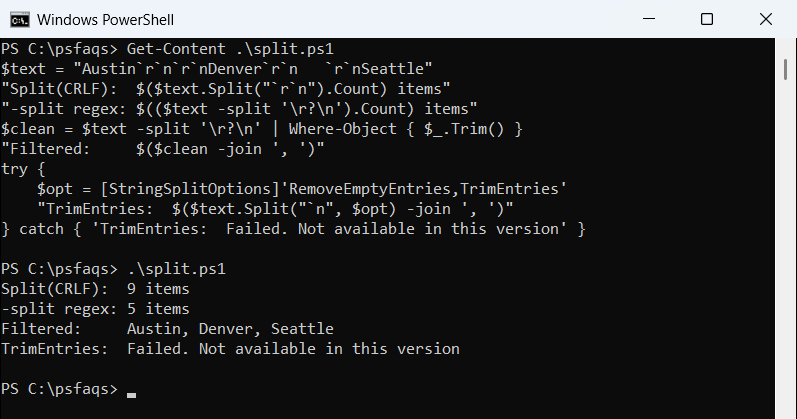
.Split("`r`n") returned 5 items in 7 but 9 in 5.1, which splits on CR and LF separately. TrimEntries needs .NET 5, so it worked only in 7.
The -split '
?
' regex plus a filter matched in both. More options are in splitting strings in PowerShell.
How do I remove blank lines from a text file in PowerShell?
Get-Content returns an array of lines. Wrap it in parentheses so the file is fully read before Set-Content writes back:
Set-Content .\offices.txt -Value 'Austin', '', 'Denver', '  ', 'Seattle', ''
$before = (Get-Content .\offices.txt).Count
(Get-Content .\offices.txt) | Where-Object { $_.Trim() } |
    Set-Content .\offices.txt
$after = (Get-Content .\offices.txt).Count
"Lines before: $before, after: $after"
Get-Content .\offices.txt
Output:
Lines before: 6, after: 3
Austin
Denver
Seattle
The file went from 6 lines to 3. File lines are never null, so $_.Trim() is safe here. On big logs, count the lines in the file to confirm.