
To reverse an array in PowerShell, pass it to the .NET [array]::Reverse() method. It flips the items in place, so the same variable now holds them in the opposite order:
$cities = 'Austin', 'Denver', 'Seattle', 'Boston'
[array]::Reverse($cities)
$cities    # Boston, Seattle, Denver, Austin
To keep the original order too, a negative index range gives you a reversed copy. I ran each method in PowerShell 7 and 5.1.
Reverse an array in place with [array]::Reverse()
[array]::Reverse() changes the array you give it and returns nothing. Assigning its result to a variable is a common mistake:
$cities = 'Austin', 'Denver', 'Seattle', 'Boston'
[array]::Reverse($cities)
$cities -join ', '
$result = [array]::Reverse($cities)
"Return value is null: $($null -eq $result)"
Output:
Boston, Seattle, Denver, Austin
Return value is null: True
The cities came back in reverse order, while $result was $null. Call the method on its own line, then use the original variable, for example to print the array in PowerShell.
Reverse an array into a new copy
Negative indexes count from the end, so -1 is the last item and -1..-$cities.Length walks back to the first. You can also reverse a clone:
$cities = 'Austin', 'Denver', 'Seattle', 'Boston'
$reversed = $cities[-1..-$cities.Length]
"Range:    $($reversed -join ', ')"
$copy = $cities.Clone()
[array]::Reverse($copy)
"Clone:    $($copy -join ', ')"
"Original: $($cities -join ', ')"
Output:
Range:    Boston, Seattle, Denver, Austin
Clone:    Boston, Seattle, Denver, Austin
Original: Austin, Denver, Seattle, Boston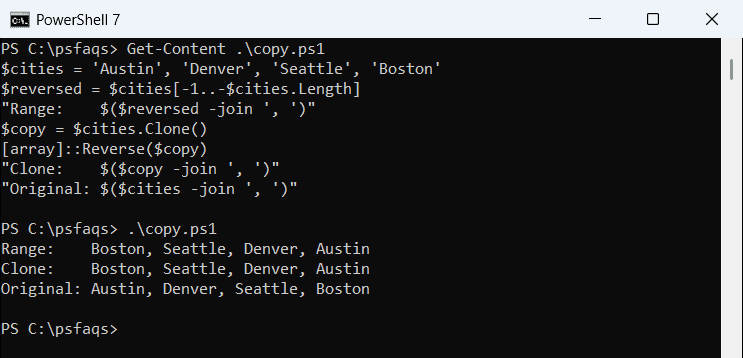
Both lines returned Boston first, and $cities kept its original order. The range trick builds on the same indexes you use to get the first element of an array.
Reverse an array with a for loop
A for loop that counts down from the last index lets you add logic per item. Assigning the loop to a variable collects its output:
$tickets = 'T-1001', 'T-1002', 'T-1003'
$reversed = for ($i = $tickets.Count - 1; $i -ge 0; $i--) {
    $tickets[$i]
}
$reversed -join ', '
Output:
T-1003, T-1002, T-1001It also avoids +=, which rebuilds the array on every pass. More in the PowerShell for loop.
How do I reverse a List or part of an array?
A generic List has its own Reverse() method. For a plain array, [array]::Reverse() also takes a starting index and a count:
$names = [System.Collections.Generic.List[string]]@('Maria', 'Tom', 'Dana')
$names.Reverse()
"List:  $($names -join ', ')"
$steps = 1..5
[array]::Reverse($steps, 1, 3)
"Range: $($steps -join ', ')"
Output:
List:  Dana, Tom, Maria
Range: 1, 4, 3, 2, 5
In the range example, only the three items from index 1 changed places. If you’re choosing between collection types, see array vs ArrayList in PowerShell.
Is Sort-Object -Descending the same as reversing an array?
No. Sort-Object -Descending orders items by value, while reversing only flips their positions. The results match only when the array is already sorted:
$cities = 'Austin', 'Denver', 'Seattle', 'Boston'
"Sorted:   $(($cities | Sort-Object -Descending) -join ', ')"
"Reversed: $($cities[-1..-$cities.Length] -join ', ')"
Output:
Sorted:   Seattle, Denver, Boston, Austin
Reversed: Boston, Seattle, Denver, Austin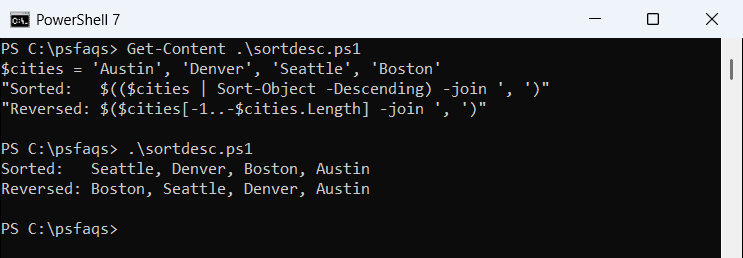
Sorting put Seattle first; reversing put Boston first. Use sorting when you want Z to A, as covered in sorting an array in PowerShell.
Reverse a string or a single item
To reverse a string, turn it into a character array, reverse it and join it back. The other trap is a variable that holds one string, not an array, because the negative range then reverses its characters:
$chars = [char[]]'Denver'
[array]::Reverse($chars)
-join $chars
$one = 'Austin'
"Scalar:  $($one[-1..-$one.Length] -join ',')"
"Wrapped: $(@($one)[-1..-@($one).Length] -join ',')"
Output:
revneD
Scalar:  n,i,t,s,u,A
Wrapped: Austin
Wrapping the value in @() keeps it a one-item array. To turn the reversed array back into text, see converting an array to a string.
[array]::Reverse() errors in PowerShell 7 vs 5.1
Passing $null throws an error in both versions, and the message is worded differently:
$servers = $null
try {
    [array]::Reverse($servers)
} catch {
    "Failed. $($_.Exception.InnerException.Message)"
}
Output:
Failed. Value cannot be null. (Parameter 'array')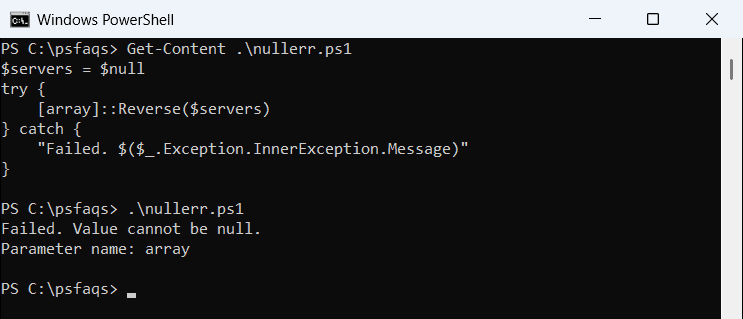
PowerShell 7 printed (Parameter 'array') on one line, while 5.1 used a second line.
Check the variable first, as shown in checking if an array is empty.
Frequently Asked Questions
Frequently Asked Questions
How do I reverse an array in PowerShell?
Run [array]::Reverse($array). It reverses the items in place and returns nothing, as the <