
The short version of Where-Object vs Select-Object: Where-Object decides which objects (rows) stay in the pipeline, and Select-Object decides which properties (columns) each object keeps. Most real commands use both, filter first:
$orders | Where-Object Total -gt 100 | Select-Object Customer, TotalI’ll show what each cmdlet returns, why the order matters, the row tricks Select-Object also has, and one version difference between PowerShell 7 and Windows PowerShell 5.1.
Where-Object filters rows, Select-Object picks properties
To keep the output the same on every PC, I’m using four sample orders instead of Get-Process. Think of them as a small table with Id, Customer, City and Total columns.
Here’s the list, followed by each cmdlet on its own:
$orders = @(
    [pscustomobject]@{ Id = 1001; Customer = 'Maria Lopez'; City = 'Austin'; Total = 250 }
    [pscustomobject]@{ Id = 1002; Customer = 'Tom Baker'; City = 'Denver'; Total = 85 }
    [pscustomobject]@{ Id = 1003; Customer = 'Dana Reyes'; City = 'Seattle'; Total = 410 }
    [pscustomobject]@{ Id = 1004; Customer = 'Sam Carter'; City = 'austin'; Total = 120 }
)

'Where-Object (rows):'
($orders | Where-Object Total -gt 100 | Format-Table | Out-String).Trim("`r`n")
'Select-Object (columns):'
($orders | Select-Object Customer, Total | Format-Table | Out-String).Trim("`r`n")
Output:
Where-Object (rows):
  Id Customer    City    Total
  -- --------    ----    -----
1001 Maria Lopez Austin    250
1003 Dana Reyes  Seattle   410
1004 Sam Carter  austin    120
Select-Object (columns):
Customer    Total
--------    -----
Maria Lopez   250
Tom Baker      85
Dana Reyes    410
Sam Carter    120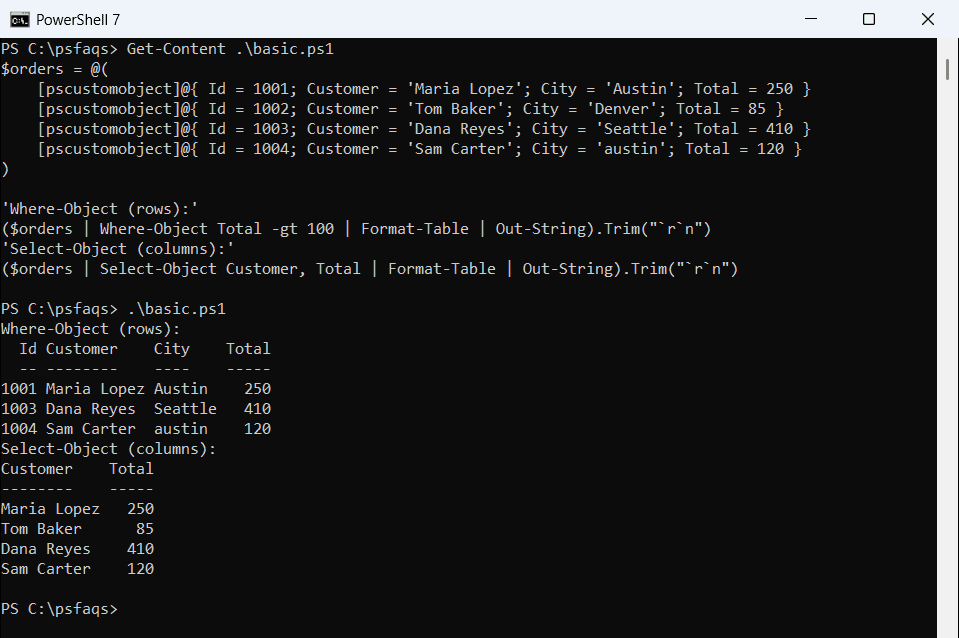
Where-Object dropped the $85 order but kept all four columns. Select-Object kept every order but trimmed each one down to two columns.
That’s the whole difference in one picture. The Where-Object guide for PowerShell covers the filter syntax and operators in depth.
What does each cmdlet return?
This is the part most comparisons skip. Where-Object passes the original objects through untouched, while Select-Object -Property builds brand-new objects:
$big = $orders | Where-Object Total -gt 100
"Where-Object:  $($big.Count) objects, properties: $($big[0].PSObject.Properties.Name -join ', ')"
$slim = $orders | Select-Object Customer, Total
"Select-Object: $($slim.Count) objects, properties: $($slim[0].PSObject.Properties.Name -join ', ')"
"Type name:     $($slim[0].PSObject.TypeNames[0])"
Output:
Where-Object:  3 objects, properties: Id, Customer, City, Total
Select-Object: 4 objects, properties: Customer, Total
Type name:     Selected.System.Management.Automation.PSCustomObject
The new objects get a type name that starts with Selected., and they only carry the properties you asked for. Anything else, including methods, is gone.
A date makes that easy to see. Filtering keeps a real DateTime, but selecting two properties turns it into a plain custom object:
$day = [datetime]'2026-10-22'
$kept = $day | Where-Object Year -eq 2026
"Where-Object:  $($kept.GetType().Name), AddDays(7) = $($kept.AddDays(7).ToString('yyyy-MM-dd'))"
$cut = $day | Select-Object Year, Month
"Select-Object: $($cut.GetType().Name)"
try { $cut.AddDays(7) } catch { "Failed. $($_.Exception.Message)" }
Output:
Where-Object:  DateTime, AddDays(7) = 2026-10-29
Select-Object: PSCustomObject
Failed. Method invocation failed because [Selected.System.DateTime] does not contain a method named 'AddDays'.
So if you still need the object’s methods later in the script, filter it, don’t select it. The PowerShell Select-Object tutorial shows -ExpandProperty when you only want a property’s value.
Use Where-Object and Select-Object together (order matters)
When you chain them, put Where-Object first. If Select-Object runs first and removes the property you filter on, the filter silently finds nothing:
$right = $orders | Where-Object Total -gt 100 | Select-Object Customer, City
"Filter, then select: $($right.Count) rows"
$wrong = $orders | Select-Object Customer, City | Where-Object Total -gt 100
"Select, then filter: $(@($wrong).Count) rows"
Output:
Filter, then sel