
To increment a variable in PowerShell, use the ++ operator, like $count++, to add 1. Use += to add any other amount, and — to subtract 1:
$count = 0
$count++
$count++
$count += 5
$count--

"Count: $count"
Output:
Count: 6That covers numbers. Strings, IDs with leading zeros and variables inside functions need a little more care, which I show below. Every example ran in PowerShell 7.6 and Windows PowerShell 5.1, with the same results.
Count items in a loop
The most common use is a counter that goes up once per item. You can keep several counters at once, and increment one only when a condition matches:
$servers = 'web01', 'web02', 'sql01', 'sql02'
$checked = 0
$sqlCount = 0

foreach ($server in $servers) {
    $checked++
    if ($server -like 'sql*') { $sqlCount++ }
    "[$checked of $($servers.Count)] Checking $server"
}
"SQL servers found: $sqlCount"
Output:
[1 of 4] Checking web01
[2 of 4] Checking web02
[3 of 4] Checking sql01
[4 of 4] Checking sql02
SQL servers found: 2
Start each counter at 0 before the loop. The foreach loop covers the other loop styles.
Increment a string variable by 1
Values read from files, CSVs and user input are strings, even when they look like numbers. += joins text, and ++ refuses to work on a string at all:
$ticket = '41'
$ticket += 1
"'41' += 1  -> '$ticket' ($($ticket.GetType().Name))"

$ticket = '41'
try { $ticket++; "'41'++     -> $ticket" }
catch { "'41'++     -> Failed. ++ works only on numbers" }

$ticket = '41'
$ticket = [int]$ticket + 1
"[int] + 1  -> $ticket ($($ticket.GetType().Name))"
Output:
'41' += 1  -> '411' (String)
'41'++     -> Failed. ++ works only on numbers
[int] + 1  -> 42 (Int32)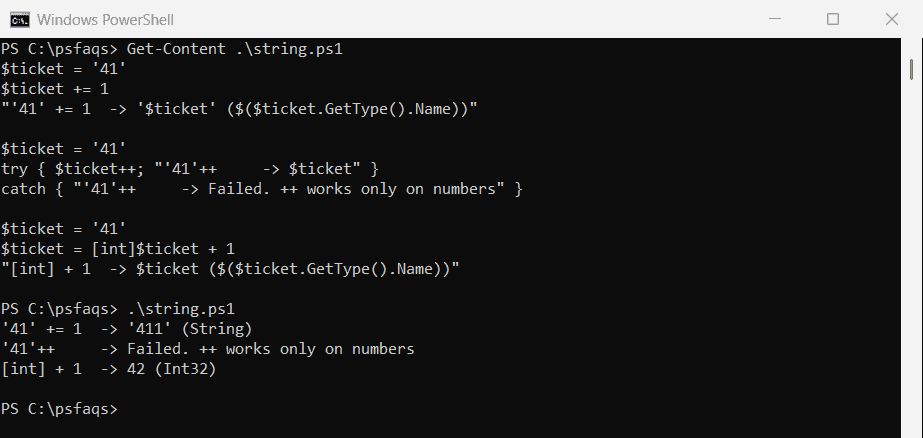
Convert the string with [int] first. Converting strings to numbers shows safer options, like TryParse, for input that might not be a number.
Increment a number inside a string
IDs like INV-0041 have a prefix and zero padding. Split off the trailing number with a regular expression, add 1, and pad it back to the same width:
function Step-Id {
    param([string]$Id)
    if ($Id -match '^(.*?)(\d+)$') {
        $number = [int]$Matches[2] + 1
        $Matches[1] + $number.ToString().PadLeft($Matches[2].Length, '0')
    }
    else { "$Id-1" }
}

foreach ($id in 'INV-0041', 'INV-0099', 'TX2026-009', 'web09', 'Report') {
    '{0,-11} -> {1}' -f $id, (Step-Id -Id $id)
}
Output:
INV-0041    -> INV-0042
INV-0099    -> INV-0100
TX2026-009  -> TX2026-010
web09       -> web10
Report      -> Report-1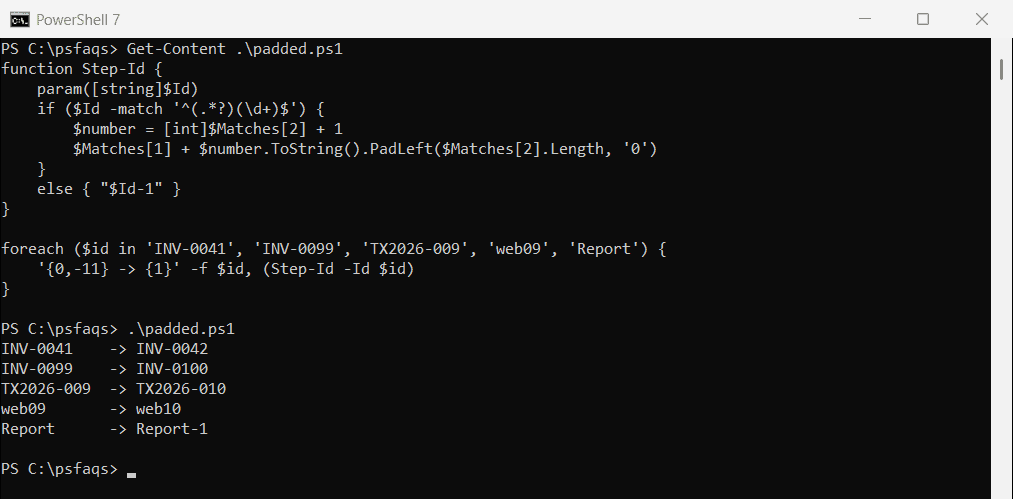
PadLeft only adds zeros, so INV-0999 becomes INV-1000 instead of losing a digit. PowerShell regex explains the pattern.
Count values with a hashtable
++ also works on a hashtable entry. If the key doesn’t exist yet, PowerShell starts it at 0, so you don’t need to check first:
$states = 'TX', 'CA', 'TX', 'WA', 'TX', 'CA'
$counts = @{}

foreach ($state in $states) { $counts[$state]++ }

$counts.GetEnumerator() | Sort-Object -Property Value -Descending |
    ForEach-Object { '{0}: {1}' -f $_.Key, $_.Value }
Output:
TX: 3
CA: 2
WA: 1
This is a quick way to count how often each value appears. Hashtables and dictionaries covers them in more depth.
Increment a variable inside a function
A function gets its own copy of outside variables, so $count++ inside it changes only the copy. Use the script: prefix to change the original:
$count = 0
function Add-One { $count++ }
Add-One; Add-One
"After a function with `$count++:         $count"

function Add-OneScript { $script:count++ }
Add-OneScript; Add-OneScript
"After a function with `$script:count++:  $count"

1..3 | ForEach-Object { $count++ }
"After ForEach-Object adds 3:            $count"
Output:
After a function with $count++:         0
After a function with $script:count++:  2
After ForEach-Object adds 3:            5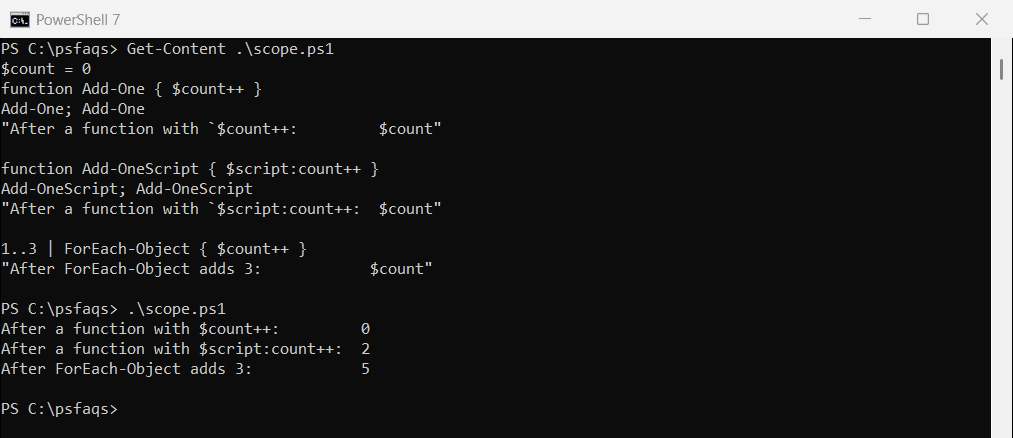
ForEach-Object runs in the current scope, so its increments stick. Returning the new value from the function is often cleaner than changing an outside variable.
Increment dates, versions and letters
Other types have their own way to step forward. Dates use AddDays, versions are rebuilt with a higher number, and letters go through their character code:
$date = Get-Date -Date '2026-09-29'
"Next day:     $($date.AddDays(1).ToString('yyyy-MM-dd'))"

$version = [version]'2.4.9'
$next = [version]::new($version.Major, $version.Minor, $version.Build + 1)
"Next build:   $next"

$letter = [char]'C'
"Next letter:  $([char]([int]$letter + 1))"
Output:
Next day:     2026-09-30
Next build:   2.4.10
Next letter:  D
Microsoft lists every operator in about_Arithmetic_Operators and about_Assignment_Operators.
Frequently Asked Questions
How do I increment a variable by 1 in PowerShell?
Use $count++. It adds 1 to the variable. $count += 1 does the same thing.
How do I increment by more than 1?
Use +=, like $total += 5. For subtraction, use -= or — to subtract 1.