
To find files larger than a specific size with PowerShell, get the files with Get-ChildItem and filter on the Length property. PowerShell understands KB, MB and GB, so you can write sizes the way you say them:
Get-ChildItem -Path D:\Shares -File -Recurse | Where-Object Length -GT 100MBBelow I run it on a sample folder, show the size units, find files in a range, include hidden files, list the largest ones and total them up. Every example gave the same result in PowerShell 7 and 5.1.
Find files over a size
My sample Media folder has videos, documents and a hidden cache file. This lists everything over 1 MB, with the size in megabytes:
Get-ChildItem -Path .\Media -File -Recurse |
    Where-Object Length -GT 1MB |
    Select-Object -Property Name, @{ Name = 'SizeMB'; Expression = { '{0:N2}' -f ($_.Length / 1MB) } }
Output:
Name              SizeMB
----              ------
handbook.pdf      1.20
demo-austin.mp4   1.50
training-2026.mp4 3.00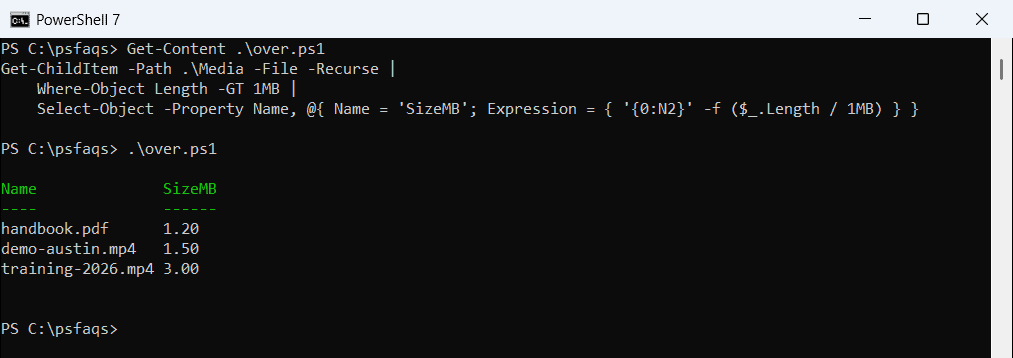
Length is the file size in bytes. The ‘{0:N2}’ format rounds it to two decimals for display, while the filter still compares exact bytes. For one file at a time, see getting the size of a file.
How KB, MB and GB work in PowerShell
The suffixes are numeric literals based on 1,024, not 1,000:
"1KB = $(1KB) bytes"
"1MB = $(1MB) bytes"
"1GB = $(1GB) bytes"
"1.5MB = $(1.5MB) bytes"
Output:
1KB = 1024 bytes
1MB = 1048576 bytes
1GB = 1073741824 bytes
1.5MB = 1572864 bytes
They also work with decimals, like 1.5MB. That matches what File Explorer shows. To round sizes for reports, see rounding to 2 decimal places.
Don’t forget hidden files
Get-ChildItem skips hidden files unless you add -Force. That’s a problem here, because cache and temp files are often both hidden and big:
"Without -Force: $(@(Get-ChildItem -Path .\Media -File -Recurse | Where-Object Length -GT 1MB).Count) files"
"With -Force:    $(@(Get-ChildItem -Path .\Media -File -Recurse -Force | Where-Object Length -GT 1MB).Count) files"
Output:
Without -Force: 3 files
With -Force:    4 files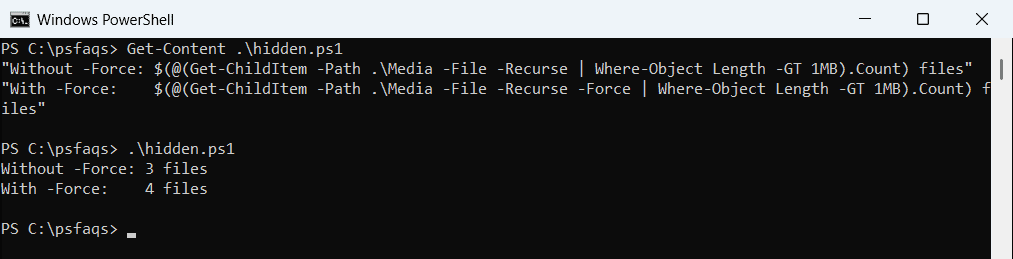
On system drives, -Force also tries protected folders, so add -ErrorAction SilentlyContinue there. More on hidden items in listing hidden files.
Find files in a size range
Combine two conditions with -and to find files between two sizes, here 500 KB to 1.5 MB:
Get-ChildItem -Path .\Media -File -Recurse |
    Where-Object { $_.Length -ge 500KB -and $_.Length -le 1.5MB } |
    Sort-Object -Property Length |
    Select-Object -Property Name, @{ Name = 'SizeMB'; Expression = { '{0:N2}' -f ($_.Length / 1MB) } }
Output:
Name             SizeMB
----             ------
budget-2026.xlsx 0.59
handbook.pdf     1.20
demo-austin.mp4  1.50
-ge and -le include the limits, so the exactly 1.5 MB video is in the list. For more filters, see Where-Object with multiple conditions.
List the largest files
Sort by Length, largest first, and keep the top few:
Get-ChildItem -Path .\Media -File -Recurse -Force |
    Sort-Object -Property Length -Descending |
    Select-Object -First 3 -Property Name, @{ Name = 'SizeMB'; Expression = { '{0:N2}' -f ($_.Length / 1MB) } }
Output:
Name              SizeMB
----              ------
training-2026.mp4 3.00
cache.tmp         2.00
demo-austin.mp4   1.50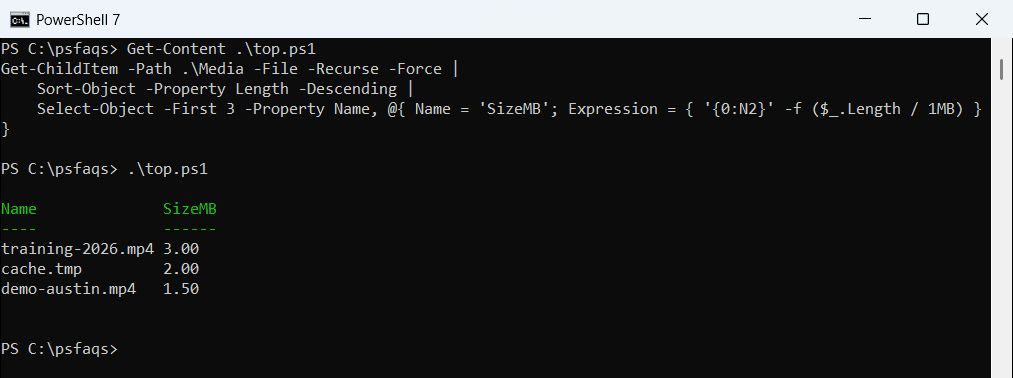
To rank whole folders instead of files, see finding the largest folders.
Count and total the large files
Measure-Object gives you the count and the combined size in one step:
$big = Get-ChildItem -Path .\Media -File -Recurse -Force | Where-Object Length -GT 1MB
$stats = $big | Measure-Object -Property Length -Sum
"Files over 1 MB: $($stats.Count)"
"Total size:      {0:N1} MB" -f ($stats.Sum / 1MB)
Output:
Files over 1 MB: 4
Total size:      7.7 MB
That’s a quick way to see how much space a cleanup would free. To check the drive itself, see checking hard drive space.
Frequently Asked Questions
How do I find files larger than 100 MB with PowerShell?
Run Get-ChildItem -Path C:\Data -File -Recurse | Where-Object Length -GT 100MB. See the Get-ChildItem reference.
Is 1MB in PowerShell 1,000,000 or 1,048,576 bytes?
1,048,576 bytes. PowerShell’s KB, MB and GB suffixes are based on 1,024, as about_Numeric_Literals explains.
Why are some large files missing from my results?
They’re probably hidden. Add -Force to Get-ChildItem so hidden and system files are included.
How do I find files between two sizes?
Use Where-Object { $_.Length -ge 500KB -and $_.Length -le 1.5MB }.