
To create a character array in PowerShell, call ToCharArray() on a string. It returns a Char[] array with one item for each character, which you can loop through, filter or count:
$chars = 'Seattle'.ToCharArray()

"Type:  $($chars.GetType().Name)"
"Count: $($chars.Count)"
"Items: $($chars -join ' | ')"
Output:
Type:  Char[]
Count: 7
Items: S | e | a | t | t | l | e
Below I compare the other ways to build one, then cover letter ranges, filtering, counting and joining characters back into a string. Every example ran in PowerShell 7.6 and Windows PowerShell 5.1.
Convert a string to an array of characters
ToCharArray() and a [char[]] cast give the same result. You can also cast a list of single letters. -split with an empty pattern looks similar, but it returns strings and adds an empty item at each end:
$city = 'Austin'

$a = $city.ToCharArray()
$b = [char[]]$city
$c = [char[]]@('A', 'u', 's')
$d = $city -split ''

'ToCharArray()   {0,-9} {1} items' -f $a.GetType().Name, $a.Count
'[char[]] cast   {0,-9} {1} items' -f $b.GetType().Name, $b.Count
'[char[]] list   {0,-9} {1} items' -f $c.GetType().Name, $c.Count
"-split ''       {0,-9} {1} items: {2}" -f $d.GetType().Name, $d.Count, (($d | ForEach-Object { "'$_'" }) -join ',')
Output:
ToCharArray()   Char[]    6 items
[char[]] cast   Char[]    6 items
[char[]] list   Char[]    3 items
-split ''       String[]  8 items: '','A','u','s','t','i','n',''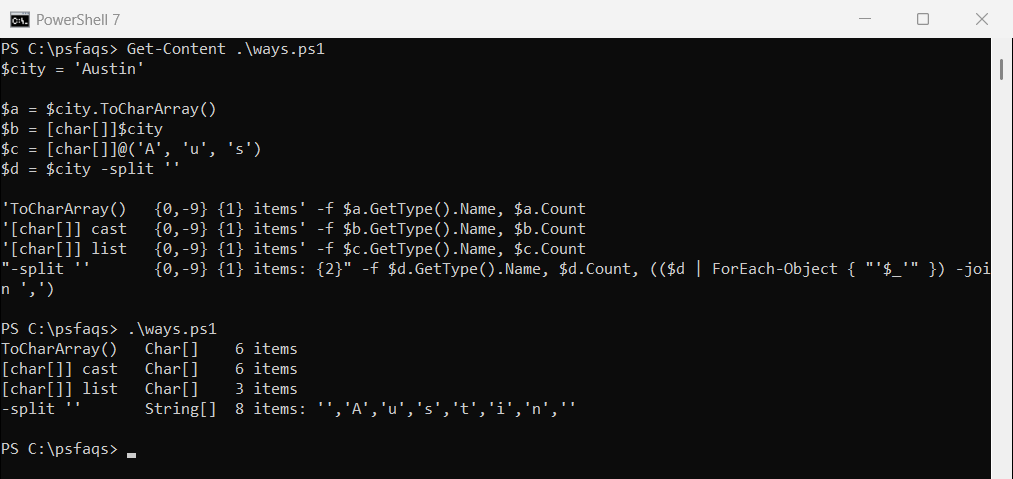
Use ToCharArray() or [char[]] unless you specifically need strings.
You don’t always need an array
A string can already be indexed like an array. Each position returns a single [char], and a range of positions returns several:
$state = 'Texas'

"First character:  $($state[0])"
"Last character:   $($state[-1])"
"Type of `$state[0]: $($state[0].GetType().Name)"
"Characters 1-3:   $($state[1..3] -join '')"
Output:
First character:  T
Last character:   s
Type of $state[0]: Char
Characters 1-3:   exa
Negative numbers count from the end, so [-1] is the last character. Getting a substring covers longer pieces of text.
Create a character array from a range
Cast a range of character codes to [char[]]. Codes 65 to 70 are A to F. For digits, take the codes of ‘0’ and ‘9’ and build the range between them:
$upper = [char[]](65..70)
"Letters from codes: $($upper -join ' ')"

$digits = [char[]]('0'[0]..'9'[0])
"Digits from codes:  $($digits -join ' ')"
Output:
Letters from codes: A B C D E F
Digits from codes:  0 1 2 3 4 5 6 7 8 9
Letter ranges work only in PowerShell 7
PowerShell 7 can make a range straight from two letters. Windows PowerShell 5.1 can’t, and fails trying to convert the letters to numbers:
$letters = 'a'..'f'
"Letters with 'a'..'f': $($letters -join ' ') ($($letters[0].GetType().Name))"
Output:
Letters with 'a'..'f': a b c d e f (Char)try { $letters = 'a'..'f'; $letters -join ' ' }
catch { "Failed. Windows PowerShell 5.1 can't make a range from letters" }Output:
Failed. Windows PowerShell 5.1 can't make a range from letters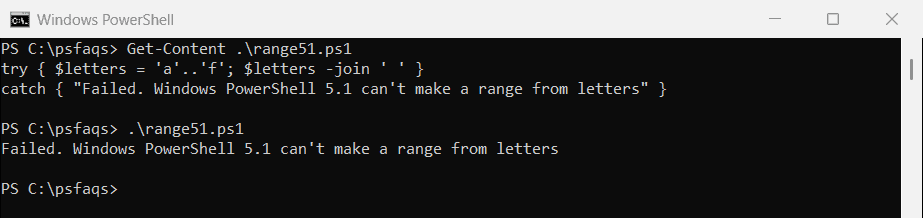
Use the [char[]](65..70) form in scripts that must run in both versions.
Join characters back into a string
-join with nothing on the left glues the characters together. [string]::new() does the same, and [array]::Reverse lets you flip the order first:
$chars = 'Denver'.ToCharArray()

"-join:              $(-join $chars)"
"[string]::new():    $([string]::new($chars))"
[array]::Reverse($chars)
"Reversed:           $(-join $chars)"
Output:
-join:              Denver
[string]::new():    Denver
Reversed:           revneD
[array]::Reverse changes the array in place and returns nothing, so call it on its own line. Converting an array to a string covers separators.
Filter characters by type
The [char] type has tests like IsDigit, IsLetter and IsUpper. Use them with Where-Object to keep only the characters you want:
$orderId = 'TX-2026-A58213'
$chars = $orderId.ToCharArray()

"Digits only:   $(-join ($chars | Where-Object { [char]::IsDigit($_) }))"
"Letters only:  $(-join ($chars | Where-Object { [char]::IsLetter($_) }))"
"Upper case:    $(($chars | Where-Object { [char]::IsUpper($_) }).Count) letters"
Output:
Digits only:   202658213
Letters only:  TXA
Upper case:    3 letters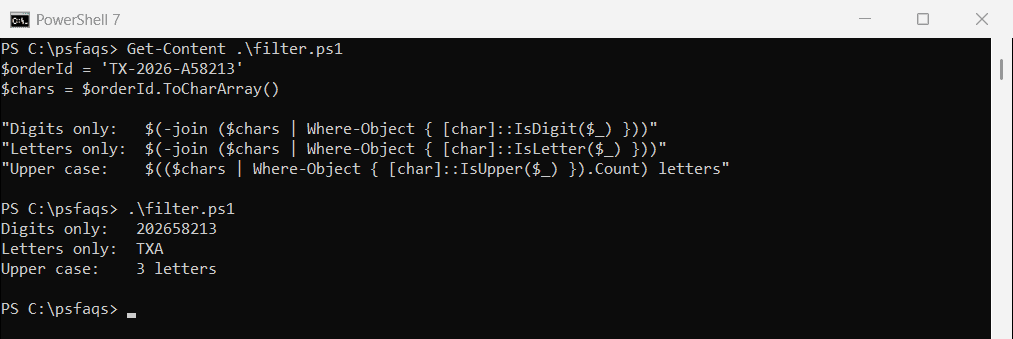
Count how often each character appears
Group-Object counts the characters for you. Add -CaseSensitive so M and m are counted separately:
'Mississippi'.ToCharArray() |
    Group-Object -CaseSensitive |
    Sort-Object -Property Count, Name -Descending |
    ForEach-Object { '{0}: {1}' -f $_.Name, $_.Count }
Output:
s: 4
i: 4
p: 2
M: 1
Sort by Count to see the most common characters first.
Comparing characters ignores case
Like strings, characters compare without case using -eq. Use -ceq when case matters:
$c = 'Boston'[0]

"[char]'B' -eq 'b'  : $($c -eq 'b')"
"[char]'B' -ceq 'b' : $($c -ceq 'b')"
"'B' -eq [char]'B