
To convert a byte array to a string in PowerShell, decode it with the matching text encoding, usually UTF-8. [System.Text.Encoding]::UTF8.GetString() takes the bytes and returns the text:
$bytes = [byte[]](72, 101, 108, 108, 111, 44, 32, 65, 117, 115, 116, 105, 110)
[System.Text.Encoding]::UTF8.GetString($bytes)
Output:
Hello, AustinThe reverse is GetBytes(), and those two methods are most of what you need. The rest of this guide covers picking the right encoding, creating byte arrays, and converting bytes to hex, Base64 and files.
I ran each example in PowerShell 7.6 and Windows PowerShell 5.1. Two things only work in one version, and I point those out where they come up.
Convert a string to a byte array
GetBytes() turns text into bytes. Notice that this four-letter word needs five bytes, not four:
$bytes = [System.Text.Encoding]::UTF8.GetBytes('Café')
$bytes -join ' '
"Byte count: $($bytes.Count)"
Output:
67 97 102 195 169
Byte count: 5
The é takes two bytes (195 and 169) in UTF-8, while plain English letters take one each. Joining with -join ' ' prints the bytes on one line instead of one per line.
Bytes are also the starting point for Base64, which is covered in converting a string to Base64.
Why does the encoding matter?
A byte array doesn’t remember which encoding made it. You have to decode with the same encoding you encoded with. Here’s the same word in three encodings:
$text = 'Café'
foreach ($name in 'UTF8', 'Unicode', 'ASCII') {
    $encoding = [System.Text.Encoding]::$name
    $bytes    = $encoding.GetBytes($text)
    $back     = $encoding.GetString($bytes)
    '{0,-8} {1} bytes: {2,-22} back to text: {3}' -f $name, $bytes.Count, ($bytes -join ' '), $back
}
Output:
UTF8     5 bytes: 67 97 102 195 169      back to text: Café
Unicode  8 bytes: 67 0 97 0 102 0 233 0  back to text: Café
ASCII    4 bytes: 67 97 102 63           back to text: Caf?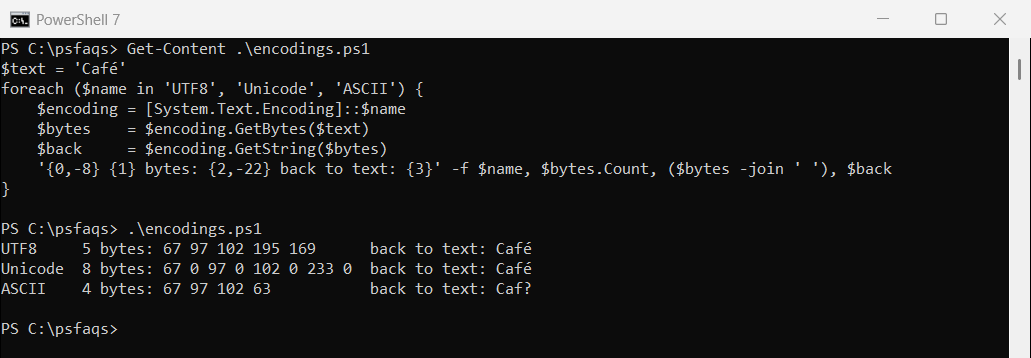
UTF-8 and Unicode (UTF-16) both round-trip correctly. ASCII can’t store é, so it silently becomes a question mark and the original is lost.
Decoding with the wrong encoding gives you the garbled text you’ve probably seen on web pages. These are UTF-8 bytes decoded as Windows-1252:
$bytes = [System.Text.Encoding]::UTF8.GetBytes('Café')
[System.Text.Encoding]::GetEncoding('windows-1252').GetString($bytes)
Output:
CaféWhen you get bytes from a file, an API or a registry value, check which encoding it uses. For most modern data, the answer is UTF-8.
Create a byte array
Cast a list of numbers to [byte[]], or create an empty array of a set size with [byte[]]::new(). Hex values like 0x50 work too:
$header = [byte[]](0x50, 0x4B, 0x03, 0x04)
$buffer = [byte[]]::new(8)

"Header: $($header -join ' ')"
"Buffer: $($buffer -join ' ')"
Output:
Header: 80 75 3 4
Buffer: 0 0 0 0 0 0 0 0
Those four bytes are the signature at the start of a ZIP file, including .docx and .xlsx files, which is a handy way to check a file’s real type. A new array is filled with zeros. Each item must be between 0 and 255:
try {
    [byte]300
}
catch {
    $_.Exception.Message
}
Output:
Cannot convert value "300" to type "System.Byte". Error: "Value was either too large or too small for an unsigned byte."Watch out when you add bytes
+= on a byte array quietly turns it into a general object array, unless the variable itself is typed:
$data = [byte[]](1, 2)
$data += 3
"Untyped variable: $($data.GetType().Name)"

[byte[]]$typed = 1, 2
$typed += 3
"Typed variable:   $($typed.GetType().Name)"
Output:
Untyped variable: Object[]
Typed variable:   Byte[]
Put [byte[]] in front of the variable name when you declare it, and every later assignment stays a byte array. That matters when you pass it to a .NET method that expects byte[].
Convert a byte array to a hex string
[System.BitConverter]::ToString() gives you hex pairs separated by dashes. Remove the dashes with -replace, or format each byte yourself for lowercase hex:
$bytes = [System.Text.Encoding]::UTF8.GetBytes('Order 42')

[System.BitConverter]::ToString($bytes)
[System.BitConverter]::ToString($bytes) -replace '-'
($bytes | ForEach-Object { $_.ToString('x2') }) -join ''
Output:
4F-72-64-65-72-20-34-32
4F72646572203432
4f72646572203432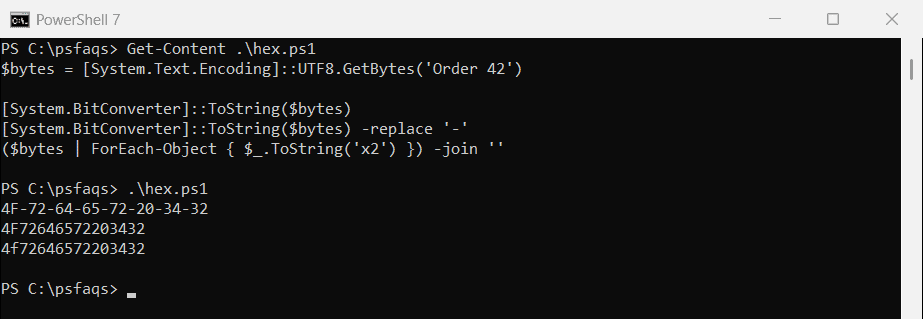
PowerShell 7 has a shorter way. [System.Convert]::ToHexString() and FromHexString() convert in both directions:
$bytes = [System.Text.Encoding]::UTF8.GetBytes('Order 42')
$hex   = [System.Convert]::ToHexString($bytes)

$hex
[System.Text.Encoding]::UTF8.GetString([System.Convert]::FromHexString($hex))
Output in PowerShell 7:
4F72646572203432
Order 42
Those two methods don’t exist in Windows PowerShell 5.1, which throws a “does not contain a method named ‘ToHexString'” error. In 5.1, convert hex back to bytes two characters at a time:
$hex   = '4F72646572203432'
$bytes = [byte[]]$(for ($i = 0; $i -lt $hex.Length; $i += 2) {
    [System.Convert]::ToByte($hex.Substring($i, 2), 16)
})

[System.Text.Encoding]::UTF8.GetString($bytes)
Output:
Order 42Convert a byte array to Base64 and back
Base64 turns any bytes into plain text that’s safe to paste into JSON, XML or an email. ToBase64String() encodes, and FromBase64String() decodes:
$bytes  = [System.Text.Encoding]::UTF8.GetBytes('Invoice 1042: $1,249.50')
$base64 = [System.Convert]::ToBase64String($bytes)
$base64

$decoded = [System.Convert]::FromBase64String($base64)
[System.Text.Encoding]::UTF8.GetString($decoded)
Output:
SW52b2ljZSAxMDQyOiAkMSwyNDkuNTA=
Invoice 1042: $1,249.50