
To convert a string to a binary number in PowerShell, turn the string into a number with [int], then call [Convert]::ToString($number, 2). The 2 means base 2, which is binary:
$text = '42'
$binary = [Convert]::ToString([int]$text, 2)

"'$text' in binary: $binary"
"Padded to 8 bits: $($binary.PadLeft(8, '0'))"
Output:
'42' in binary: 101010
Padded to 8 bits: 00101010
PadLeft adds leading zeros so every value has the same width. Below I also convert text to binary, binary back to decimal, and binary back to text. Every example ran in PowerShell 7.6 and Windows PowerShell 5.1.
Convert numbers to binary
ToString with base 2 works on any whole number. Each extra binary digit doubles the value:
foreach ($n in 5, 10, 255, 1024) {
    '{0,5} -> {1}' -f $n, [Convert]::ToString($n, 2)
}
Output:
    5 -> 101
   10 -> 1010
  255 -> 11111111
 1024 -> 10000000000
The same method takes 8 for octal and 16 for hexadecimal.
If your number starts out as text, see converting a string to an integer first.
Convert text to binary
Letters aren’t numbers, so first turn the text into bytes with an encoding. Then convert each byte to an 8-bit binary string:
$word = 'Hi!'
$bytes = [System.Text.Encoding]::UTF8.GetBytes($word)

foreach ($b in $bytes) {
    '{0} = {1,3} = {2}' -f [char]$b, $b, [Convert]::ToString($b, 2).PadLeft(8, '0')
}
"All together: $(($bytes | ForEach-Object { [Convert]::ToString($_, 2).PadLeft(8, '0') }) -join ' ')"
Output:
H =  72 = 01001000
i = 105 = 01101001
! =  33 = 00100001
All together: 01001000 01101001 00100001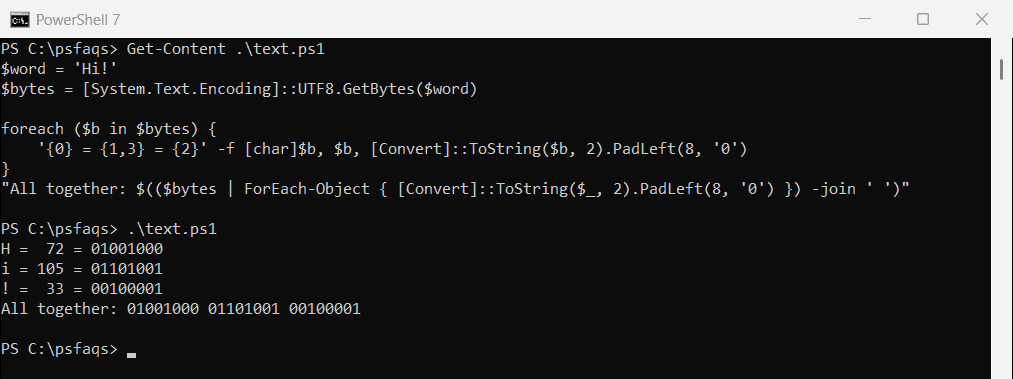
UTF-8 uses one byte for plain English letters and more for accented characters or emoji. Converting between strings and bytes covers the other encodings.
Convert binary to decimal
Go the other way with [Convert]::ToInt32($binary, 2). It reads a string of 1s and 0s as a base 2 number:
foreach ($bin in '101010', '11111111', '10000000000') {
    '{0,12} -> {1}' -f $bin, [Convert]::ToInt32($bin, 2)
}
Output:
      101010 -> 42
    11111111 -> 255
 10000000000 -> 1024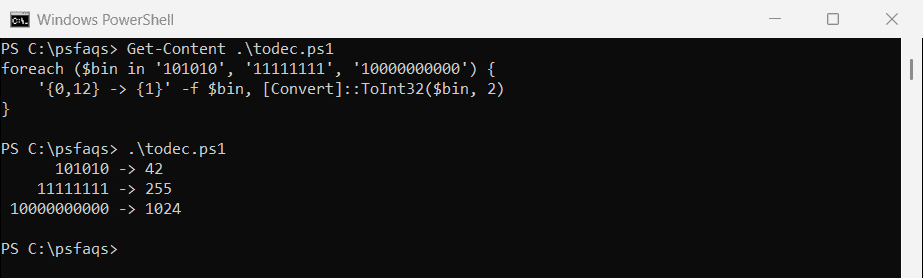
Microsoft covers the base parameter in the Convert.ToInt32 reference.
Binary literals in PowerShell 7
PowerShell 7 also accepts binary numbers written directly in code, with a 0b prefix:
$flags = 0b1011
"0b1011 = $flags"
Output:
0b1011 = 11Windows PowerShell 5.1 doesn’t know the prefix, so the same line fails there:
try { $flags = 0b1011; "0b1011 = $flags" }
catch { 'Failed. 5.1 reads 0b1011 as the name of a command, which does not exist' }
Output:
Failed. 5.1 reads 0b1011 as the name of a command, which does not existUse [Convert]::ToInt32 in scripts that must run in both.
Convert binary back to text
Split the binary string into 8-digit groups, turn each into a byte with ToByte, then decode the bytes with the same encoding:
$binary = '01001000 01101001 00100001'

$bytes = $binary -split ' ' | ForEach-Object { [Convert]::ToByte($_, 2) }
"Back to text: $([System.Text.Encoding]::UTF8.GetString($bytes))"
Output:
Back to text: Hi!Invalid and oversized binary strings
ToInt32 throws an error for any digit other than 0 or 1, and for an empty string. Wrap it in try/catch when the input comes from a user or a file:
foreach ($bin in '1010', '10201', '') {
    try { '{0,-7} -> {1}' -f "'$bin'", [Convert]::ToInt32($bin, 2) }
    catch { '{0,-7} -> Failed. Not a valid binary number' -f "'$bin'" }
}
Output:
'1010'  -> 10
'10201' -> Failed. Not a valid binary number
''      -> Failed. Not a valid binary number
It also fails when the value needs more than 32 bits. Switch to ToInt64 for up to 64 bits:
$bin = '1' * 40
try { [Convert]::ToInt32($bin, 2) }
catch { 'ToInt32: Failed. 40 bits is too big for a 32-bit number' }
"ToInt64: $([Convert]::ToInt64($bin, 2))"
Output:
ToInt32: Failed. 40 bits is too big for a 32-bit number
ToInt64: 1099511627775
Check individual bits
Binary is often used for flags, where each bit means something. -band tests a bit, and -shl builds the mask for bit number n:
$permissions = [Convert]::ToInt32('0110', 2)

foreach ($bit in 0..3) {
    $isSet = ($permissions -band (1 -shl $bit)) -ne 0
    "Bit $bit is $(if ($isSet) { 'on' } else { 'off' })"
}
Output:
Bit 0 is off
Bit 1 is on
Bit 2 is on
Bit 3 is off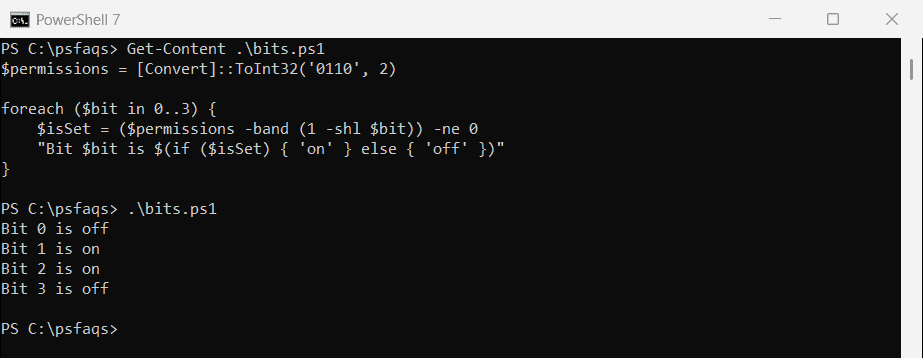
Bits are numbered from the right, starting at 0. Arithmetic operators covers the other number operators.
Frequently Asked Questions
How do I convert a number to binary in PowerShell?
Use [Convert]::ToString(42, 2), which returns 101010. Add .PadLeft(8, '0') for a fixed width.