
The PowerShell -in operator checks whether a value is in a collection, and -contains runs the same check with the collection written first. Both return True or False:
'Denver' -in 'Austin', 'Denver', 'Seattle'          # True
'Austin', 'Denver', 'Seattle' -contains 'Denver'    # True
They compare whole items, never parts of text, and that trips up a lot of scripts. I ran each example below in PowerShell 7 and Windows PowerShell 5.1.
How the -in and -notin operators work
Put the single value on the left and the list on the right. -notin returns the opposite answer, and adding a c (-cin, -cnotin) makes the match case-sensitive:
$cities = 'Austin', 'Denver', 'Seattle'

"'Denver' -in:     $('Denver' -in $cities)"
"'denver' -in:     $('denver' -in $cities)"
"'denver' -cin:    $('denver' -cin $cities)"
"'Boston' -notin:  $('Boston' -notin $cities)"
"'denver' -cnotin: $('denver' -cnotin $cities)"
Output:
'Denver' -in:     True
'denver' -in:     True
'denver' -cin:    False
'Boston' -notin:  True
'denver' -cnotin: True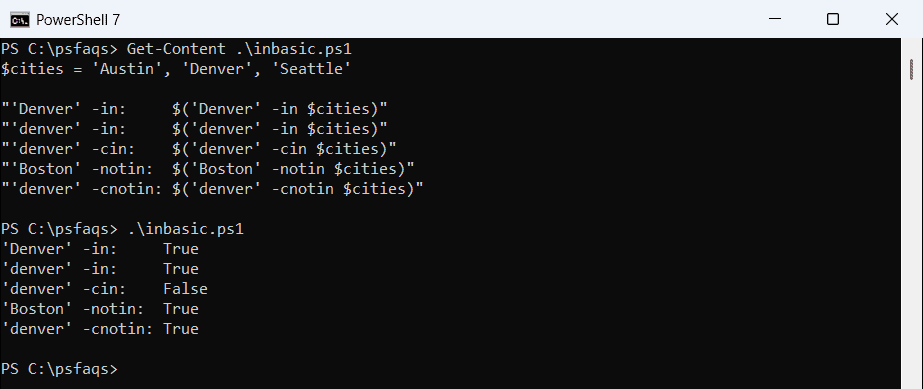
Microsoft added -in and -notin in PowerShell 3.0, so they work the same in 5.1 and 7. They sit next to the other PowerShell comparison operators but always return a Boolean.
-in vs -contains: what’s the difference?
There’s no difference in the result, only in the order. With -contains, the collection goes on the left and the value on the right:
$cities = 'Austin', 'Denver', 'Seattle'

"-contains 'Denver':     $($cities -contains 'Denver')"
"-contains 'denver':     $($cities -contains 'denver')"
"-ccontains 'denver':    $($cities -ccontains 'denver')"
"-notcontains 'Boston':  $($cities -notcontains 'Boston')"
Output:
-contains 'Denver':     True
-contains 'denver':     True
-ccontains 'denver':    False
-notcontains 'Boston':  True
Both operators stop at the first match, so they’re quick even on long lists. Pick the one that reads naturally; the guide on checking if an array contains a value has more array checks.
Why does -in return False when the array is on the wrong side?
PowerShell doesn’t throw an error when you swap the operands. It turns the misplaced array into one string, joined with spaces, and compares that instead:
$cities = 'Austin', 'Denver', 'Seattle'

"'Austin' -in `$cities:       $('Austin' -in $cities)"
"`$cities -in 'Austin':       $($cities -in 'Austin')"
"'Austin' -contains `$cities: $('Austin' -contains $cities)"
"`$cities -in 'Austin Denver Seattle': $($cities -in 'Austin Denver Seattle')"
Output:
'Austin' -in $cities:       True
$cities -in 'Austin':       False
'Austin' -contains $cities: False
$cities -in 'Austin Denver Seattle': True
The last line proves it: the three cities became ‘Austin Denver Seattle’. If a check returns False and you’re sure the value is there, look at the operand order first.
That’s the same join you get when you convert an array to a string in a double-quoted string.
Filter objects with -in and -notin in Where-Object
-in shines in filters. Where-Object has an -In parameter, so you can keep the people whose City is one of your offices without a script block:
$people = @(
    [pscustomobject]@{ Name = 'Maria Lopez'; City = 'Austin' }
    [pscustomobject]@{ Name = 'Tom Baker';   City = 'Boston' }
    [pscustomobject]@{ Name = 'Dana Reyes';  City = 'Denver' }
)
$offices = 'Austin', 'Denver'

$people | Where-Object City -In $offices | Select-Object -ExpandProperty Name
Output:
Maria Lopez
Dana Reyes
For the reverse, -notin inside a script block drops every server that’s in the maintenance list. Here it is in Windows PowerShell 5.1:
$servers     = 'WEB01', 'WEB02', 'DB01', 'APP01'
$maintenance = 'WEB01', 'DB01'

$servers | Where-Object { $_ -notin $maintenance }
Output:
WEB02
APP01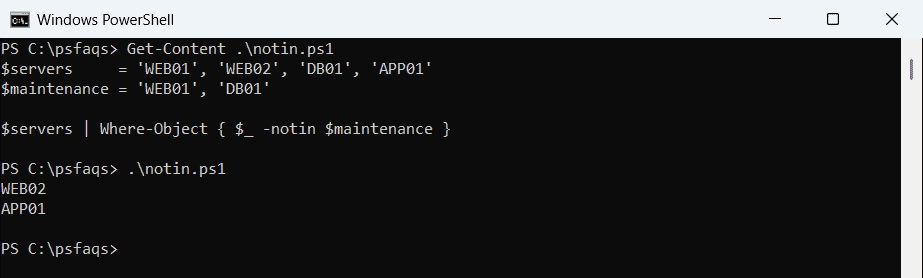
Both forms give the same result in 7 and 5.1. Filtering with Where-Object covers the full syntax, and Where-Object contains handles partial text.
Check if several values are in an array
-in and -contains take one value at a time. Pass two and PowerShell joins them into one string, so the answer is False. Check each value with Where-Object instead:
$cities = 'Austin', 'Denver', 'Seattle'
$wanted = 'Austin', 'Boston'

"Both at once with -in: $($wanted -in $cities)"
$missing = @($wanted | Where-Object { $_ -notin $cities })
"Missing:     $($missing -join ', ')"
"All present: $($missing.Count -eq 0)"
"Any present: $(@($wanted | Where-Object { $_ -in $cities }).Count -gt 0)"
Output:
Both at once with -in: False
Missing:     Boston
All present: False
Any present: True
Missing lists the values that aren’t there, which also answers “are all of them present?” To match two full lists, compare two arrays for matches with Compare-Object.
Why does -contains return False for a substring?
-