
A PowerShell global variable is one you create with the $global: prefix. It’s visible everywhere in your session, and it stays there after the script that created it ends:
$global:Environment = 'Production'
$scriptOnly = 'I disappear when the script ends'
That’s the script set-config.ps1. Here’s what’s left after running it:
& C:\psfaqs\set-config.ps1

"Global variable after the script: $Environment"
"Normal variable after the script: [$scriptOnly]"
Output:
Global variable after the script: Production
Normal variable after the script: []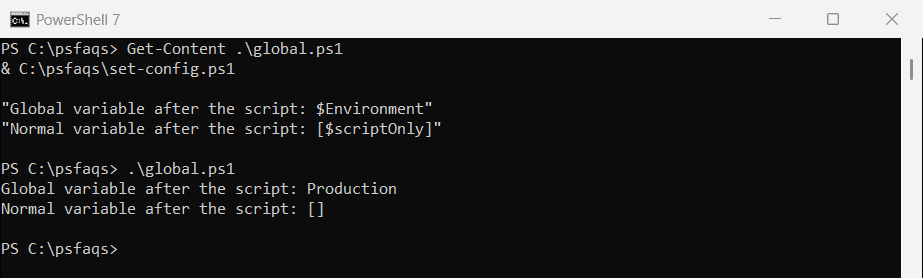
The normal variable disappeared with the script, and the global one stayed. That’s both the point of globals and their risk. Below I cover each scope, and the safer ways to share values between functions.
I ran every example in PowerShell 7.6 and Windows PowerShell 5.1, and the results were identical.
How PowerShell scopes work
| Scope | Prefix | Visible in |
|---|---|---|
| Global | $global: | The whole session, until you close PowerShell |
| Script | $script: | The script file and all functions in it |
| Local | none, or $local: | The current scope, and readable by child scopes |
| Private | $private: | The current scope only, not even child scopes |
Every function and script block gets its own scope. A function is a child of the script that calls it, and the script is a child of the global scope.
Instead of a global variable, you can pass a variable by reference with [ref].
For the basics of creating variables, see setting variables in PowerShell.
Local variables: read yes, change no
A function can read a variable from the script that calls it. But assigning to the same name creates a new local variable, and the original doesn’t change:
$server = 'WEB01'

function Show-Server {
    "Inside, I can read it:     $server"
    $server = 'SQL01'
    "Inside, after assigning:   $server"
}

Show-Server
"Outside, it's still:       $server"
Output:
Inside, I can read it:     WEB01
Inside, after assigning:   SQL01
Outside, it's still:       WEB01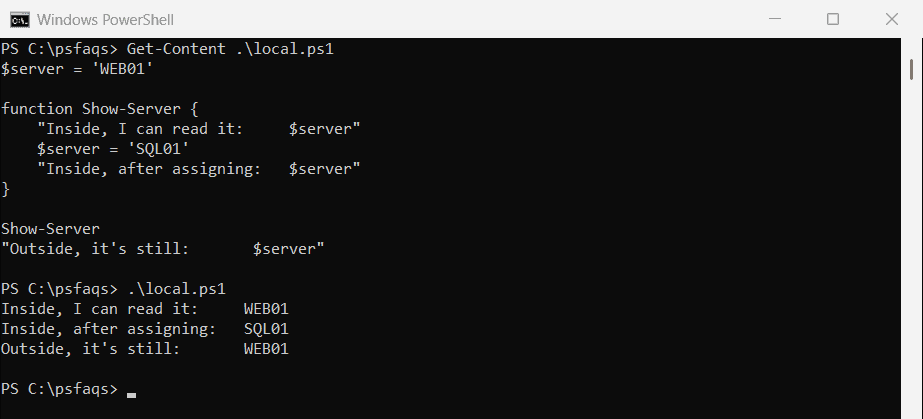
This catches almost everyone once. The function looks like it changes $server, but it only changes its own copy.
Local names hide global ones
A local variable with the same name as a global one hides it inside the function. The prefix still reaches the global:
$global:Region = 'East US'

function Test-Region {
    $Region = 'West US'
    "Local: $Region | Global: $global:Region"
}

Test-Region
Output:
Local: West US | Global: East USLook up a parent scope’s value
Get-Variable -Scope reads a variable from a specific scope. 0 is the current scope and 1 is the parent:
$count = 1

function Test-Scope {
    $count = 2
    "Local (scope 0):  $count"
    "Parent (scope 1): $((Get-Variable -Name count -Scope 1).Value)"
}

Test-Scope
Output:
Local (scope 0):  2
Parent (scope 1): 1
Private variables
$private: keeps a variable out of child scopes, so functions you call can’t read it:
$private:apiKey = 'demo-key-123'

function Get-ApiKey {
    "The function sees: [$apiKey]"
}

Get-ApiKey
"The script sees:   [$apiKey]"
Output:
The function sees: []
The script sees:   [demo-key-123]