
The best PowerShell script examples are short, safe ones you can run right away and adapt later. Most follow the same pattern, a pipeline that finds, filters, and reports:
Get-ChildItem -Path .\Reports -File | Where-Object Length -gt 1MB | Select-Object Name, LengthBelow are 14 small scripts grouped by task, from files and logs to services, dates, and errors. I ran each one in PowerShell 7 and Windows PowerShell 5.1 inside a test folder, and I point out where the two shells disagree.
How do you run a PowerShell script?
Save the code in a file with a .ps1 extension, then call it by path from a PowerShell prompt. This example writes a tiny script with a parameter and runs it twice:
Set-ExecutionPolicy -ExecutionPolicy RemoteSigned -Scope Process -Force
Set-Content -Path .\ScriptDemo\Say-Hello.ps1 -Value @'
param([string]$City = 'Austin')
"Hello from $City. Today is $((Get-Date -Year 2026 -Month 10 -Day 13).ToString('MMMM d, yyyy'))."
'@
.\ScriptDemo\Say-Hello.ps1
.\ScriptDemo\Say-Hello.ps1 -City Denver
'Process policy: ' + (Get-ExecutionPolicy -Scope Process)
Output:
Hello from Austin. Today is October 13, 2026.
Hello from Denver. Today is October 13, 2026.
Process policy: RemoteSigned
The first line sets the execution policy for the current session only, so nothing on the PC changes for good. Windows clients block scripts by default, which is why the running scripts is disabled error is so common.
For a lasting fix, set the execution policy for your user. To launch a script from cmd or Task Scheduler, run it from the command line with parameters.
PowerShell script examples for files and folders
All three scripts work on a sample folder, so test them on a copy before real data.
1. Report folder size by file type
Group-Object buckets the files by extension, and Measure-Object adds up the sizes in each bucket:
Get-ChildItem -Path .\ScriptDemo -File -Recurse |
    Group-Object -Property Extension |
    Sort-Object -Property Name |
    ForEach-Object {
        $kb = ($_.Group | Measure-Object -Property Length -Sum).Sum / 1KB
        '{0,-5} {1} file(s) {2,6:N1} KB' -f $_.Name, $_.Count, $kb
    }
Output:
.csv  2 file(s)    1.6 KB
.log  3 file(s)    6.3 KB
.pdf  2 file(s)    6.0 KB
.txt  1 file(s)    0.3 KB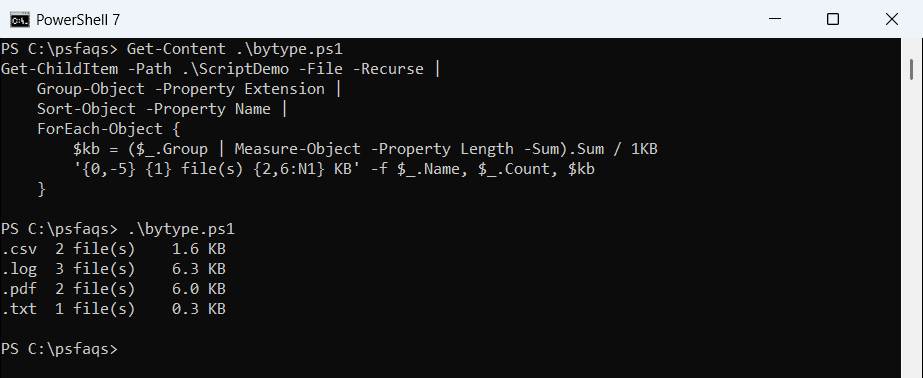
To total a whole tree, see how to get the size of a folder.
2. Find files older than 90 days
A fixed cutoff date keeps the result predictable. Swap in (Get-Date).AddDays(-90) for a rolling window:
$cutoff = ([datetime]'2026-10-13').AddDays(-90)
Get-ChildItem -Path .\ScriptDemo -File -Recurse |
    Where-Object { $_.LastWriteTime -lt $cutoff } |
    Sort-Object -Property Name |
    ForEach-Object { '{0,-18} {1:yyyy-MM-dd}' -f $_.Name, $_.LastWriteTime }
Output:
archive-q1.log     2026-03-02
invoice-1001.pdf   2026-05-18
Once the list looks right, you can delete files older than a set number of days, ideally with -WhatIf first.
3. Add a date prefix to file names
Rename-Item accepts a script block for -NewName, so every file gets its own new name:
$pdfs = Get-ChildItem -Path .\ScriptDemo -Filter *.pdf
$pdfs | Rename-Item -NewName { '2026-10-13_' + $_.Name } -PassThru |
    Select-Object -ExpandProperty Name
Output:
2026-10-13_invoice-1001.pdf
2026-10-13_invoice-1002.pdf
I save the list in a variable first, so renamed files can’t be picked up a second time. More patterns are in renaming files with a date.
Text and string script examples
4. Count errors in a log file
Select-String finds matching lines, and Group-Object counts each distinct message:
$errors = Select-String -Path .\ScriptDemo\server.log -Pattern ' ERROR '
"Errors found: $($errors.Count)"
$errors |
    ForEach-Object { ($_.Line -split ' ', 4)[3] } |
    Group-Object |
    Sort-Object -Property @{ Expression = 'Count'; Descending = $true }, Name |
    ForEach-Object { '{0}x {1}' -f $_.Count, $_.Name }
Output:
Errors found: 3
2x Payment API timeout
1x Login failed for svc-reports
The extra Name sort key matters in 5.1, where Sort-Object isn’t stable. Learn more ways to find text patterns with Select-String.