
To replace a string before a character in PowerShell, use the -replace operator with a regex that matches from the start of the string up to that character:
'Order:2026-0142' -replace '^[^:]*:', '' # 2026-0142That pattern stops at the first colon. Below I’ll cover the last-occurrence version, keeping the delimiter, a no-regex option with IndexOf(), -split, special characters, file renames, and a few spots where PowerShell 7 and Windows PowerShell 5.1 disagree.
Replace everything before the first occurrence of a character
The pattern ^[^:]* reads as “from the start, any run of characters that aren’t a colon.” Because it can’t cross a colon, it always stops at the first one:
$status = 'Order:2026-0142:Shipped'
$status -replace '^[^:]*:', ''
$status -replace '^[^:]*', 'Invoice'
$status -replace '^[^:]*:', 'PO-'
Output:
2026-0142:Shipped
Invoice:2026-0142:Shipped
PO-2026-0142:Shipped
Line one removes the text and the colon. Line two leaves the colon out of the pattern, so the delimiter stays and only the text before it changes to Invoice.
Line three swaps the prefix and the colon for something new. The -replace operator and the Replace() method handle plain text replacements, and the regex part is what makes “before a character” possible.
The empty string as the second argument is optional. $status -replace '^[^:]*:' removes the match too.
First vs last occurrence: greedy ‘^.*:’ and ‘^[^:]*:’
Many examples online use '.*:'. That works when there’s only one colon, but .* is greedy and grabs as much as it can, so it runs to the LAST match:
$path = 'Sales/2026/Q3/Austin.csv'
'First: ' + ($path -replace '^[^/]*/', '')
'Last:  ' + ($path -replace '^.*/', '')
'Lazy:  ' + ($path -replace '^.*?/', '')
Output:
First: 2026/Q3/Austin.csv
Last:  Austin.csv
Lazy:  2026/Q3/Austin.csv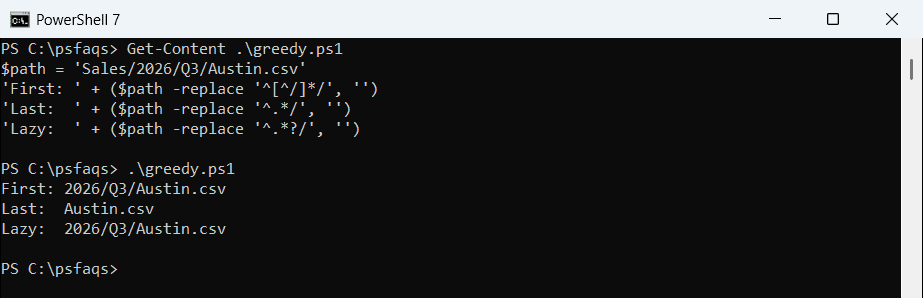
The negated class [^/]* and the lazy .*? both stopped at the first slash. The greedy version removed the whole folder path and left only Austin.csv.
So pick the pattern by the result you want: the first occurrence for prefixes and IDs, the last occurrence for file names. If you’re new to these symbols, this PowerShell regex guide explains anchors and quantifiers.
To check where a character appears before you replace anything, see how to find a character in a string.
Use IndexOf() or LastIndexOf() with Substring() (no regex)
If regex feels like overkill, find the position of the character and cut the string there. IndexOf() returns the first position and LastIndexOf() returns the last:
$email = 'dana.reyes@contoso.com'
$at = $email.IndexOf('@')
$email.Substring($at + 1)
$email.Substring($at)

$path = 'Sales/2026/Q3/Austin.csv'
$path.Substring($path.LastIndexOf('/') + 1)
'Archive' + $path.Substring($path.IndexOf('/'))
Output:
contoso.com
@contoso.com
Austin.csv
Archive/2026/Q3/Austin.csv
Adding 1 to the index skips the delimiter, so the first line returns contoso.com. Leaving the + 1 out keeps the @ sign, which is handy when you want to swap only the text in front of it.
The last line replaces the text before the first slash with Archive by joining a new prefix with the rest. The Substring() method takes a start index and an optional length.
These methods are case-sensitive and work with literal characters only, so dots and backslashes need no escaping here.
Split the string at the first character with -split
Another approach is to split once and keep the second part. A max-substrings value of 2 tells PowerShell to stop after the first delimiter:
$record = 'Tom Baker: Denver: Account manager'
($record -split ':\s*', 2)[1]
$record.Split(':', 2)[1].Trim()

$name, $rest = $record -split ':\s*', 2
"Name=$name | Rest=$rest"
Output:
Denver: Account manager
Denver: Account manager
Name=Tom Baker | Rest=Denver: Account manager
Everything after the first colon stays together, including the second colon. Multiple assignment puts the text before the character in $name and the rest in $rest in one step.
The -split operator treats the delimiter as a regex, which is why ':\s*' also removed the space. The Split() method takes literal characters, so I trimmed the space myself.
For more patterns, read the guides on how to split a string in PowerShell and get the second element after a split.
What happens if the string doesn’t contain the character?
This is where the methods behave differently. -replace finds no match and returns the string as is, while Substring() throws an error because IndexOf() returns -1:
$values = 'Seattle:WA', 'Portland'
foreach ($v in $values) {
    $i = $v.IndexOf(':')
    $safe = if ($i -ge 0) { $v.Substring($i + 1) } else { $v }
    $re = $v -replace '^[^:]*:', ''
    '{0,-11} replace: {1,-9} safe: {2}' -f $v, $re, $safe
}
try { 'Portland'.Substring('Portland'.IndexOf(':')) }
catch { "Failed. $($_.Exception.InnerException.GetType().Name)" }
Output:
Seattle:WA  replace: WA        safe: WA
Portland    replace: Portland  safe: Portland
Failed. ArgumentOutOfRangeException
Portland has no colon, so -replace left it alone and my guarded version did the same. The unguarded Substring() call failed with ArgumentOutOfRangeException in both shells.
The full error text differs, though. PowerShell 7 says startIndex (‘-1’) must be a non-negative value, while 5.1 says StartIndex cannot be less than zero.
If you’d rather skip strings without the delimiter, test them first with the -match operator or the methods shown in check if a string contains a substring.
Replace text before a dot, backslash, or pipe
In a regex, the dot, backslash, pipe, and several other characters have special meanings. Escape them with a backslash, or let [regex]::Escape() do it for you:
'release.2026.10.4' -replace '^[^.]*\.', ''
'\\fs01\Finance\Budget.xlsx' -replace '^.*\\', ''
[regex]::Escape('.|\')

$d = '|'
$row = 'Austin|TX|78701'
($row -split $d, 2) -join ' / '
($row -split [regex]::Escape($d), 2) -join ' / '
$row -replace ('^.*?' + [regex]::Escape($d)), ''
Output:
2026.10.4
Budget.xlsx
\.\|\\
 / Austin|TX|78701