
To generate a random password in PowerShell 7.4 or later, pick characters with Get-SecureRandom, which uses a cryptographically secure generator, and join them into a string:
$chars = [char[]]'ABCDEFGHJKLMNPQRSTUVWXYZabcdefghijkmnopqrstuvwxyz23456789!@#$%^&*'
-join (1..16 | ForEach-Object { Get-SecureRandom -InputObject $chars })
For Windows PowerShell 5.1, or when you must guarantee every character type, use the New-RandomPassword function below. Every password in this post is a fresh random sample, so yours will be different.
Use Get-SecureRandom in PowerShell 7
Get-SecureRandom was added in PowerShell 7.4. It works like Get-Random, but its values are safe to use for secrets:
$chars = [char[]]'ABCDEFGHJKLMNPQRSTUVWXYZabcdefghijkmnopqrstuvwxyz23456789!@#$%^&*'
$password = -join (1..16 | ForEach-Object { Get-SecureRandom -InputObject $chars })
$password
"Length: $($password.Length)"
Output:
Q7iFiKt9zujAmge*
Length: 16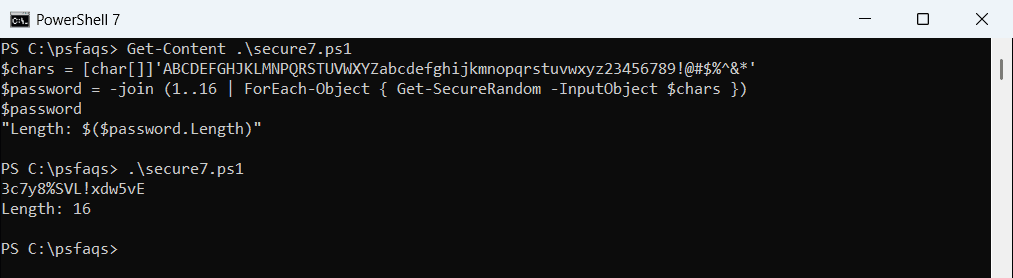
I left out I, l, O, 0 and 1, because people mix them up when they type a password from a screen.
Why not Get-Random?
Microsoft’s documentation warns that Get-Random doesn’t ensure cryptographically secure randomness, and its seed can be set by other code in the session. That’s fine for test data, not for passwords.
The Membership.GeneratePassword method only works in 5.1
Many older guides use System.Web.Security.Membership. It’s part of .NET Framework, so it exists in Windows PowerShell 5.1 but not in PowerShell 7:
try {
    Add-Type -AssemblyName System.Web
    [System.Web.Security.Membership]::GeneratePassword(16, 3).Length
}
catch { "Failed. $($_.Exception.Message)" }
Output:
Failed. Unable to find type [System.Web.Security.Membership].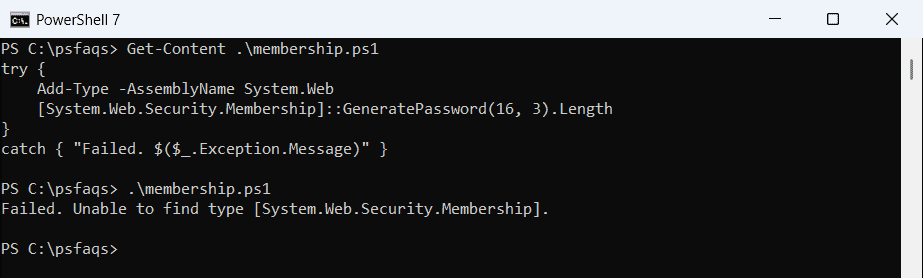
In 5.1 the same code prints 16, the length of the generated password. Because it breaks in PowerShell 7, I don’t use it in new scripts.
A password generator that works in both versions
This function uses .NET’s RandomNumberGenerator, which is cryptographically secure in both PowerShell 7 and 5.1. It guarantees at least one uppercase letter, lowercase letter, digit and symbol, then shuffles them:
function New-RandomPassword {
    param([ValidateRange(8, 128)][int]$Length = 16)

    $sets = 'ABCDEFGHJKLMNPQRSTUVWXYZ', 'abcdefghijkmnopqrstuvwxyz', '23456789', '!@#$%^&*-_=+?'
    $rng  = [System.Security.Cryptography.RandomNumberGenerator]::Create()

    function Get-Index([int]$Count) {
        $byte  = [byte[]]::new(1)
        $limit = 256 - (256 % $Count)              # skip values that would skew the odds
        do { $rng.GetBytes($byte) } while ($byte[0] -ge $limit)
        $byte[0] % $Count
    }

    $all   = -join $sets
    $chars = foreach ($set in $sets) { $set[(Get-Index $set.Length)] }     # one of each kind
    $chars += foreach ($n in 1..($Length - $sets.Count)) { $all[(Get-Index $all.Length)] }

    for ($i = $chars.Count - 1; $i -gt 0; $i--) {                         # shuffle them
        $j = Get-Index ($i + 1)
        $chars[$i], $chars[$j] = $chars[$j], $chars[$i]
    }
    -join $chars
}

1..3 | ForEach-Object { New-RandomPassword -Length 16 }
Output:
Mn6FzL7=qL6w4?pV
$PwC&UQ!YNZ5kfXS
tJiyBuRZ8gj?#!QZ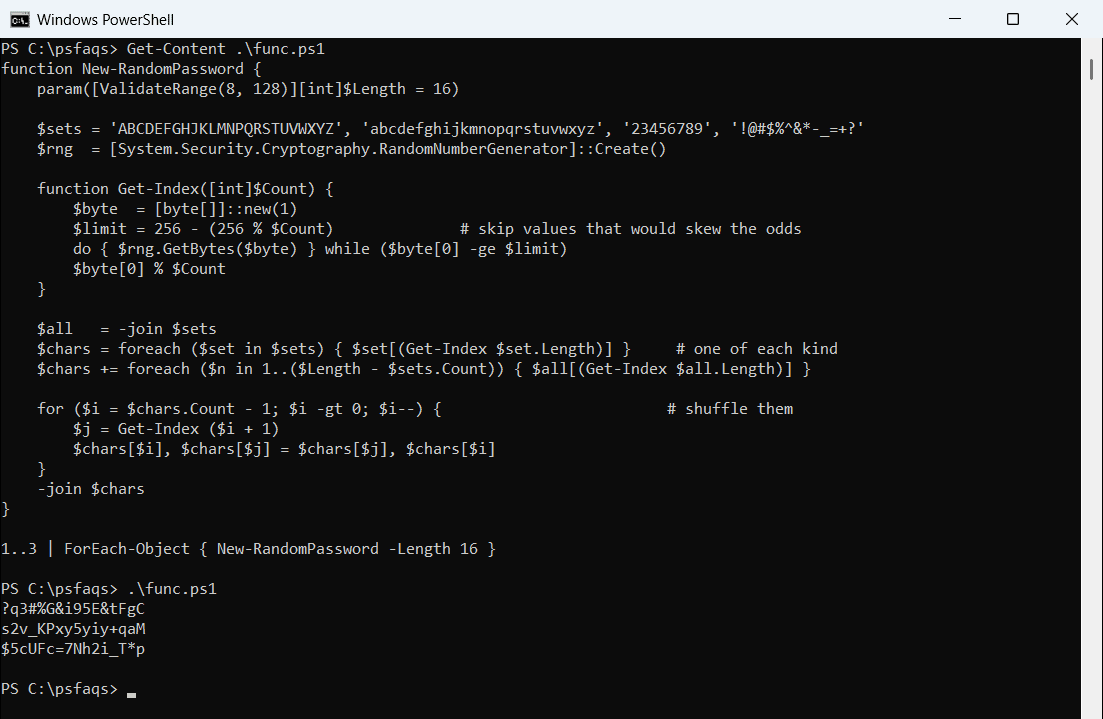
The do-while loop skips byte values that would make some characters slightly more likely than others. The shuffle stops the first four characters from always being upper, lower, digit and symbol.
Check that a password meets the rules
I saved the function as New-RandomPassword.ps1 and dot-sourced it. A quick check with -cmatch, which is case-sensitive, confirms all four character types:
. .\New-RandomPassword.ps1
$password = New-RandomPassword -Length 20

"Length:    $($password.Length)"
"Uppercase: $($password -cmatch '[A-Z]')"
"Lowercase: $($password -cmatch '[a-z]')"
"Digit:     $($password -match '\d')"
"Symbol:    $($password -match '[^a-zA-Z0-9]')"
Output:
Length:    20
Uppercase: True
Lowercase: True
Digit:     True
Symbol:    True
Adjust the four character sets if your system rejects some symbols. For other kinds of random values, see generating random strings in PowerShell.
Use the password without showing it
Most cmdlets that take a password want a SecureString. Convert the new password right away instead of printing it:
. .\New-RandomPassword.ps1
$secure = ConvertTo-SecureString -String (New-RandomPassword -Length 16) -AsPlainText -Force
"Type:   $($secure.GetType().Name)"
"Length: $($secure.Length)"
Output:
Type:   SecureString
Length: 16
Then pass $secure to a cmdlet, for example New-LocalUser -Name 'jsmith' -Password $secure. See setting a local user password and creating a credential object.
If you must hand the password to someone, use a password manager or a one-time secret link. Never put it in email or a log file. The generator is described in the RandomNumberGenerator class reference.
Frequently Asked Questions
How do I generate a random password in PowerShell?
In PowerShell 7.4+, run -join (1..16 | ForEach-Object { Get-SecureRandom -InputObject $chars }). In 5.1, use RandomNumberGenerator, as in the function above.
Is Get-Random safe for passwords?
No. Microsoft says Get-Random doesn’t ensure cryptographically secure randomness. Use Get-SecureRandom or RandomNumberGenerator.