
“Cannot index into a null array” means you used square brackets on a variable that holds $null, so there’s no array to read from. Check the value first, or force it into an array with @():
$servers = @(Get-Content -Path .\servers.txt)
if ($servers.Count -gt 0) { $servers[0] }
The real work is finding out why the variable is empty. Below are the usual causes, the fixes I use, and where PowerShell 7 and 5.1 differ.
What does “Cannot index into a null array” mean?
Here’s the error in its most common form. The script reads a server list from a file that turned out to be empty, then asks for the first line:
$servers = Get-Content -Path .\servers.txt     # the file is empty
$servers[0]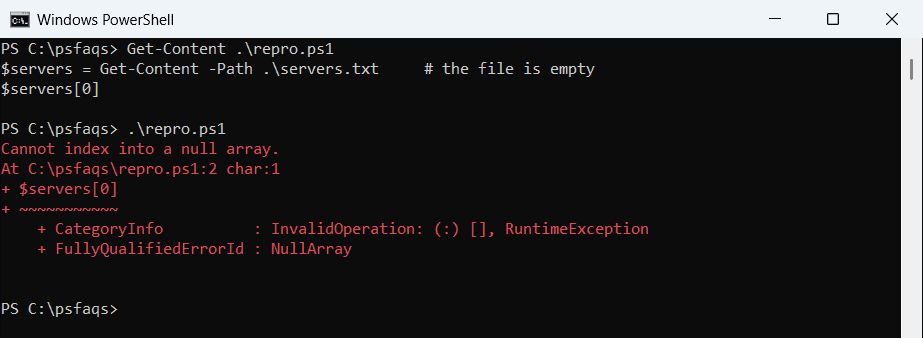
Get-Content returns nothing for an empty file, so $servers is $null. Windows PowerShell 5.1 prints the classic red block:
Cannot index into a null array.
At C:\psfaqs\repro.ps1:2 char:1
+ $servers[0]
+ ~~~~~~~~~~~
    + CategoryInfo          : InvalidOperation: (:) [], RuntimeException
    + FullyQualifiedErrorId : NullArray
PowerShell 7 shows the same message in its shorter concise view: InvalidOperation, the script line, and the failing $servers[0] underlined.
Both messages come from a RuntimeException with the error ID NullArray. If you suspect a typo, check whether the variable exists before you trust its value.
Common causes of a null array in PowerShell
The variable is almost never $null on purpose. These three scripts each fail in a different way, and I caught every error so they print one line each:
$tests = [ordered]@{
    'Misspelled variable'   = { $serverList = 'NYC-SQL01'; $serverLst[0] }
    'No matching process'   = { $p = Get-Process -Name 'payroll-sync' -ErrorAction SilentlyContinue; $p[0] }
    'Missing JSON property' = { $cfg = '{"site":"Austin"}' | ConvertFrom-Json; $cfg.servers[0] }
}
foreach ($name in $tests.Keys) {
    try   { & $tests[$name] | Out-Null; '{0,-22} OK' -f $name }
    catch { '{0,-22} Failed. {1}' -f $name, $_.Exception.Message }
}
Output:
Misspelled variable    Failed. Cannot index into a null array.
No matching process    Failed. Cannot index into a null array.
Missing JSON property  Failed. Cannot index into a null array.
A misspelled name ($serverLst) is a brand-new variable, and new variables are $null. A Get-Process call with -ErrorAction SilentlyContinue hides the “not found” error and leaves you with nothing.
The JSON case catches people who are reading a JSON file into an array. A missing property returns $null, not an error, so the failure shows up later.
Check for $null or Count before you index
The simplest fix is to test the value before you read an element. PowerShell adds a Count property that returns 0 for $null, so one test covers both an empty and a missing result:
$servers = Get-Content -Path .\servers.txt     # empty file
"Is null: $($null -eq $servers)"
"Count:   $($servers.Count)"
if ($servers.Count -gt 0) { "First server: $($servers[0])" }
else { 'servers.txt is empty, so there is nothing to process.' }
Output:
Is null: True
Count:   0
servers.txt is empty, so there is nothing to process.
When you compare with $null directly, put $null on the left, as in $null -ne $servers. With the variable on the left, an array filters its own elements instead of returning True or False. For text values, IsNullOrEmpty also catches empty strings.
There’s one trap in Windows PowerShell 5.1. A single [pscustomobject] doesn’t have a Count property there, so a Count check says the object isn’t there:
$user = [pscustomobject]@{ Name = 'Maria Lopez' }
"Count:       [$($user.Count)]"
"Count -gt 0: $($user.Count -gt 0)"
"@() Count:   $(@($user).Count)"
Output:
Count:       [1]
Count -gt 0: True
@() Count:   1
That output is from PowerShell 7. Windows PowerShell 5.1 prints Count: [] and Count -gt 0: False, even though the object exists.
Wrapping it in @() returns 1 in both versions, which is one more reason to use the next fix.
Wrap command output in @() to always get an array
The array subexpression operator @() always returns an array of zero or more items. Zero results become an empty array instead of $null, and a single result becomes a one-item array:
$cities = 'Austin', 'Denver', 'Seattle'
$match = $cities | Where-Object { $_ -like 'A*' }
"Without @(): $($match[0])"
$match = @($cities | Where-Object { $_ -like 'A*' })
"With @():    $($match[0])"
$none = @($cities | Where-Object { $_ -like 'Z*' })
"No match:    Count $($none.Count), [0] is null: $($null -eq $none[0])"
Output:
Without @(): A
With @():    Austin
No match:    Count 0, [0] is null: True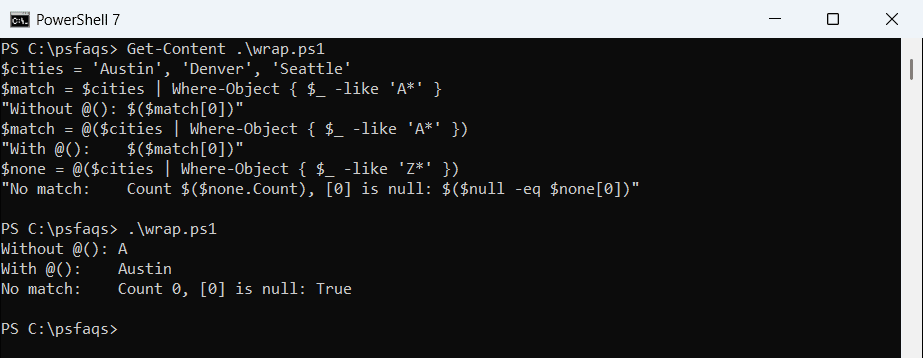
Look at the first line. With only one match, Where-Object returns a plain string, and [0] on a string returns its first character, A. That bug is quieter than the error, because nothing turns red.
For more ways to read the first element of an array, including Select-Object -First, see that guide.
Initialize arrays and reset variables in loops
Variables you fill inside a loop should exist before the loop starts, and a generic List is a good choice when you add items one at a time.
Resetting the loop variable to $null on every pass stops a value from the previous pass leaking into the next one:
$found = [System.Collections.Generic.List[string]]::new()
foreach ($city in 'Austin', 'Denver', 'Seattle') {
    $server = $null                           # reset on every pass
    if ($city -ne 'Denver') { $server = "$city-SQL01" }
    if ($null -ne $server) { $found.Add($server) }
}
"Servers found: $($found.Count)"
"First one:     $($found[0])"
Output: