
A PowerShell dictionary, usually called a hashtable, stores key and value pairs so you can look up a value by its key. Create one with @{ key = value } and read it with $table['key']:
$capitals = @{
    Texas    = 'Austin'
    Colorado = 'Denver'
    Florida  = 'Tallahassee'
}

"Capital of Texas: $($capitals['Texas'])"
"Same with dot notation: $($capitals.Colorado)"
"Number of entries: $($capitals.Count)"
Output:
Capital of Texas: Austin
Same with dot notation: Denver
Number of entries: 3
Hashtables are PowerShell’s built-in dictionary, and some older posts call them associative arrays. I ran every example in PowerShell 7.6 and Windows PowerShell 5.1 and point out where they differ.
Add, update and remove entries
Assigning to a key adds it if it’s new and updates it if it exists. Add() only adds, and fails if the key is already there:
$stock = @{ Laptops = 12; Monitors = 30 }

$stock['Keyboards'] = 45      # adds a new key
$stock['Laptops']   = 10      # updates an existing key
$stock.Remove('Monitors')

try { $stock.Add('Laptops', 99) } catch { 'Add() failed. Laptops is already a key' }
$stock.GetEnumerator() | Sort-Object -Property Name | ForEach-Object { '{0} = {1}' -f $_.Name, $_.Value }
Output:
Add() failed. Laptops is already a key
Keyboards = 45
Laptops = 10
I use the bracket form almost everywhere, since it never fails. Remove() is also safe when the key doesn’t exist.
Missing keys and case
Reading a key that doesn’t exist returns $null instead of an error, so check with ContainsKey when it matters. Keys ignore case by default:
$capitals = @{ Texas = 'Austin' }

"Missing key returns: [$($capitals['Ohio'])]"
"ContainsKey('Ohio'):  $($capitals.ContainsKey('Ohio'))"
"Keys ignore case:     $($capitals['TEXAS'])"
Output:
Missing key returns: []
ContainsKey('Ohio'):  False
Keys ignore case:     Austin
Number keys and text keys are different
The key 101 and the key ‘101’ aren’t the same. This bites when the lookup value comes from a CSV file or Read-Host, which are always text:
$rooms = @{ 101 = 'Sales'; 102 = 'Finance' }

"Number key 101:  [$($rooms[101])]"
"Text key '101':  [$($rooms['101'])]"
"Cast first:      [$($rooms[[int]'101'])]"
Output:
Number key 101:  [Sales]
Text key '101':  []
Cast first:      [Sales]
Keep keys in order with [ordered]
A plain hashtable doesn’t keep your keys in the order you typed them. Add [ordered] to keep that order:
$plain   = @{ First = 1; Second = 2; Third = 3; Fourth = 4 }
$ordered = [ordered]@{ First = 1; Second = 2; Third = 3; Fourth = 4 }

"@{} order:        $($plain.Keys -join ', ')"
"[ordered] order:  $($ordered.Keys -join ', ')"
Output in Windows PowerShell 5.1:
@{} order:        Third, First, Second, Fourth
[ordered] order:  First, Second, Third, Fourth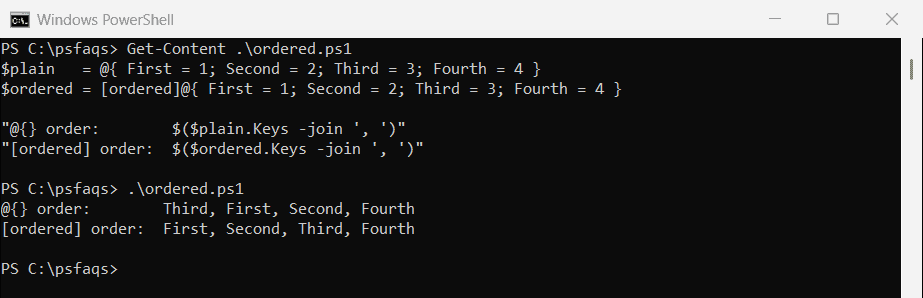
In PowerShell 7, the @{} order was different every time I ran the script, because .NET randomizes string hash codes per process. Use [ordered] whenever order matters, like report columns.
Loop through a hashtable
Loop over .Keys, or use GetEnumerator() to get Name and Value pairs you can sort and filter:
$sales = [ordered]@{ Austin = 18250; Denver = 12400; Miami = 20975 }

foreach ($city in $sales.Keys) {
    '{0,-7} {1,10:C0}' -f $city, $sales[$city]
}

$sales.GetEnumerator() | Sort-Object -Property Value -Descending |
    Select-Object -First 1 | ForEach-Object { "Top city: $($_.Name)" }
Output:
Austin     $18,250
Denver     $12,400
Miami      $20,975
Top city: Miami
Each item from GetEnumerator() has a Name (the key) and a Value. foreach vs ForEach-Object covers the two loop styles.
Don’t change a hashtable while looping over its keys
Updating values inside a loop over $table.Keys fails, because the key collection changes under the loop:
$prices = @{ Coffee = 3.50; Bagel = 2.75; Muffin = 3.25 }

try {
    foreach ($item in $prices.Keys) { $prices[$item] += 0.25 }
}
catch { "Failed. $($_.Exception.Message)" }
Output:
Failed. Collection was modified; enumeration operation may not execute.Copy the keys into an array first with @(), and the same loop works:
$prices = @{ Coffee = 3.50; Bagel = 2.75; Muffin = 3.25 }

foreach ($item in @($prices.Keys)) { $prices[$item] += 0.25 }
'Coffee now costs {0:C}' -f $prices['Coffee']
Output:
Coffee now costs $3.75Hashtables in the pipeline
A hashtable goes down the pipeline as one object, not one item per entry. Use GetEnumerator() to send the entries one at a time:
$capitals = @{ Texas = 'Austin'; Colorado = 'Denver'; Florida = 'Tallahassee' }

"Piped to Measure-Object: $(($capitals | Measure-Object).Count)"
"Using GetEnumerator():   $(($capitals.GetEnumerator() | Measure-Object).Count)"
"Values with an 'a':      $(($capitals.GetEnumerator() | Where-Object Value -like '*a*' | Sort-Object Name).Name -join ', ')"
Output:
Piped to Measure-Object: 1
Using GetEnumerator():   3
Values with an 'a':      Florida, Texas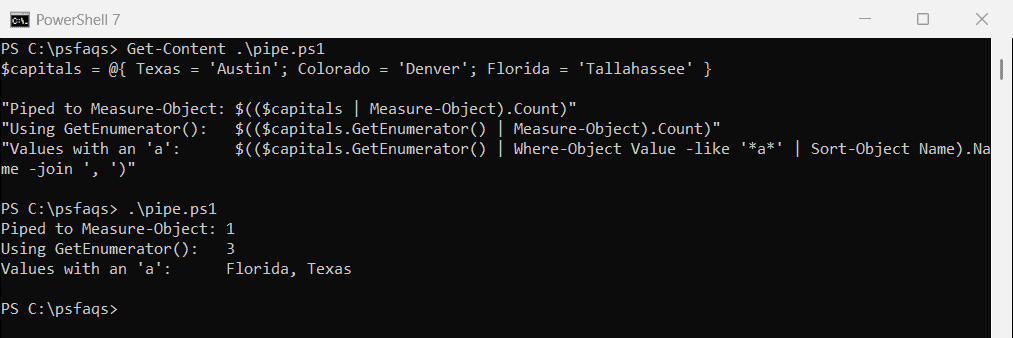
The same applies to Where-Object, Sort-Object and ForEach-Object. Without GetEnumerator(), they get the whole table at once.
Find a key or value in a hashtable
ContainsKey and ContainsValue answer yes or no. To find which key holds a value, or to search with wildcards, filter the entries:
$phoneBook = @{ 'Alice Johnson' = '512-555-0142'; 'Bob Smith' = '303-555-0187'; 'Carol Diaz' = '512-555-0199' }

"ContainsValue('303-555-0187'): $($phoneBook.ContainsValue('303-555-0187'))"
"Key for 303-555-0187: $(($phoneBook.GetEnumerator() | Where-Object Value -eq '303-555-0187').Name)"
"Austin (512) numbers: $(($phoneBook.GetEnumerator() | Where-Object Value -like '512-*' | Sort-Object Name).Name -join ', ')"
Output:
ContainsValue('303-555-0187'): True
Key for 303-555-0187: Bob Smith
Austin (512) numbers: Alice Johnson, Carol Diaz
ContainsValue is exact and case-sensitive, while -like and -eq in Where-Object ignore case. Checking arrays with -contains covers the array side.
An array of hashtables
A list of hashtables is a quick way to hold records, but convert each one to [pscustomobject] before you export or format it. Windows PowerShell 5.1 exports the hashtable’s own properties instead of your keys:
$people = @(
    [ordered]@{ Name = 'Alice Johnson'; State = 'TX' }
    [ordered]@{ Name = 'Bob Smith';     State = 'CO' }
)
$people | Export-Csv -Path C:\psfaqs\Hash\hashtables.csv -NoTypeInformation
"Hashtables give these columns: $((Get-Content -Path C:\psfaqs\Hash\hashtables.csv -TotalCount 1))"

$people | ForEach-Object { [pscustomobject]$_ } | Export-Csv -Path C:\psfaqs\Hash\objects.csv -NoTypeInformation
"Objects give these columns:    $((Get-Content -Path C:\psfaqs\Hash\objects.csv -TotalCount 1))"
Output in PowerShell 7:
Hashtables give these columns: "Name","State"
Objects give these columns:    "Name","State"
Output in Windows PowerShell 5.1:
Hashtables give these columns: "Count","IsReadOnly","Keys","Values","IsFixedSize","SyncRoot","IsSynchronized"
Objects give these columns:    "Name","State"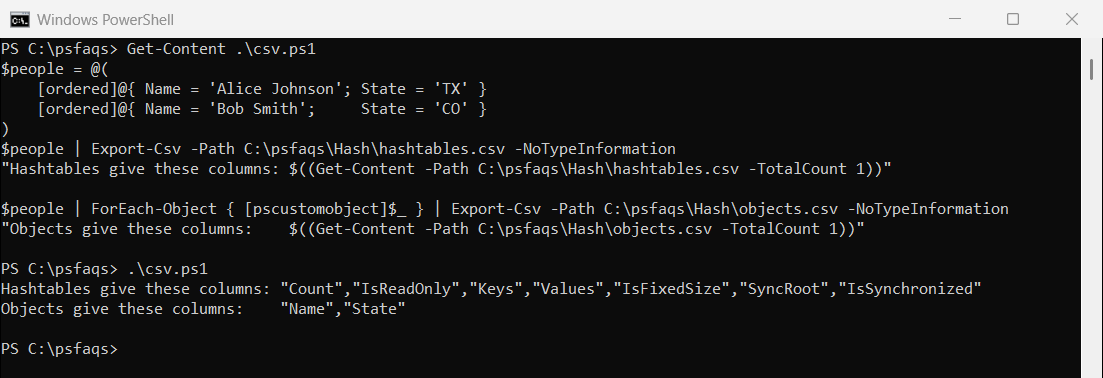
PowerShell 7 exports the keys, but converting to objects works in both and also gives you tidy Format-Table output.
Convert an array to a hashtable
To look items up by an ID, loop once and store each item under its key. Group-Object can build the table for you:
$employees = @(
    [pscustomobject]@{ Id = 'E100'; Name = 'Alice Johnson' }
    [pscustomobject]@{ Id = 'E101'; Name = 'Bob Smith' }
    [pscustomobject]@{ Id = 'E102'; Name = 'Carol Diaz' }
)

$byId = @{}
foreach ($e in $employees) { $byId[$e.Id] = $e.Name }
"E101 is $($byId['E101'])"

$grouped = $employees | Group-Object -Property Id -AsHashTable -AsString
"Group-Object value type: $($grouped['E101'].GetType().Name), name: $($grouped['E101'].Name)"
Output:
E101 is Bob Smith
Group-Object value type: Collection`1, name: Bob Smith
With Group-Object, each value is a collection of the matching objects, not the object itself. Add -AsString so keys are plain text, or lookups by string can fail.
Hashtable vs array: when to use which
Use an array for an ordered list you walk through. Use a hashtable when you look things up by a key, because a lookup doesn’t scan every item:
$ids   = 1..100000 | ForEach-Object { "EMP$_" }
$index = @{}
foreach ($id in $ids) { $index[$id] = $true }

$arrayTime = (Measure-Command { 1..200 | ForEach-Object { $ids -contains 'EMP99999' } }).TotalMilliseconds
$hashTime  = (Measure-Command { 1..200 | ForEach-Object { $index.ContainsKey('EMP99999') } }).TotalMilliseconds
"Hashtable lookups were more than 10 times faster: $($arrayTime / $hashTime -gt 10)"
Output:
Hashtable lookups were more than 10 times faster: TrueIn my runs the gap was about 50 times in PowerShell 7.6 and about 300 times in 5.1, with 100,000 items. For a few dozen items, either is fine.
Use a typed .NET Dictionary
[System.Collections.Generic.Dictionary[string, int]] enforces the key and value types. Unlike @{}, its keys are case-sensitive unless you pass a comparer:
$scores = [System.Collections.Generic.Dictionary[string, int]]::new()
$scores['Alice'] = 92

"Exact case 'Alice': [$($scores['Alice'])]"
"Other case 'ALICE': ContainsKey = $($scores.ContainsKey('ALICE'))"

$ci = [System.Collections.Generic.Dictionary[string, int]]::new([StringComparer]::OrdinalIgnoreCase)
$ci['Alice'] = 92
"With OrdinalIgnoreCase: ContainsKey('ALICE') = $($ci.ContainsKey('ALICE'))"

try { $scores['Bob'] = 'high' } catch { "A Dictionary[string, int] won't take 'high' as a value" }
Output:
Exact case 'Alice': [92]
Other case 'ALICE': ContainsKey = False
With OrdinalIgnoreCase: ContainsKey('ALICE') = True
A Dictionary[string, int] won't take 'high' as a value
I reach for a typed Dictionary in larger scripts where a wrong value type should fail right away. The Dictionary class reference lists its methods, like TryGetValue.
Pass parameters with splatting
A hashtable can also hold a command’s parameters. Put @ instead of $ before the name to pass them:
$params = @{
    Path    = 'C:\psfaqs\Hash'
    Filter  = '*.csv'
    File    = $true
}
(Get-ChildItem @params).Name
Output:
q3-sales.csvSplatting keeps long commands readable and lets you add parameters conditionally. Microsoft explains it in about_Splatting, and the hashtable deep dive and about_Hash_Tables cover the rest.
Frequently Asked Questions
How do I create a hashtable in PowerShell?
Use @{ Key1 = 'Value1'; Key2 = 'Value2' }. For an empty one, use @{}, and add keys with $table['Key'] = 'Value'.
Is a PowerShell hashtable the same as a dictionary?
It’s PowerShell’s built-in dictionary type. You can also use a .NET Dictionary, which enforces key and value types and has case-sensitive keys by default.
How do I keep the order of keys in a hashtable?
Use [ordered]@{ ... }. A plain @{} doesn’t keep insertion order, and in PowerShell 7 its order can change between runs.
How do I loop through a hashtable in PowerShell?
Use foreach ($key in $table.Keys), or $table.GetEnumerator() to get Name and Value pairs you can sort and filter.
How do I check if a key exists in a hashtable?
Use $table.ContainsKey('Key'). Use ContainsValue to check values.
More collection guides worth reading next:
- Array vs ArrayList
- Check if an array contains a value
- Get the first and last array items
- Check a variable’s type

Bijay Kumar is an esteemed author and the mind behind PowerShellFAQs.com, where he shares his extensive knowledge and expertise in PowerShell, with a particular focus on SharePoint projects. Recognized for his contributions to the tech community, Bijay has been honored with the prestigious Microsoft MVP award. With over 15 years of experience in the software industry, he has a rich professional background, having worked with industry giants such as HP and TCS. His insights and guidance have made him a respected figure in the world of software development and administration. Read more.