
To convert a variable to a string in PowerShell, cast it with [string], call its ToString() method, or put it inside double quotes. For a number, all three give the same text:
$orderId = 1042

$a = [string]$orderId
$b = $orderId.ToString()
$c = "$orderId"

"$a, $b, $c are all $($a.GetType().Name), $($b.GetType().Name), $($c.GetType().Name)"
Output:
1042, 1042, 1042 are all String, String, StringThey don’t always agree, though. Dates, decimals, arrays and $null each behave a little differently depending on which one you use, and that’s what this guide covers.
I ran the examples in PowerShell 7.6 and Windows PowerShell 5.1 on a US-English Windows 11 PC, and both versions printed the same results.
Convert a number to a formatted string
ToString() accepts a format code, which is the easiest way to get currency, thousands separators or leading zeros. The -f operator does the same inside a longer message:
$price = 1249.56

$price.ToString('C')
$price.ToString('N0')
(7).ToString('D3')
(255).ToString('X2')
'{0} licenses at {1:C} each' -f 3, 19.99
Output:
$1,249.56
1,250
007
FF
3 licenses at $19.99 each| Format | Meaning | Example result |
|---|---|---|
C | Currency, using the current culture | $1,249.56 |
N0, N2 | Number with separators and 0 or 2 decimals | 1,250 |
D3 | Whole number padded with zeros to 3 digits | 007 |
X2 | Hexadecimal, 2 digits | FF |
For rounding before you format, see how to round to 2 decimal places.
Convert a date to a string
This is where the three methods split. Inside double quotes, PowerShell writes the date in a fixed format. ToString() follows the PC’s regional settings:
$date = Get-Date -Year 2026 -Month 9 -Day 28 -Hour 14 -Minute 30 -Second 0

"Inside quotes:   $date"
"ToString():      $($date.ToString())"
"Custom format:   $($date.ToString('MMMM d, yyyy h:mm tt'))"
Output:
Inside quotes:   09/28/2026 14:30:00
ToString():      9/28/2026 2:30:00 PM
Custom format:   September 28, 2026 2:30 PM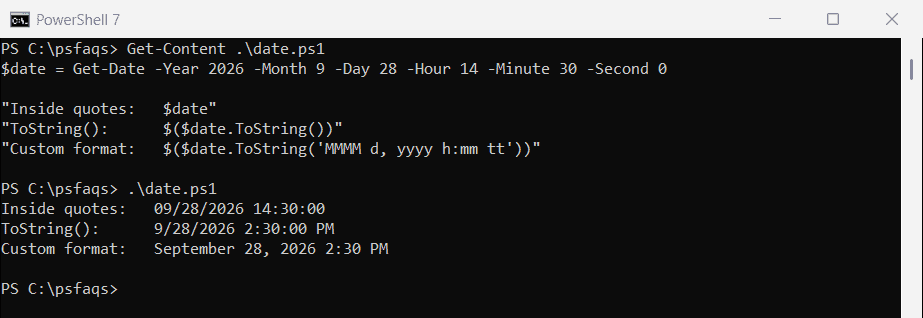
The first line is always month/day/year with a 24-hour clock, on any PC. When the text goes into a report or a file name, pass your own format to ToString() so you know exactly what you’ll get.
More patterns are in how to format dates in PowerShell.
Why does ToString() give a different result on another PC?
[string] and double quotes use the invariant culture, which never changes. ToString() uses the current culture. Here’s the same number on a PC set to German:
[System.Threading.Thread]::CurrentThread.CurrentCulture = 'de-DE'
$amount = 1234.5

"[string] cast:  $([string]$amount)"
"ToString():     $($amount.ToString())"
"Fixed culture:  $($amount.ToString([cultureinfo]::InvariantCulture))"
Output:
[string] cast:  1234.5
ToString():     1234,5
Fixed culture: 1234.5![PowerShell ToString() uses the current culture while a [string] cast does not](https://powershellfaqs.com/wp-content/uploads/2026/09/powershell-tostring-vs-string-cast-culture.png)
Germany uses a comma for decimals, so ToString() wrote 1234,5. If a script builds CSV files or SQL values that another system reads, use the cast or pass InvariantCulture, and the output stays the same wherever the script runs.
How do I convert an array to a string?
Calling ToString() on an array returns its type name, not its contents. Casting joins the items with spaces, and -join lets you pick the separator: