
PowerShell function parameters live in a param() block at the top of the function. Each one is a variable with an optional type and default value, and you pass it by name when you call the function:
function Get-Greeting {
    param(
        [string]$Name = 'there'
    )
    "Hello, $Name!"
}

Get-Greeting
Get-Greeting -Name Maria
Output:
Hello, there!
Hello, Maria!
That’s the whole idea. Once a function has parameters, it acts like a small cmdlet, with named arguments, defaults, required values and validation.
In this tutorial, I’ll show you how to write PowerShell function parameters of every common kind, then cover the function basics people trip over: return values, scope, -WhatIf and loading functions from a file.
I ran each example in PowerShell 7.6 and Windows PowerShell 5.1. Where they disagree, you’ll see both outputs.
How do you add parameters to a PowerShell function?
Put a param() block first inside the braces. List the parameters separated by commas, put a type in square brackets before each name, and add = value for a default:
function New-Invoice {
    param(
        [string]$Customer,
        [decimal]$Amount,
        [int]$DueDays = 30
    )
    'Invoice for {0}: ${1:0.00}, due in {2} days' -f $Customer, $Amount, $DueDays
}

New-Invoice -Customer 'Tom Baker' -Amount 450
New-Invoice -Customer 'Dana Reyes' -Amount 99.5 -DueDays 15
Output:
Invoice for Tom Baker: $450.00, due in 30 days
Invoice for Dana Reyes: $99.50, due in 15 days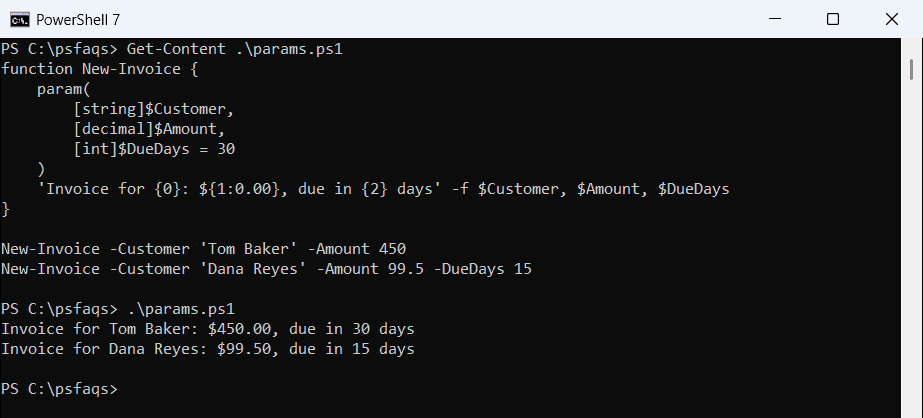
The type does real work. [decimal]$Amount turned 450 into a number, so the format string could print it as dollars. Pass text that can’t convert and PowerShell rejects the call before your code runs.
Name the function with an approved verb and a singular noun, like New-Invoice. The PowerShell naming conventions cover verbs, nouns and parameter names.
Short syntax: parameters in parentheses
For a quick one-off function, you can list the parameters in parentheses right after the name. It works the same way:
function Get-Welcome([string]$Name = 'there', [string]$City = 'Austin') {
    "Welcome, $Name, from $City!"
}

Get-Welcome -Name Tom -City Denver
Output:
Welcome, Tom, from Denver!I stick with the param() block for anything I’ll keep. Attributes like Mandatory read more clearly there, and scripts use the same syntax. To accept several values in one parameter, see PowerShell array parameters.
Pass parameters by name or by position
By default, every function parameter is positional, in the order you declared it. So Get-Shipping Denver 12 fills $City first and $Weight second.
To require names, add [CmdletBinding(PositionalBinding = $false)]. A Position value still lets you keep one parameter unnamed:
function Get-Shipping {
    param([string]$City, [int]$Weight)
    "$City : $Weight lb"
}
Get-Shipping Denver 12

function Get-ShippingStrict {
    [CmdletBinding(PositionalBinding = $false)]
    param(
        [Parameter(Position = 0)]
        [string]$City,
        [int]$Weight
    )
    "$City : $Weight lb"
}
Get-ShippingStrict Seattle -Weight 8
try {
    Get-ShippingStrict Seattle 8
}
catch {
    "Failed. $($_.Exception.Message)"
}
Output:
Denver : 12 lb
Seattle : 8 lb
Failed. A positional parameter cannot be found that accepts argument '8'.
Seattle went into $City because of Position = 0. The bare 8 failed, since $Weight now needs its name.
Named parameters are easier to read six months later, so I use names in scripts and positions only at the prompt. The same rules apply when you run a script from the command line with parameters.
Mandatory parameters and default values
Add [Parameter(Mandatory)] to make a parameter required. In an interactive console, PowerShell prompts for the missing value; type !? at that prompt to see your HelpMessage text.
A scheduled task or -NonInteractive session can’t prompt, so it fails instead. This example also limits Priority with ValidateSet:
function New-Ticket {
    param(
        [Parameter(Mandatory, HelpMessage = 'Customer full name')]
        [string]$Customer,

        [ValidateSet('Low', 'Normal', 'High')]
        [string]$Priority = 'Normal'
    )
    "Ticket for $Customer ($Priority)"
}

New-Ticket -Customer 'Dana Reyes'
New-Ticket -Customer 'Tom Baker' -Priority high
try { New-Ticket } catch { "Failed. $($_.Exception.Message)" }
try {
    New-Ticket -Customer 'Tom Baker' -Priority Urgent
}
catch { "Failed. $($_.Exception.Message)" }
Output:
Ticket for Dana Reyes (Normal)
Ticket for Tom Baker (high)
Failed. Cannot process command because of one or more missing mandatory parameters: Customer.
Failed. Cannot validate argument on parameter 'Priority'. The argument "Urgent" does not belong to the set "Low,Normal,High" specified by the ValidateSet attribute. Supply an argument that is in the set and then try the command again.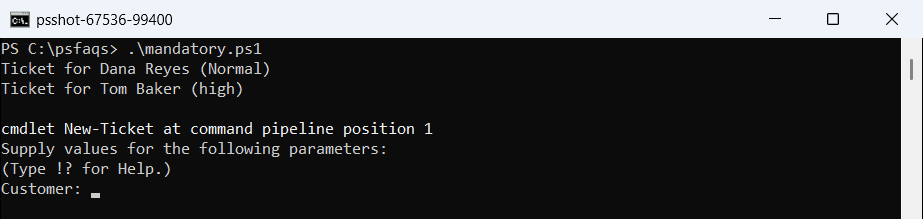
In the console run above, the third call stopped at a Customer: prompt and waited. The text output shows the non-interactive result, where the same call fails with an error.
Notice that high was accepted as typed. Validate