
To convert a hex string to a byte array in PowerShell 7, call [System.Convert]::FromHexString(). Windows PowerShell 5.1 doesn’t have that method, so there you convert each pair of hex digits with [Convert]::ToByte($pair, 16):
$bytes = [System.Convert]::FromHexString('48656C6C6F')      # PowerShell 7
$bytes = [byte[]]@(for ($i = 0; $i -lt $hex.Length; $i += 2) { [Convert]::ToByte($hex.Substring($i, 2), 16) })   # 5.1
Below I show both, then a function that handles spaces, dashes and 0x prefixes, checks the input, and turns the bytes back into hex. I ran every example in PowerShell 7 and Windows PowerShell 5.1.
Use FromHexString in PowerShell 7
Each pair of hex digits is one byte. My sample string spells a short greeting:
$hex = '48656C6C6F2C2041757374696E'
$bytes = [System.Convert]::FromHexString($hex)

"Bytes: $($bytes -join ' ')"
"Count: $($bytes.Length)"
"Text:  $([System.Text.Encoding]::ASCII.GetString($bytes))"
Output:
Bytes: 72 101 108 108 111 44 32 65 117 115 116 105 110
Count: 13
Text:  Hello, Austin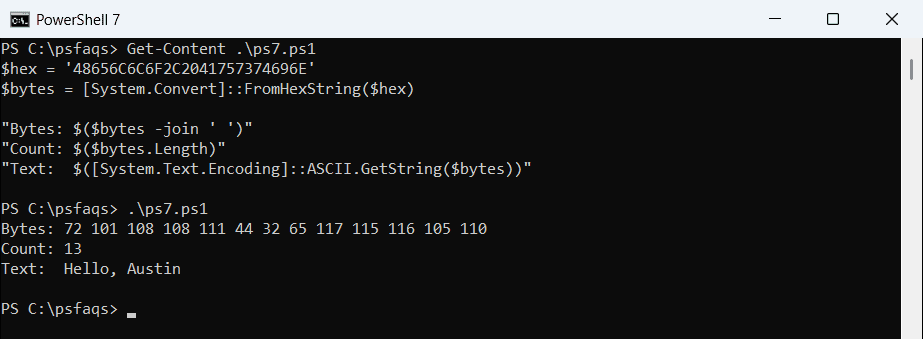
FromHexString accepts upper and lowercase letters, but no spaces or separators. To turn bytes into text with other encodings, see converting a byte array to a string.
FromHexString isn’t in Windows PowerShell 5.1
FromHexString was added in .NET 5. PowerShell 7 runs on .NET, but 5.1 runs on .NET Framework, so the same line fails there:
try   { [System.Convert]::FromHexString('48656C6C6F') -join ' ' }
catch { "Failed. $($_.Exception.Message)" }
Output:
72 101 108 108 111
The output above is from PowerShell 7. If a script must run on older servers, use the function in the next section. To check which version you’re on, see checking the PowerShell version.
A ConvertFrom-Hex function for both versions
Hex strings come in many shapes: with spaces from a packet capture, dashes from BitConverter, colons from a MAC or certificate tool, or a 0x prefix. This function removes the separators, checks the input and converts each pair:
function ConvertFrom-Hex ([string]$Hex) {
    $clean = $Hex -replace '^0x', '' -replace '[\s:-]', ''
    if ($clean.Length % 2) { throw "Odd number of hex digits: $($clean.Length)" }
    if ($clean -notmatch '^[0-9A-Fa-f]*$') { throw "Not a hex string: $Hex" }
    $bytes = [byte[]]::new($clean.Length / 2)
    for ($i = 0; $i -lt $bytes.Length; $i++) {
        $bytes[$i] = [System.Convert]::ToByte($clean.Substring($i * 2, 2), 16)
    }
    , $bytes
}
The comma before $bytes stops PowerShell from unrolling the array into single bytes. I saved the function as ConvertFrom-Hex.ps1 and dot-source it below:
. .\ConvertFrom-Hex.ps1
foreach ($hex in '48656C6C6F', '48 65 6C 6C 6F', '48-65-6C-6C-6F', '0x48656C6C6F', 'de:ad:be:ef') {
    $bytes = ConvertFrom-Hex $hex
    '{0,-16} -> {1}' -f $hex, ($bytes -join ' ')
}
Output:
48656C6C6F       -> 72 101 108 108 111
48 65 6C 6C 6F   -> 72 101 108 108 111
48-65-6C-6C-6F   -> 72 101 108 108 111
0x48656C6C6F     -> 72 101 108 108 111
de:ad:be:ef      -> 222 173 190 239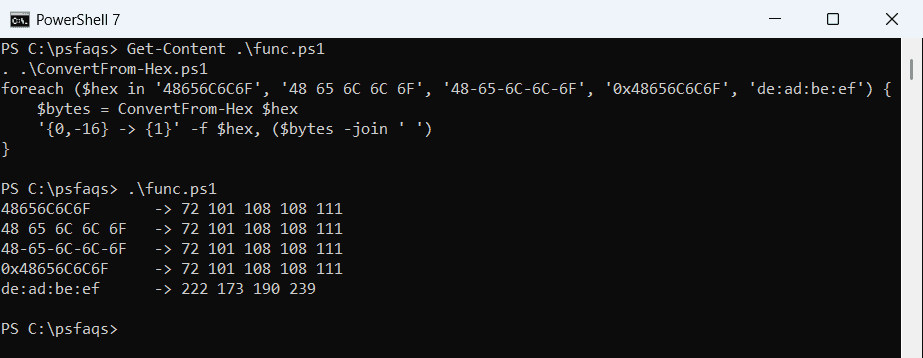
All five gave the same bytes in Windows PowerShell 5.1. More on writing functions is in functions in PowerShell.
Catch bad hex input
A missing digit or a typo shifts every byte after it, so the function throws a clear error instead:
. .\ConvertFrom-Hex.ps1
foreach ($hex in 'ABC', '4G6F', '') {
    try   { "'$hex' -> $((ConvertFrom-Hex $hex).Length) bytes" }
    catch { "'$hex' -> Failed. $($_.Exception.Message)" }
}
Output:
'ABC' -> Failed. Odd number of hex digits: 3
'4G6F' -> Failed. Not a hex string: 4G6F
'' -> 0 bytes
An empty string returns an empty array, which is usually what you want. Without the checks, [Convert]::ToByte fails on 4G with a less helpful message. See PowerShell try catch for handling the errors.
Convert bytes back to a hex string
BitConverter.ToString works in both versions and adds dashes, which -replace removes. The format operator gives lowercase hex:
$bytes = [byte[]](72, 101, 108, 108, 111)

"BitConverter:    $([System.BitConverter]::ToString($bytes))"
"Without dashes:  $([System.BitConverter]::ToString($bytes) -replace '-', '')"
"Format operator: $(($bytes | ForEach-Object { '{0:x2}' -f $_ }) -join '')"
Output:
BitConverter:    48-65-6C-6C-6F
Without dashes:  48656C6C6F
Format operator: 48656c6c6f
PowerShell 7 also has [Convert]::ToHexString($bytes), which returns uppercase hex without dashes. For a different text format, see converting a string to Base64.
Turn a file hash into bytes
Get-FileHash returns the hash as a 64-character hex string. Some APIs and signature checks want the 32 raw bytes instead:
. .\ConvertFrom-Hex.ps1
Set-Content -Path .\invoice-2026-10.txt -Value 'Invoice INV-2026-1001, Austin, $1,250.00' -NoNewline
$hash  = (Get-FileHash -Path .\invoice-2026-10.txt -Algorithm SHA256).Hash
$bytes = ConvertFrom-Hex $hash

"Hash:  $($hash.Substring(0, 16))..."
"Bytes: $($bytes.Length)"
"First: $($bytes[0..3] -join ' ')"
Output:
Hash:  DCF97FE3A8183B5A...
Bytes: 32
First: 220 249 127 227
Your hash will differ if the file content differs, but it’s always 32 bytes for SHA256. More hashing examples are in getting the hash of a file.
Frequently Asked Questions
How do I convert a hex string to a byte array in PowerShell?
In PowerShell