
PowerShell shows “Missing an argument for parameter” when you type a parameter name that needs a value but give it nothing. For Get-Date -Year, read the property instead:
(Get-Date).Year # 2026Below are the other causes I reproduced, how to read the error record, and what changes between PowerShell 7 and 5.1.
Why Get-Date -Year says Missing an argument for parameter ‘Year’
The Year parameter of Get-Date doesn’t return the year. It sets the year of the date you’re building, so it expects an Int32 after it:
Write-Host (Get-Date -Year)Output:
Get-Date: C:\psfaqs\year.ps1:1
Line |
   1 |  Write-Host (Get-Date -Year)
     |                       ~~~~~
     | Missing an argument for parameter 'Year'. Specify a parameter of type 'System.Int32' and try again.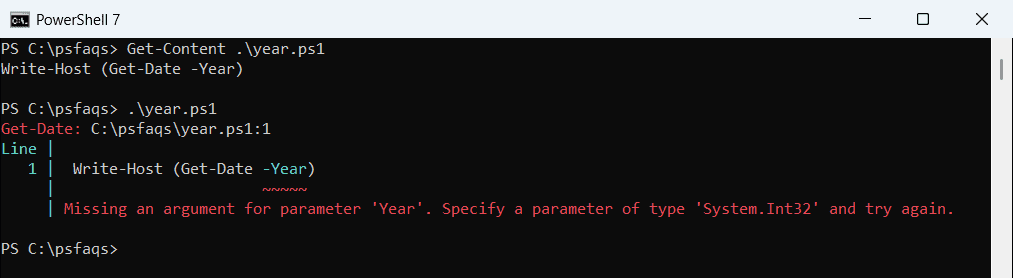
To get the current year, use the Year property or a format string. To build a date, give -Year a number:
Write-Host (Get-Date).Year
Get-Date -Format yyyy
$launch = Get-Date -Year 2026 -Month 7 -Day 4
$launch.ToString('MMMM d, yyyy')
Output:
2026
2026
July 4, 2026
Both (Get-Date).Year and Get-Date -Format yyyy print the year, and the second one returns a string. The date format strings in PowerShell work the same way for months and days.
What causes Missing an argument for parameter in PowerShell?
PowerShell binds named parameters first. If a parameter needs a value and the next token is the end of the line, a pipe, or another real parameter, binding stops with this error:
try { Get-ChildItem -Filter } catch { 'Failed. ' + $_.Exception.Message }
try { Get-Process -Name -ErrorAction SilentlyContinue } catch { 'Failed. ' + $_.Exception.Message }
try { Get-Service -Name | Select-Object -First 1 } catch { 'Failed. ' + $_.Exception.Message }
Output:
Failed. Missing an argument for parameter 'Filter'. Specify a parameter of type 'System.String' and try again.
Failed. Missing an argument for parameter 'Name'. Specify a parameter of type 'System.String[]' and try again.
Failed. Missing an argument for parameter 'Name'. Specify a parameter of type 'System.String[]' and try again.
The cmdlet never runs, so -ErrorAction SilentlyContinue can’t hide the error. It even makes things worse here, because it’s the token that took the value’s place.
The type in the message tells you what to pass. String[] means one or more names, as covered in PowerShell array parameters.
A value that starts with a dash
A dash token only counts as a parameter when the command has a parameter with that name. Otherwise PowerShell binds it as the value:
function Send-Report {
    param([string]$Name, [string]$City)
    "Report for [$Name] in [$City]"
}
try { Send-Report -City -Name 'Tom Baker' } catch { 'Failed. ' + $_.Exception.Message }
Send-Report -Name 'Tom Baker' -City -Denver
Send-Report -Name 'Tom Baker' -City 'Denver'
Output:
Failed. Missing an argument for parameter 'City'. Specify a parameter of type 'System.String' and try again.
Report for [Tom Baker] in [-Denver]
Report for [Tom Baker] in [Denver]
-Name is a real parameter, so -City got nothing. -Denver isn’t a parameter, so it became the city. Quote values that start with a dash to make your intent clear.
Line breaks and backtick line continuation mistakes
A new line ends the command, so a parameter at the end of a line loses its value. A backtick at the very end of the line continues the command:
try {
    Get-ChildItem -Path
        . -Filter *.csv
} catch { 'Failed. ' + $_.Exception.Message }

Get-ChildItem -Path `
    . -Filter *.csv | Select-Object -ExpandProperty Name
Output:
Failed. Missing an argument for parameter 'Path'. Specify a parameter of type 'System.String[]' and try again.
sales-austin-2026.csv
sales-denver-2026.csv
I also tested a backtick followed by a space. The space breaks the continuation, and you get the same error for Path. The backtick is the same escape character you use to escape special characters in PowerShell, so it has to be the last character.
Does an empty or $null variable cause this error?
No. Once a variable follows the parameter name, the parameter has an argument, even when the variable is $null or an empty string:
function Send-Invoice {
    param([string]$Customer, [decimal]$Amount)
    "Invoice for [$Customer]: $Amount USD"
}
$customer = $null
Send-Invoice -Customer $customer -Amount 1250
$customer = ''
Send-Invoice -Customer $customer -Amount 1250
Output:
Invoice for []: 1250 USD
Invoice for []: 1250 USD
The [string] parameter turned $null into an empty string and the function ran. If you need to stop on empty input, check the value with IsNullOrEmpty or make the parameter mandatory.
Switch parameters vs parameters that need a value
A [switch] parameter takes no value: being present means true. A [bool] or [int] parameter needs one, which is why some older cmdlets fail when you pass only the name:
function Export-Orders {
    param([switch]$IncludeArchived, [bool]$Compress, [int]$Top)
    "IncludeArchived=$IncludeArchived Compress=$Compress Top=$Top"
}
Export-Orders -IncludeArchived
try { Export-Orders -Compress } catch { 'Failed. ' + $_.Exception.Message }
Export-Orders -IncludeArchived:$false -Compress $true -Top 5
Output:
IncludeArchived=True Compress=False Top=0
Failed. Missing an argument for parameter 'Compress'. Specify a parameter of type 'System.Boolean' and try again.
IncludeArchived=False Compress=True Top=5
Pass $true or $false after a Boolean parameter. To turn a switch off explicitly, use the colon form, -IncludeArchived:$false. My guide to the PowerShell switch parameter covers more switch patterns.
Mandatory parameters in your own functions
Three different errors look alike in PowerShell functions with a mandatory parameter. The FullyQualifiedErrorId tells them apart:
function New-Customer {
    param([Parameter(Mandatory)][string]$Name, [stri